
The bluebarry plugin for WordPress connects your WooCommerce store to bluebarry. It loads bluebarry on every page, so your quizzes, search, product chat and popups can appear. It also keeps your products in sync and tracks the orders of shoppers who used bluebarry.
Install the plugin
- In WordPress, go to Plugins → Add New and search for bluebarry. You can also open the plugin page on WordPress.org.
- Click Install Now, then Activate.
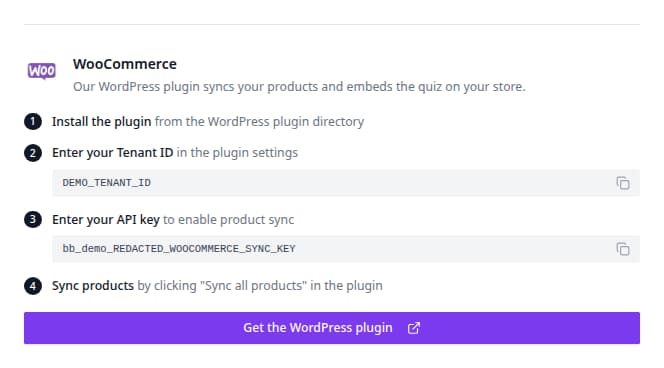
- Open Bluebarry in the WordPress admin menu. The settings page walks you through four numbered steps.
Connect your store
- Connect your store. In bluebarry, go to Store data → Integrations and copy the Tenant ID at the top of the page. Paste it into Tenant ID. (The plugin's hint mentions Settings, but the ID lives on the Integrations page.)
- Choose how your products sync. Pick Live sync (recommended) to push product changes as they happen, or CSV feed to let bluebarry import a feed once a day. See Sync WooCommerce products for the difference.
- Set up product sync. For live sync, paste an API Key. Create one in bluebarry under Store data → Integrations: open the Developer area, click Manage next to API keys and create a key for WooCommerce.
- Optional features. On-site search shows which search configuration powers your store's search box. You switch it on in bluebarry, on the configuration's Launch step. You can also switch on debug logging here.
- Click Save Settings.
What loads on your store
- Quizzes open from any link or button that uses your quiz link, or from the
[bluebarry_quiz_button]shortcode below. Find it on the quiz's publish dialog under Implementation. - Popups you publish in the Popups app appear without extra code.
- Product chat appears in classic shop grids by itself. In block themes, place the shortcode
[bluebarry_shopping_help]where it should show. See Install product chat. - Search runs once you switch a configuration on in bluebarry. See Launch search on your store.
Show bluebarry on your product and cart pages
In bluebarry, go to Store data → Integrations, click Manage on WooCommerce and open On your store. Switch on what you want:
- Product check button: an “Is this right for me?” button under the add to cart button, on products that have a product check quiz. Pick those products on the quiz's Launch step.
- Product chat: under the add to cart button.
Recommendation blocks for product pages and the cart are switched on under Recommendations → Placements. See Design and add recommendations to your store.
Click Save. Your store updates right away. If your store can't be reached from outside (for example a staging site behind a password), it picks up the change within the hour.
Shortcodes
To place something anywhere else, use a shortcode in a page, a widget or your page builder's shortcode element:
[bluebarry_quiz_button quiz="QUIZ ID" text="Find your match"]: a button that opens a quiz.[bluebarry_quiz_popup quiz="QUIZ ID" trigger="delay" delay="5"]: opens a quiz as a popup after a delay. Usetrigger="scroll" scroll="50"for halfway down the page, ortrigger="exit"when the shopper is about to leave.[bluebarry_product_check]: the product check button, on a product page.[bluebarry_recommendations block="BLOCK ID"]: a recommendation block.[bluebarry_product_chat]: product chat.
The quiz's Launch step shows its quiz button and popup shortcodes ready to copy.
What the plugin sends to bluebarry
From version 2.3.0, the plugin does more than load bluebarry and sync products:
- Orders. Every order goes to bluebarry once it is paid, and refunds and cancellations after that. Orders power best sellers, purchase history and purchase-based segments. You can also import the last 12 months, see Import your orders.
- What shoppers look at. Page views, product views and adds to the cart. They power recently viewed products, behaviour segments, popup rules by product or cart, and product chat that knows the page and the cart.
- Categories. Your product categories sync to bluebarry. See Browse synced collections.
- Add to cart. Quiz results, the search widget and recommendation blocks put products straight in the WooCommerce cart.
Use a cookie banner that supports the WP Consent API, such as Complianz, CookieYes or Cookiebot? Then bluebarry only records what a shopper looks at once they allow statistics cookies.
Discounts become coupons
A discount you offer on a quiz result page or in a recommendation block becomes a one-time WooCommerce coupon. Once the shopper adds a product the offer covers, the plugin creates the coupon, limits it to those products and applies it to the cart. Shoppers type no code. This needs coupons switched on in WooCommerce, under WooCommerce → Settings → General. With coupons off, shoppers see no offers. See Offer bundles and discounts.
Privacy requests
WordPress's own privacy tools include what bluebarry holds. Tools → Export Personal Data adds everything bluebarry has for that email address: profile, consent history, orders, quiz answers, popup sign-ups, chats, searches and views. Tools → Erase Personal Data anonymizes the shopper in bluebarry. Both need the plugin's API key. Removing the plugin erases nothing in bluebarry.