
A segment is a live group of shoppers built from your bluebarry profiles. You describe who belongs in it, and bluebarry keeps the group up to date as people browse, search, take quizzes and buy. You then use that group to personalize search, target popups and build Meta audiences.
What a segment is
Every visitor gets a profile, whether or not you know their email address. A segment is a set of rules over those profiles, such as “viewed running shoes at least three times in the last 30 days and bought nothing”. There is no list to refresh: bluebarry checks the rules at the moment it needs the answer. Someone who matches now is in, and someone who stops matching drops out on their own.
Anonymous visitors can match too. A first-time shopper who searched for boots twice can see a personalized search before they ever share an email address.
Create a segment
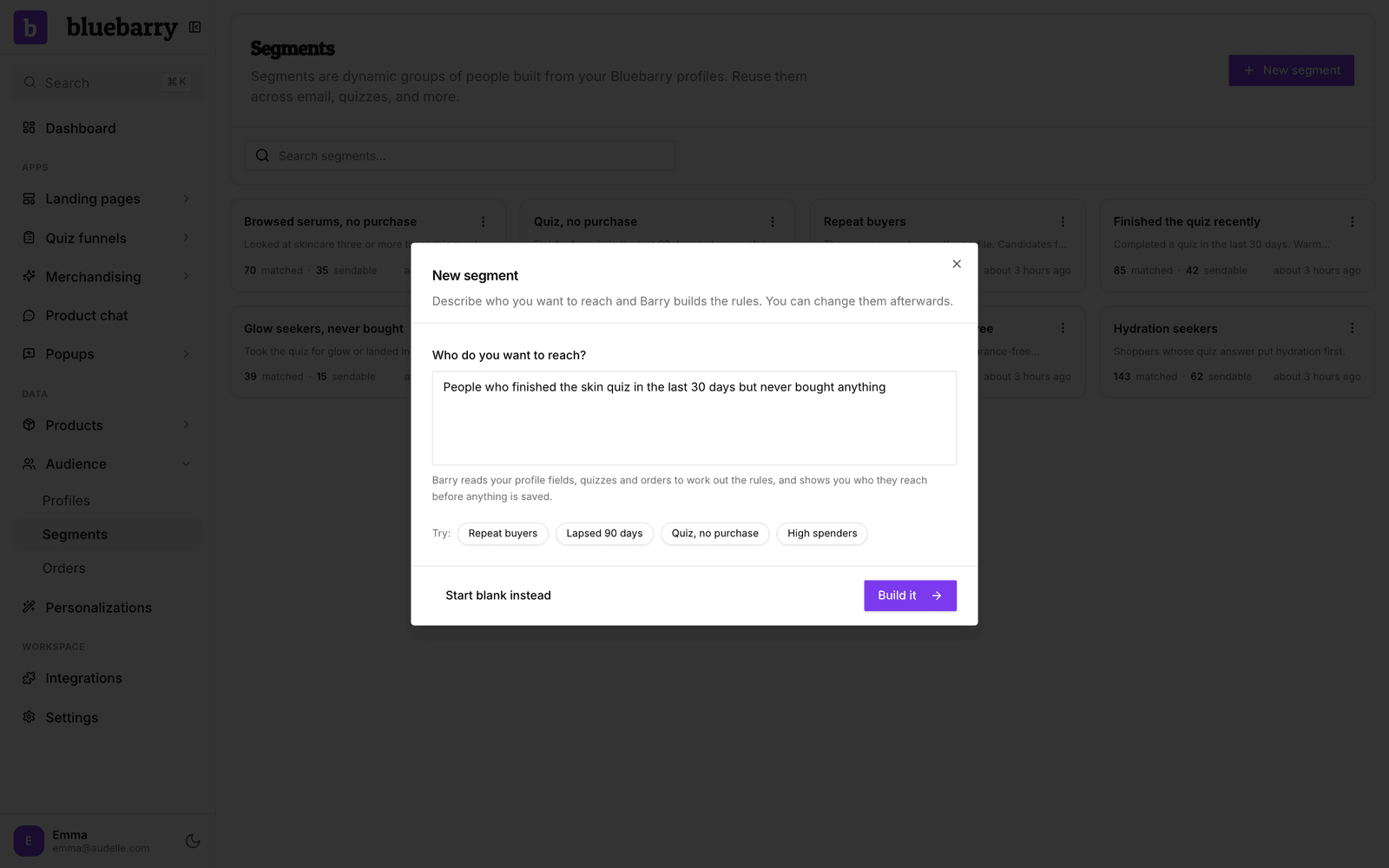
The fastest way is to tell Barry, the bluebarry assistant, who you want to reach. Barry turns your sentence into rules and shows how many people they match before anything is saved.
- Go to Audience → Segments.
- Click New segment.
- Under Who do you want to reach?, describe the group in plain words, for example “people who finished the skin quiz in the last 30 days but never bought anything”. Or click a starter next to Try: (Repeat buyers, Lapsed 90 days, Quiz, no purchase, High spenders) and edit the text.
- Click Build it. Barry reads your profile fields, quizzes and orders, then shows the rules in a sentence with the number of Matched profiles. If something is unclear, Barry asks one question first.
- Click Create segment. You land on the segment, where you can rename it and fine-tune every rule.
Prefer to build it yourself? Click Start blank instead in the same window. A new segment without rules matches everyone, including anonymous visitors.
Rules in plain language
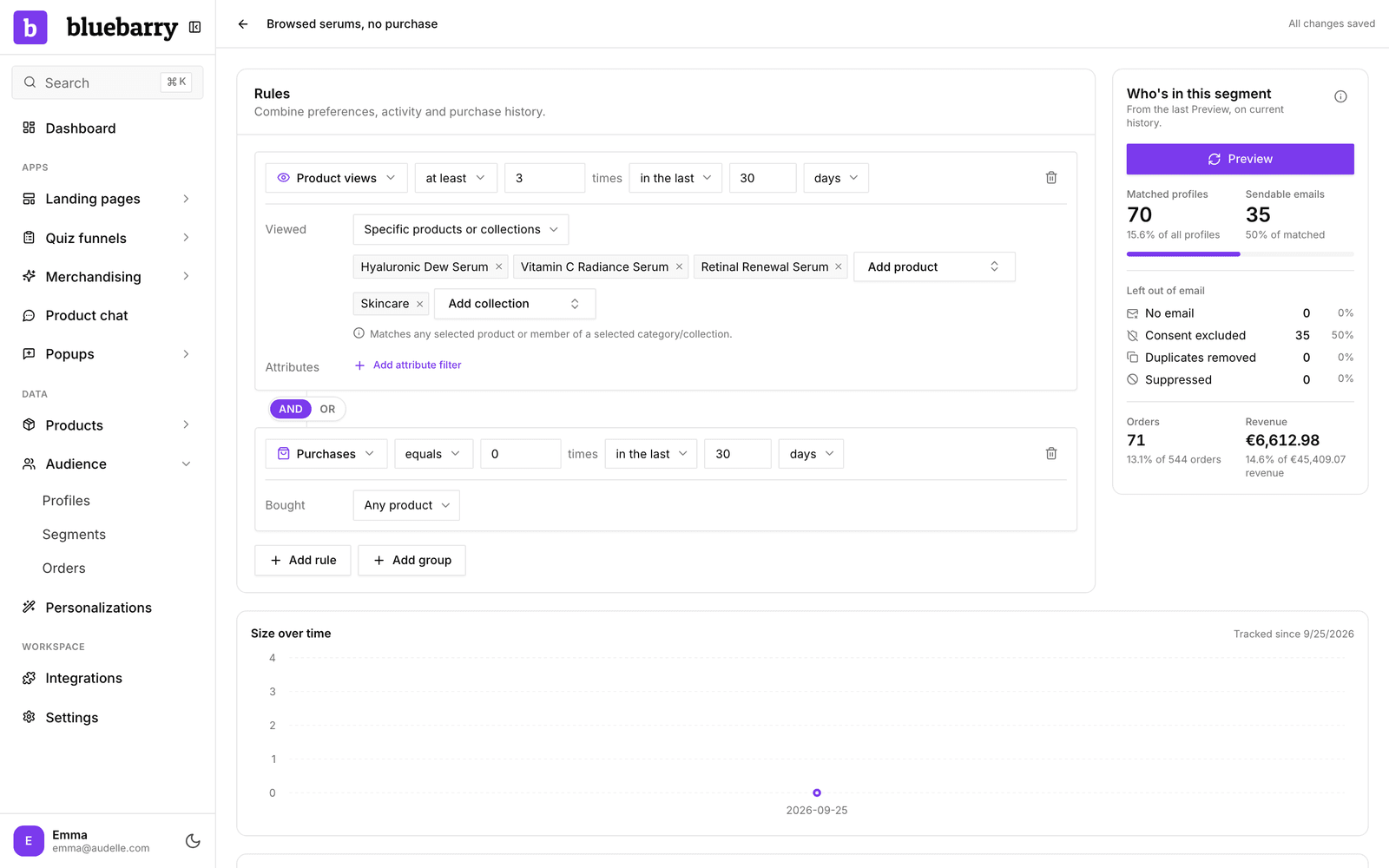
On the segment page, the Rules panel combines preferences, activity and purchase history. Click Add rule, then pick what the rule looks at. Between two rules, switch AND (match every rule) or OR (match at least one). Use Add group when you need both, such as “bought twice AND (searched for boots OR viewed boots)”. Changes save automatically.
| Rule | Matches |
|---|---|
| Profile property | What a shopper told you or what you imported: quiz answers saved to the profile, popup form fields, and customer data. Compare text, numbers or dates. |
| Consent accepted | Whether the shopper accepted, declined or never answered your marketing consent question. |
| Product views | How often someone viewed products. Narrow it to specific products or collections, or to products with an attribute such as Brand is Apple. |
| Quiz completions | Finished quiz runs, optionally for one quiz and with specific answers picked in the same run. |
| Quizzes started but not finished | Quiz runs where the shopper answered at least one question and never reached the results. Finishing later removes the run. |
| Search filter selections | How often the shopper ticked a filter value on the search results page, for example Size M. |
| Searches | What the shopper typed into search. Add terms such as boots, or count only searches that found nothing. |
| Purchases | Recorded orders, with an optional product or collection scope. Use equals 0 for people who never bought. |
| Total customer revenue (EUR) | Everything a customer spent, after refunds, converted to euros. |
| No purchase after latest matching quiz | Someone finished a quiz and has not bought anything since. |
| No purchase after latest matching search | Someone searched and has not bought anything since. |
Quiz answers and popup fields show up under Profile property with the key you gave them, plus how many profiles have each value. Stated preferences and behaviour stay separate: a shopper whose quiz answer says size L but who keeps filtering on M matches both signals, and you decide which one the segment uses.
Time windows
Activity and purchase rules take a period:
- in all available history: everything bluebarry has recorded.
- in the last a number of hours, days, weeks or months: a rolling window. People leave the segment on their own when their activity gets too old.
- between two dates, both included, in the timezone you choose. Handy for a sale weekend.
Combine windows to catch lapsed customers: Purchases at least 1 in all available history AND Purchases equals 0 in the last 90 days.
Preview who is in it
Click Preview in the Who's in this segment panel to count who matches right now. You see:
- Matched profiles, and what share of all profiles that is.
- Sendable emails: matched people with a usable email address and marketing consent.
- Orders and Revenue from the people in the segment.
- A Matching profiles list you can sort by last active, orders or revenue.
After you change a rule, the panel tells you to run Preview again. Once bluebarry has recorded some history for the segment, Size over time shows how many people were in it at the end of each day, for up to the last 90 days.
Where to use segments
- Search. Give a segment its own pin, boost, bury and exclude rules in your search configuration under Ranking & Personalization. See Personalize search results.
- Popups. Choose Only show to or Never show to under Who sees it. See Target popups to segments.
- Meta ads. Switch on Sync to Meta on the segment page to keep a Custom Audience in step. See Connect Meta.
- Recommendations. A recommendation block can give a segment its own products, message and discount. See Personalize recommendations for segments.
- Experiments. An experiment can be limited to one segment, to find the best version for those shoppers. See Set up an experiment.
- Measurement. Every segment you target in search or a recommendation block shows up under Analytics → Personalizations with its uplift. See Measure personalizations.
Good to know
- Purchase and revenue rules need order history. If your store has no orders in bluebarry yet, these segments cannot match anyone. Import them first: see Import your orders.
- Test and cancelled orders never count as purchases. Revenue is refund aware and converted to euros. An order without a known total cannot match a revenue rule.
- If you delete a product, collection or property that a rule points to, the segment stops working until you fix that rule. The preview panel tells you when that happens.
- A search for the same words within one visit counts once, and singular and plural count as the same word, so boot also matches “waterproof boots”.
- Being in a segment does not require an email address or consent. Consent only matters where you contact people, such as Meta audiences.