
Connect Meta to send quiz events to your Meta pixel and keep your bluebarry segments in sync as Custom Audiences. You can then retarget people who finished a quiz, reach lookalikes of your best customers, or leave recent buyers out of a campaign, without exporting a single list.
Before you start
- A Meta business portfolio with an ad account and a pixel (dataset).
- Admin access to that business, so you can grant bluebarry access.
bluebarry never creates campaigns or spends money in your ad account. It sends events and keeps audiences up to date. What you do with them in Ads Manager is up to you.
Connect your Meta account
- Go to Store data → Integrations and find Meta under Marketing & analytics.
- Click Connect.
- Click Continue with Facebook, log in and approve access for your business.
- Or paste a System User access token and click Connect with token. You create one in Meta Business settings under Users → System users. It needs the ads_management and business_management permissions. A system user token does not expire, which suits a connection you want to set up once and forget.
The card now says Setup incomplete until you pick where events go.
Choose the ad account and pixel
- On the Meta card, click Configure.
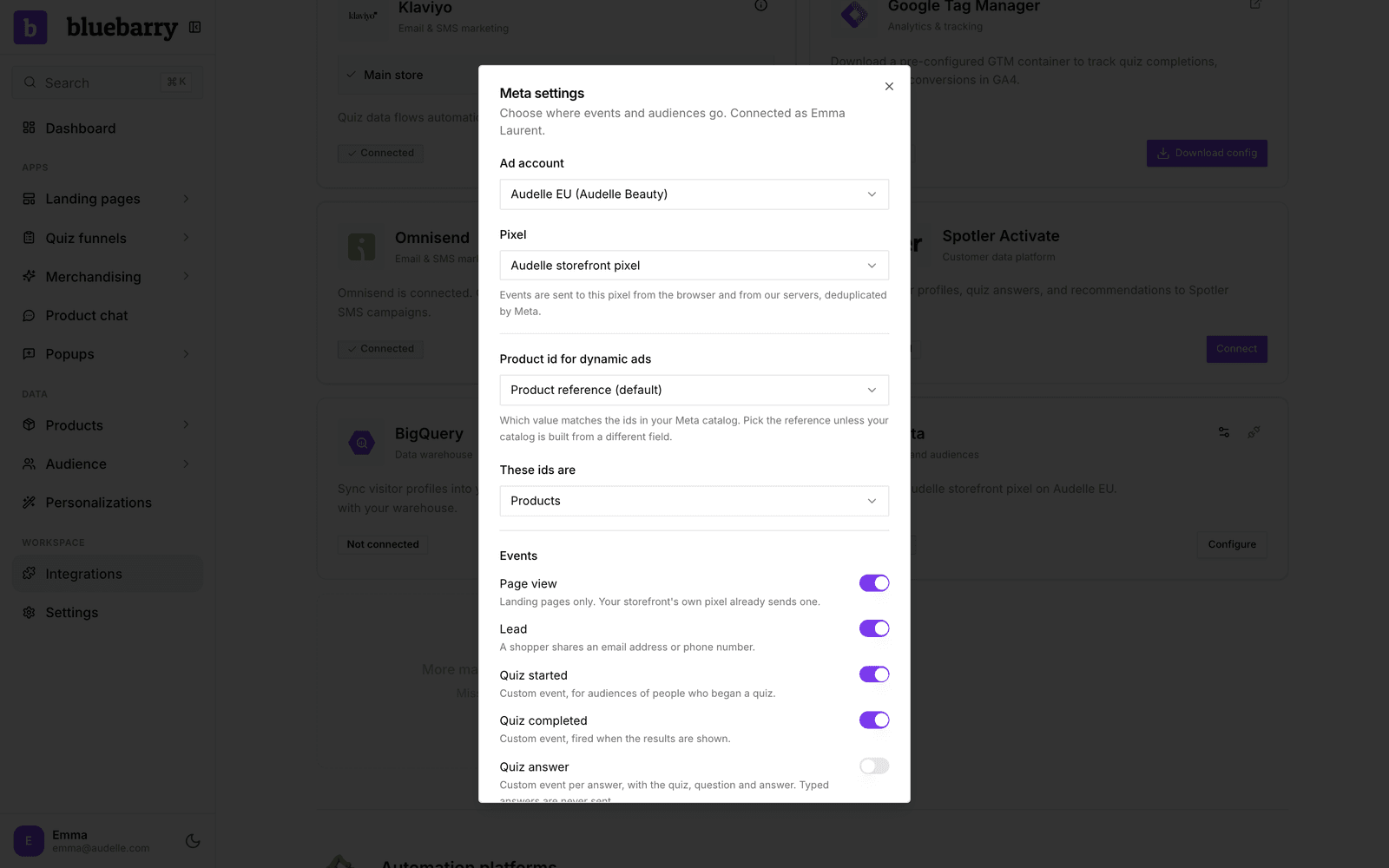
- Under Ad account, pick the account your ads run from.
- Under Pixel, pick the pixel that account uses.
- Set Product id for dynamic ads (see below) and switch off any events you do not want.
- Click Save. The card shows Connected and names the pixel.
Which events are sent
| Event | When it fires |
|---|---|
| Page view | Landing pages only. Your store's own Meta setup already sends page views for your shop. |
| Lead | A shopper shares an email address or phone number in a quiz or on a landing page. Sent once per visit. |
| Quiz started | Custom event when someone opens a quiz, for audiences of people who began one. |
| Quiz completed | Custom event when the results are shown. |
| Quiz answer | Custom event per answer, with the quiz, the question and the picked answer. Typed answers are never sent. |
| View content | The products recommended on the results page, so your ads can retarget them. |
Quiz events fire wherever the quiz runs: embedded on your store, in a popup, or on a bluebarry landing page. If your theme has no Meta pixel, bluebarry loads yours for these events.
Browser and server, counted once
Most events go out twice: from the shopper's browser through your pixel, and from our servers through Meta's Conversions API. Both copies carry the same event id, so Meta keeps one and drops the other. You get the reach of the server copy, which ad blockers cannot stop, without double counting. View content is sent from the server only, because only the server knows your catalog ids.
What is not sent
- Purchases. Shopify's and CCV Shop's own Meta apps already send them. Sending them again would double count your sales.
- Search, popup and product chat events.
- Anything a shopper typed. Email addresses and phone numbers are only sent as secure hashes with a Lead.
Product ids for dynamic ads
For Meta to show the exact products someone was recommended, the ids bluebarry sends must match the ids in your Meta catalog. Under Product id for dynamic ads, keep Product reference (default) unless your catalog is built from another field, such as a SKU property. Then set These ids are to Products when your catalog lists each variant, or Product groups when it lists the parent product. Compare a few ids in Commerce Manager with a product in bluebarry to be sure.
Sync segments as Custom Audiences
- Go to Audience → Segments and open a segment.
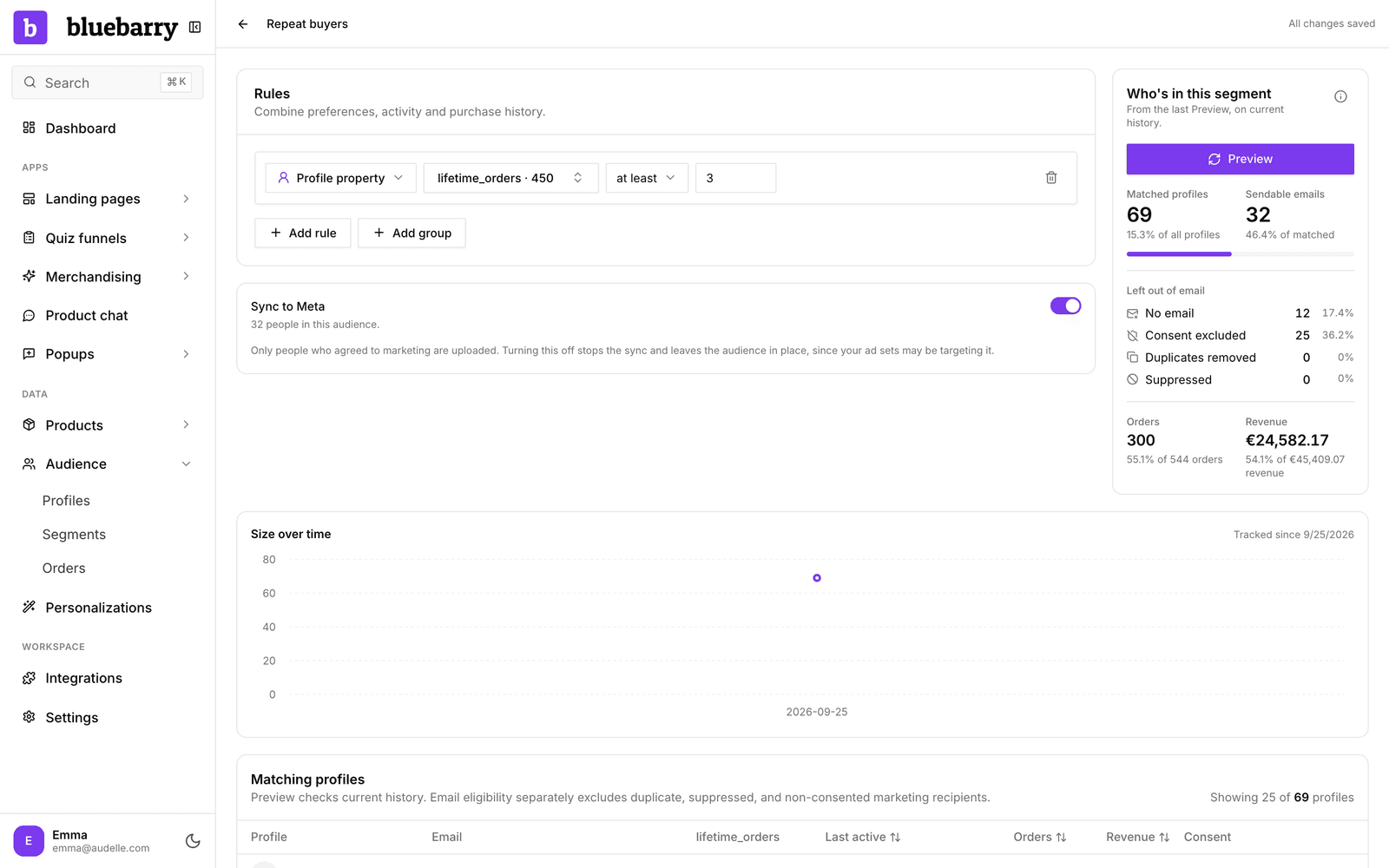
- Switch on Sync to Meta. The switch appears once Meta is connected with an ad account.
- Within a couple of minutes, a Custom Audience with the segment's name appears in your ad account. The switch shows how many people are in it.
From then on the audience follows the segment. People are added when they enter it and removed when they leave, every few minutes, with nothing to re-upload.
Who is uploaded
- Only people who agreed to marketing. Someone who withdraws consent leaves the audience, even if they still match the segment.
- Only people with an email address or phone number. Anonymous visitors stay in the segment for on-site use but cannot be matched by Meta.
- Contact details are hashed before they leave bluebarry, as Meta requires.
Meta needs about 100 matched people before you can target an audience. The switch tells you when an audience is still below that.
Good to know
- Turning Sync to Meta off stops the updates but leaves the audience in Meta, because an ad set may still be using it. Delete it in Ads Manager if you no longer need it.
- A Facebook login stays valid for about 60 days. When Meta rejects the connection, the card shows Reconnect needed. Click Reconnect, or use a system user token to avoid this.
- If Meta reports an error, you see it in the Meta settings window and on the segment's sync switch.
- Did you set a pixel on your landing pages before? It has moved into this integration, with your existing Lead setting.
Next: build the groups you want to reach in Build segments.