
The Personalizations tab of Analytics answers one question for every segment you target: is it earning its keep? It lists each personalization once, with how many shoppers saw it, what it did to conversion, and how sure that result is.
What counts as a personalization
A personalization is a set of search rules aimed at one segment. You create one in a search configuration under Ranking & Personalization: click Add personalization, pick a segment, and give those shoppers their own pin, boost, bury and exclude rules. Everyone else keeps the rules under Everyone. See Personalize search results for the setup.
As soon as a personalization exists, it appears under Analytics → Personalizations, even before anyone has seen it.
Recommendations
If you use Recommendations, their personalizations show up here too. Set the surface filter to Recommendations to see each segment version of a block and its Behavioural re-rank. These rows count impressions instead of searches. See Measure recommendation performance.
How the holdout makes it measurable
Comparing a segment with “everyone else” would flatter it: your repeat buyers convert better anyway. So bluebarry holds back a small share of the shoppers in each targeted segment, 10% by default. They match the segment but see your standard search. That control group is the fair comparison. The difference between the two groups is what the personalization itself did.
A shopper stays in the same group across visits, so nobody flips between two versions of your search.
Read the table
- Go to Analytics → Personalizations: click Analytics in the sidebar, then the Personalizations tab.
- Pick a date range at the top right. Analytics opens on the last 7 days, and the range you pick also applies to the Overview and Modules tabs.
- Choose the goal: Conversion rate (orders) or Click-through rate (clicks on results, which reacts sooner).
- Narrow the list with Filter by name or a status filter such as Needs attention or Significant.
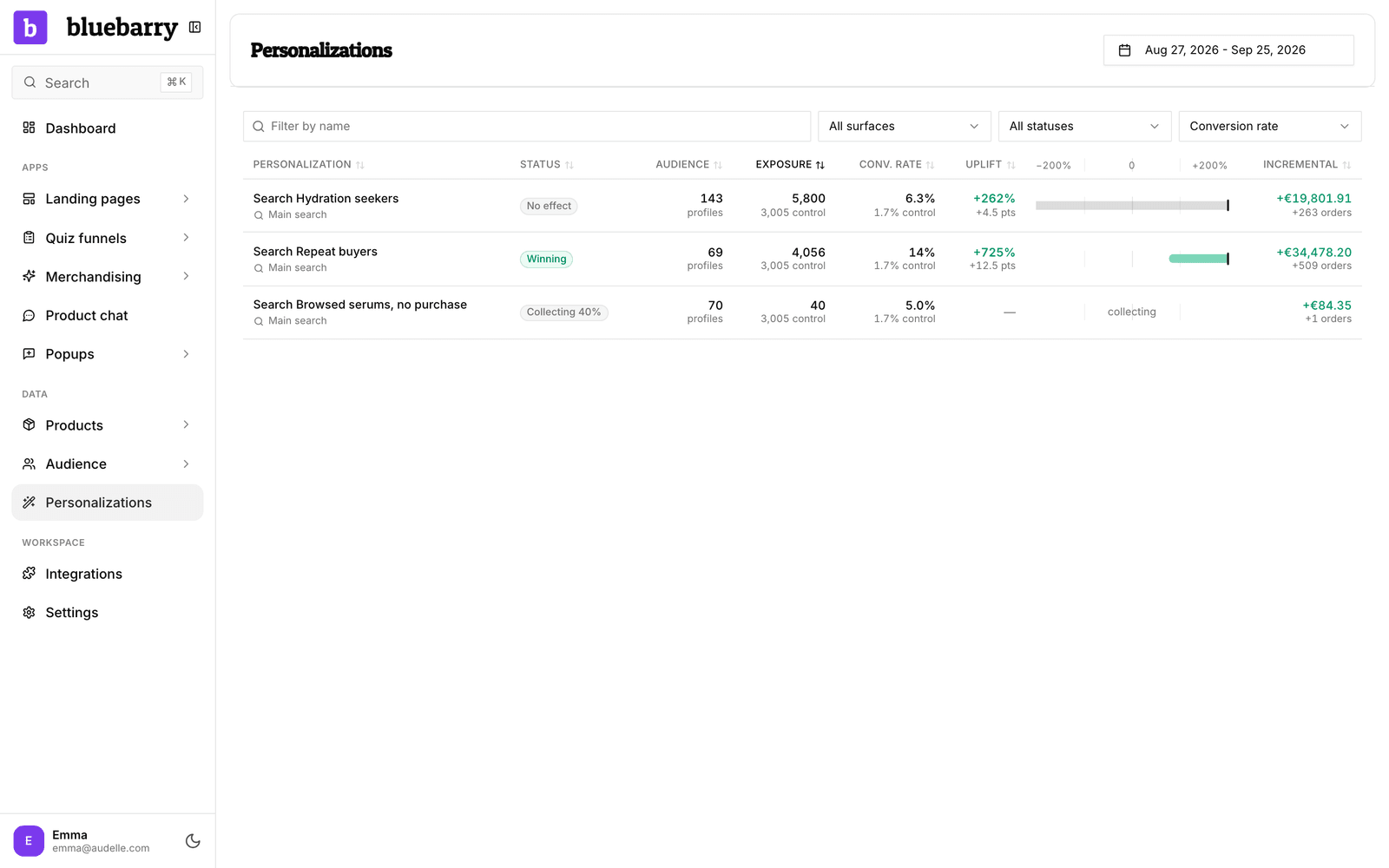
- Personalization: the segment, with the search configuration it belongs to underneath. Click it to open that configuration.
- Audience: how many profiles were in the segment at its last preview.
- Exposure: searches that got the personalization, with the control group's searches underneath.
- Conv. rate or CTR: the rate for personalized searches, with the control rate underneath.
- Uplift: the best estimate of the difference, as a percentage of the control rate and in percentage points. It stays empty until both groups have enough data.
- The range bar next to it: the confidence range. The true effect is very likely inside it. A bar that crosses zero means the result is not proven yet. Hover it for the exact numbers.
- Incremental: the extra revenue and orders the personalization brought in over the period, compared with what the same searches would have earned at the control rate. Negative when it is losing.
What each status means
| Status | What it means |
|---|---|
| Winning | Shoppers who got the personalization convert (or click) more than the control group, and the whole range is above zero. |
| Losing | The whole range is below zero: the personalization does worse than what the control group gets. |
| No effect | There is enough data, but the range still includes zero. No difference has been shown either way. |
| Collecting | Fewer than 100 searches (or impressions) in the personalized or the control group so far. The percentage shows how close it is. |
| Paused | You switched the personalization off. It keeps its row so you can still see what it did. |
| No control | Nobody is held back, so there is nothing to compare with and no uplift can be shown. |
| Orphaned | The segment it targeted was deleted. It no longer applies to anyone. |
The ranges get wider as you add more personalizations. With thirty rows on the page, one would look like a winner by luck alone, so bluebarry asks for stronger evidence before it calls anything Winning or Losing.
When something is Losing or No effect
Losing
The rules are making search worse for that group. Open the configuration from the row and look at what the segment gets. Common causes: a pin or boost that pushes products people do not want, or an exclude rule that hides popular items. Change or remove the rule, or pause the personalization with the Active switch while you think it over.
No effect
The segment gets different results, but shoppers behave the same. Either the change is too small to matter, or the segment is too broad to care. Try rules that change more of the first results, or make the segment more specific, such as people who searched for a category and did not buy. Keep in mind that No effect with a narrow range around zero is also an answer: you can simplify your setup.
Collecting for a long time
A small segment or a quiet store takes longer to reach 100 searches in the control group. Widen the date range, or broaden the segment.
Good to know
- Orders count toward a personalization when the shopper bought a product they found through search, the same way your search analytics count them. Revenue needs imported or tracked orders: see Import your orders.
- When a shopper is in more than one targeted segment, the personalization highest in your list applies. Reorder them in the search configuration.
- Deleting a segment turns its personalization into Orphaned. Its past results stay visible.
- Want to compare whole versions of a quiz, search setup or popup instead? Experiments test a new version on a share of shoppers and help you publish the winner. See How experiments work.