
Recommendations are product blocks you place on your Shopify store, such as "Pairs well with" on a product page or "You may also like" in the cart. Each block picks products for the shopper who is looking at it, based on your catalog, your orders and what other shoppers browse. The goal is simple: help people find the next right product, and sell more per order.
Three kinds of recommendations
Every block has one use case. Create as many blocks as you like, for example one for your product pages and one for your cart.
| Use case | What shoppers see | Good for |
|---|---|---|
| Complementary products | Products that go with the one they are looking at, such as a moisturiser next to a serum. Can be offered as a bundle. | Bigger baskets |
| Frequently viewed together | Products other shoppers looked at on the same day as this one. | Discovery on product pages |
| Similar alternatives | Other options of the same kind, such as other shades or another SPF, with the differences spelled out. | Helping undecided shoppers choose |
Where the recommendations come from
You do not have to pick products by hand, although you can. A block combines several signals:
- Your orders. Products that are often bought in the same order are paired up. Recent orders count more than old ones, and the pairings refresh throughout the day. Import your order history once and new Shopify orders arrive on their own. See Import orders.
- Browsing on your store. Two products count as viewed together when the same shopper looks at both on the same day. This data updates daily.
- Your catalog. Collections and product attributes decide which products are alternatives to each other. When you create a block, Barry reads your catalog and suggests pairings such as "cleansers go with toners", so a new store gets sensible recommendations before it has much order history.
- Your rules. Pairings you teach the block, products you pin to a slot, boost or hide, and conditions that keep products such as samples out.
- The shopper. With personalization on, products a shopper viewed recently or often, and products their quiz matched, move forward in the block.
Where a block shows up
You place a block with the bluebarry recs app block in your Shopify theme editor. On a product page it recommends from the product the shopper is viewing, and it follows the variant they pick. On other pages, such as the cart, it recommends from what is in the cart and updates when the cart changes.
A few things always hold: products already in the cart are never recommended back, sold-out products drop out on their own, and a block with nothing to show stays hidden instead of showing an empty box.
Recommendations follow the basket
Two things happen on their own, with no setting:
- On the product page, cart and checkout, a block moves the one cheapest of its products that gets the cart over the next cart reward or the free shipping amount to the first slot.
- Everywhere, products priced near the average item in the basket move up a little.
On Shopify, bluebarry reads your free shipping rates once you approve the shipping permission the app asks for. On WooCommerce, Magento and CCV Shop only bluebarry's cart rewards count for now.
Find recommendations in bluebarry
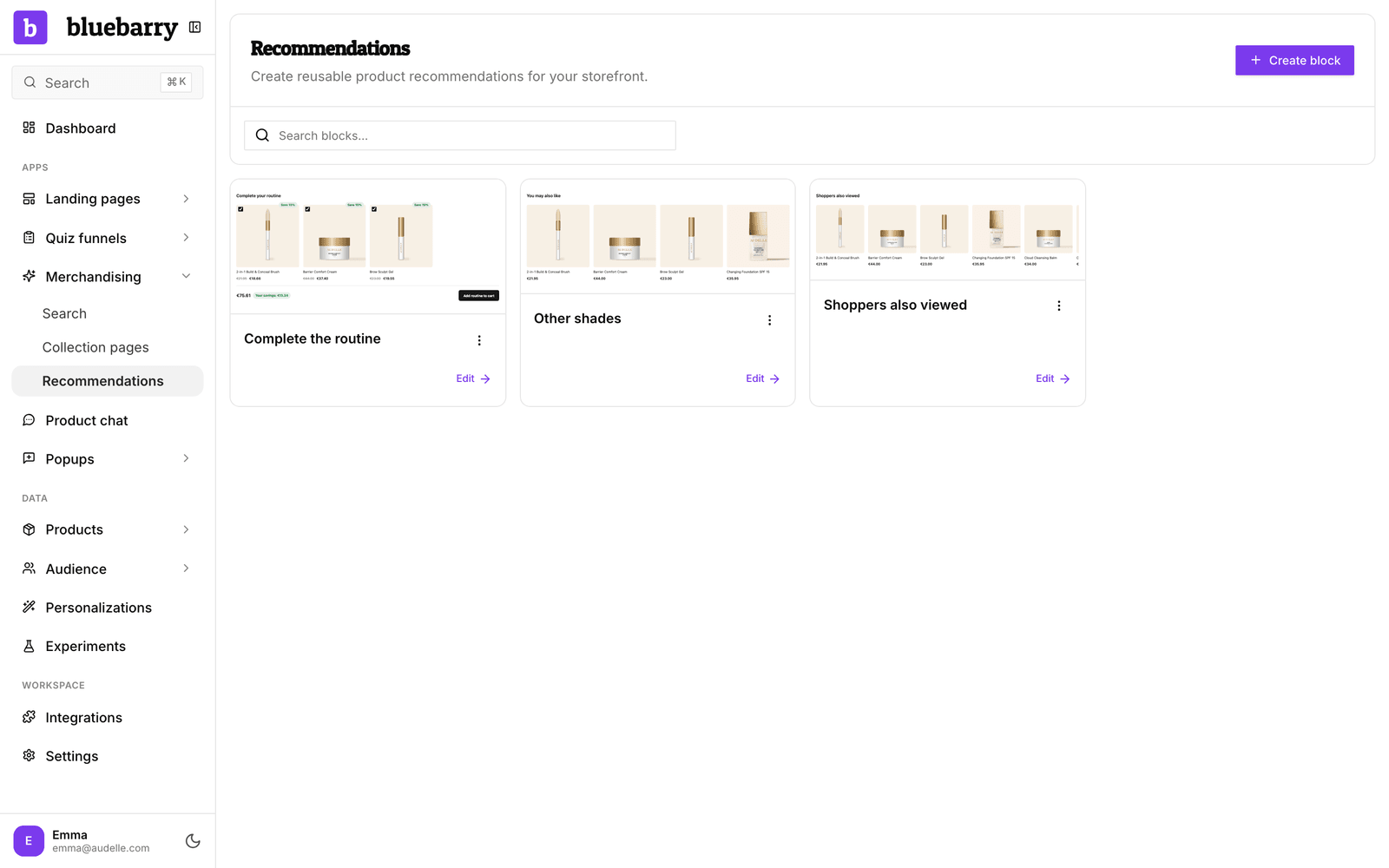
Go to Recommendations → Blocks. You see all your blocks with a small preview each. Click Create block to start a new one, or use the menu on a block to Edit, Duplicate or Delete it. Not in the sidebar yet? A module only shows under Live on your store once it is live or has a draft. Click + Add a module and then Add next to Recommendations, and Barry sets it up with you.
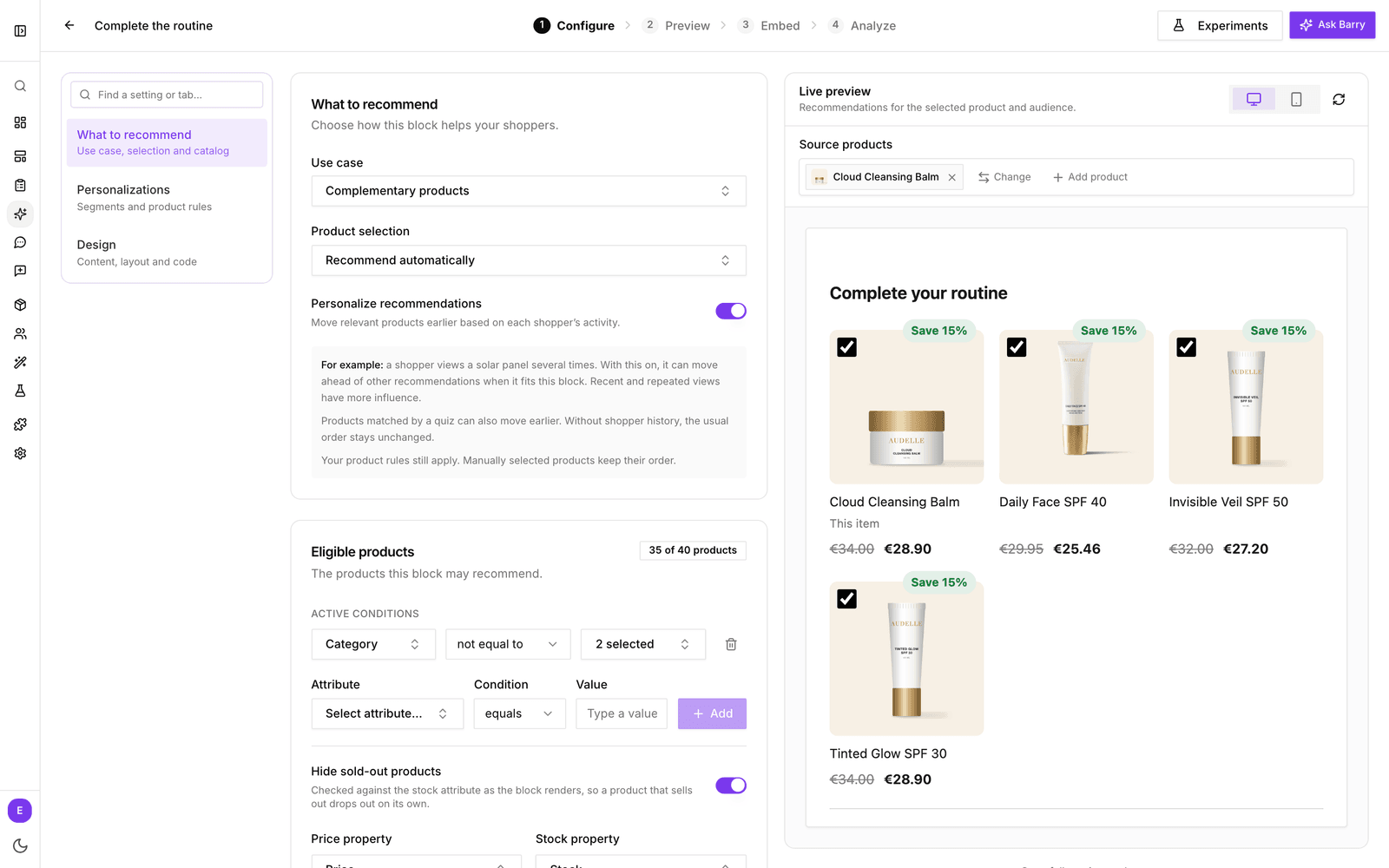
A block has four steps along the top of its editor:
- Configure: what the block recommends, who gets which version, and how it looks, with a live preview beside your settings.
- Preview: a larger preview on desktop and mobile, per audience.
- Embed: the block ID you paste into your theme.
- Analyze: impressions, clicks, orders and revenue, and what personalization adds.
There is no separate publish step. Every change saves on its own and is live on your store straight away.
How recommendations connect to the rest of bluebarry
- Segments. Give a segment its own products, message or discount in the same block. See Personalize recommendations for segments.
- Personalizations. Each segment version and each block's personalized ordering shows up under Analytics → Personalizations, with its uplift against a control group.
- Quizzes. Products a shopper's quiz matched can move forward in a personalized block.
- Barry. Barry prepares new blocks, and in the block editor you can ask Barry to restyle a block, change its title or boost products for an audience (⌘J or Ctrl+J). Your weekly digest gets a recommendations section, and Barry points out blocks that are seen but rarely clicked.
- Discounts. A block can offer a discount on what it recommends. bluebarry applies it at checkout through its own Shopify discount. See Offer bundles and discounts.
- Experiments. If you use Experiments, you can test versions of a block against each other, for example a different title, design or personalization.
- Collection pages. The same shopper signals can order your collection pages for each visitor.