
A profile is everything bluebarry knows about one shopper, in one place. Quiz answers, searches, popup sign-ups, product chat conversations, product views and orders all land on the same profile, so you can see what someone wants and act on it with segments and your email tools.
Where profiles come from
bluebarry recognizes each visitor with a first-party cookie, so their activity across your store joins up without any setup. A profile grows as the shopper uses your store:
- Quizzes and product checks: answers, recommendations and the email or phone number they leave.
- Search: what they searched for, the filters they used and the products they opened.
- Popups: form answers, email, phone and marketing consent.
- Product chat: the products the assistant recommended and the ones they opened.
- Your store: page and product views, and orders from checkout tracking or an order import.
- Imports: customers you upload from your CRM, email tool or a spreadsheet.
As soon as a visitor shares an email address, at checkout or in a form, their earlier anonymous activity joins that profile. Read how bluebarry recognizes customers for the details.
The Profiles page
Go to Audience → Profiles in the Studio sidebar. The table shows your newest profiles first, with the columns Visitor, Phone, First seen, Consent and, when Klaviyo, Omnisend or Spotler Activate is connected, Synced. A small bag icon next to a name means the shopper has bought something.
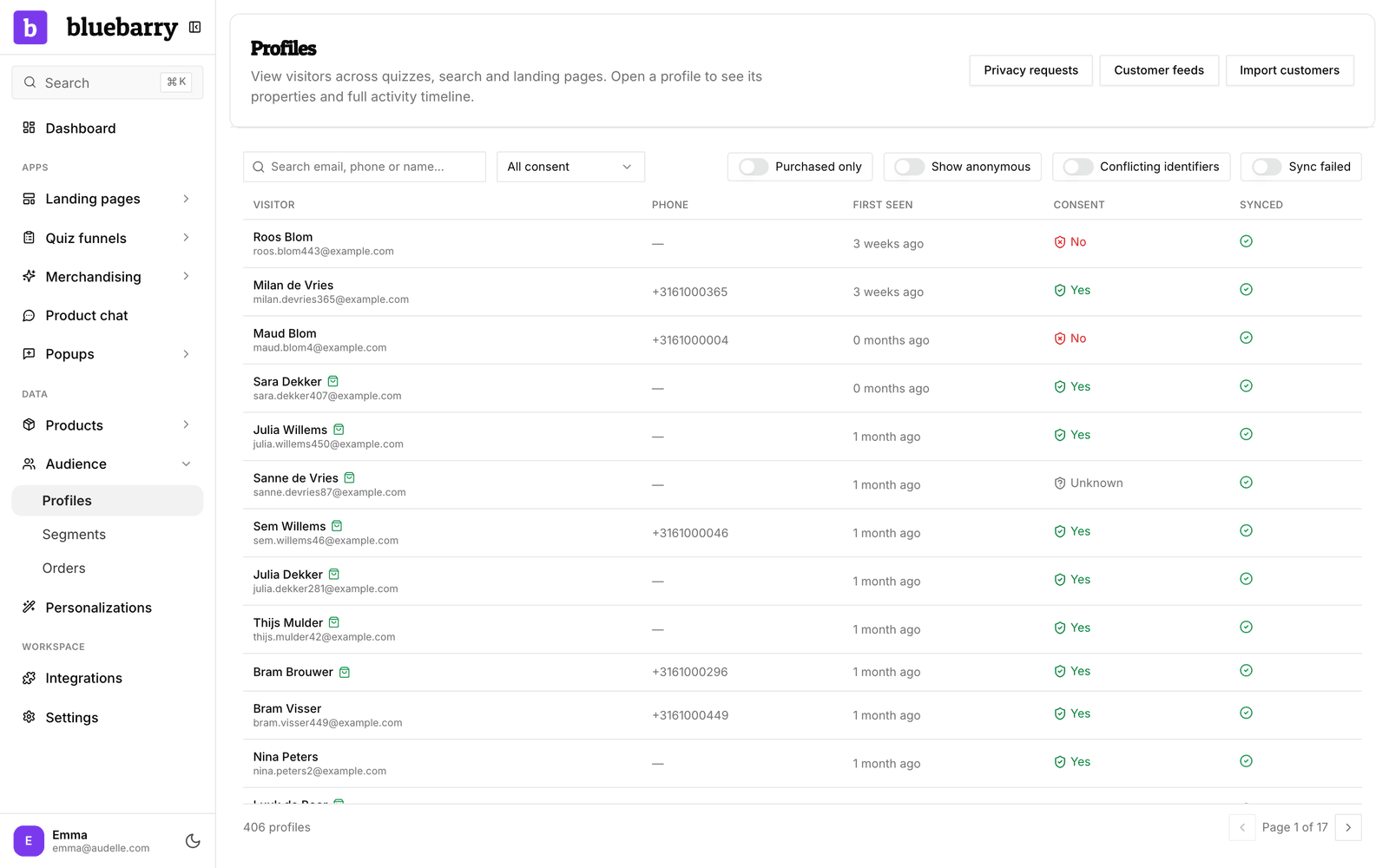
By default the list hides anonymous visitors, people who never shared an email, phone number or name. Use the search box and filters to find someone, then click a row to open their profile. See find and review a profile.
What a profile shows
| Section | What you learn |
|---|---|
| Summary | Orders, revenue, number of recorded events, first and last seen, consent and sync status. |
| Origin | How they first reached your store and their last campaign, from the referrer or UTM tags. |
| Latest recommendations and Properties | The products bluebarry last recommended, and what the shopper told you: quiz answers, popup fields and imported fields. |
| Segments | Which segments they are in now, and which they were in before. |
| Consent history | Every time they gave or declined marketing consent, where, and with which wording. |
| Sources | The records this profile was built from, so you can split off one that does not belong. |
| Activity | A timeline of quizzes, searches, chat recommendations, page and product views, and purchases. |
Bring in customers from other tools
You can add customers you already know, for example from your CRM or email tool. They join existing profiles by email or phone number.
- On the Profiles page, click Import customers.
- Click Download template and example to see the expected columns.
- Prepare a CSV with one row per customer and an
emailorexternal_idcolumn. The columnsphone,first_name,last_name,consent,consent_dateandobserved_atare recognized too. Every other column becomes a profile property. - Give the import a Source name, such as
crm, choose the file (up to 16 MB) and click Import customers.
The import runs in the background. The result appears under the page header, with how many customers were new, updated or skipped. Empty cells never overwrite what bluebarry already has, and importing the same file twice is safe.
To keep a list in sync automatically, click Customer feeds and Add feed. A feed is a CSV at a public URL with the same columns. bluebarry downloads it every day around 04:00 UTC, or whenever you click Run now. Feeds add and update customers; they never remove anyone.
Importing a customer does not give you marketing consent. Only a consent column that says so, or consent the shopper gives on your store, counts. To bring in purchase history, see import orders.
Good to know
- Profiles feed your segments. Use them to personalize search, target popups and build Meta audiences. See build segments.
- Profiles with an email or phone number sync to Klaviyo, Omnisend or Spotler Activate when you connect one. See check profile sync status.
- Shoppers can ask for their data or to be forgotten. You handle that from the profile itself, with Export data and Anonymize.