
A shopper is missing in Klaviyo, is not subscribed when you expected it, or a flow does not start? Start in bluebarry: the Profiles page tells you whether the profile was sent and why it failed, and the Klaviyo settings decide who gets subscribed.
Check the profile first
- Go to Audience → Profiles and search for the shopper's email.
- Hover the icon in the Synced column. It shows Synced, Not synced or Failed for Klaviyo.
- If it failed, open the profile. The red box shows Klaviyo's reason. Fix it and click Retry.
- To find every rejected profile at once, turn on the Sync failed filter.
Check the Klaviyo settings
- Go to Store data → Integrations and find Klaviyo under Marketing & analytics.
- Make sure the account shows as connected. Reconnect it if Klaviyo access was removed.
- Open the account's settings to review Marketing subscription and Add to list.
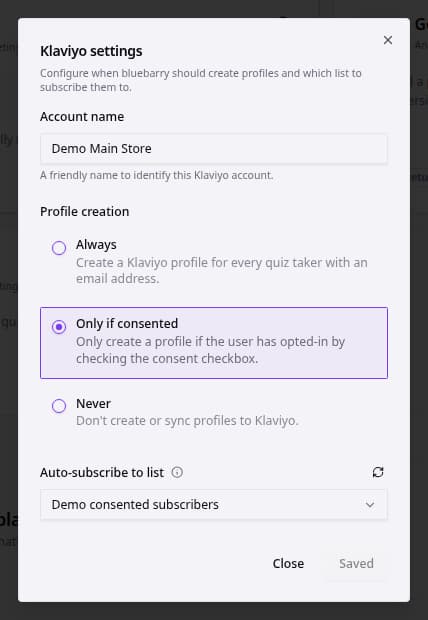
Whatever you choose, bluebarry sends shoppers who left an email on your store to Klaviyo, with their quiz answers and other properties. When a list is selected under Add to list, they are added to that list. Marketing subscription decides who is also subscribed to email marketing:
- Always: everyone, except shoppers who declined consent.
- Only if consented: only shoppers who ticked the consent checkbox.
- Never: nobody is subscribed.
Common problems
| Problem | Why, and what to do |
|---|---|
| Shopper not in Klaviyo at all | The profile has no email, or it only came from an import without consent. Otherwise check the sync status above. |
| In Klaviyo but not subscribed | With Only if consented, the shopper did not tick the consent box. Check Consent history on their profile. |
| A flow on Quiz Completed did not start | The shopper was only recognized later, for example at checkout. bluebarry does not send quiz events from before that moment. |
| Properties have odd names | Property names come from your questions' internal names. Rename them in the quiz editor for new answers. |
After a change, test with a fresh email address and give the sync a few minutes.