
A quiz result without products almost always means a filter is too strict: one answer, or a filter on the whole quiz, excludes every product. The Match products tab shows you which one.
Find the filter that empties the result
- Go to Quizzes and open the quiz.
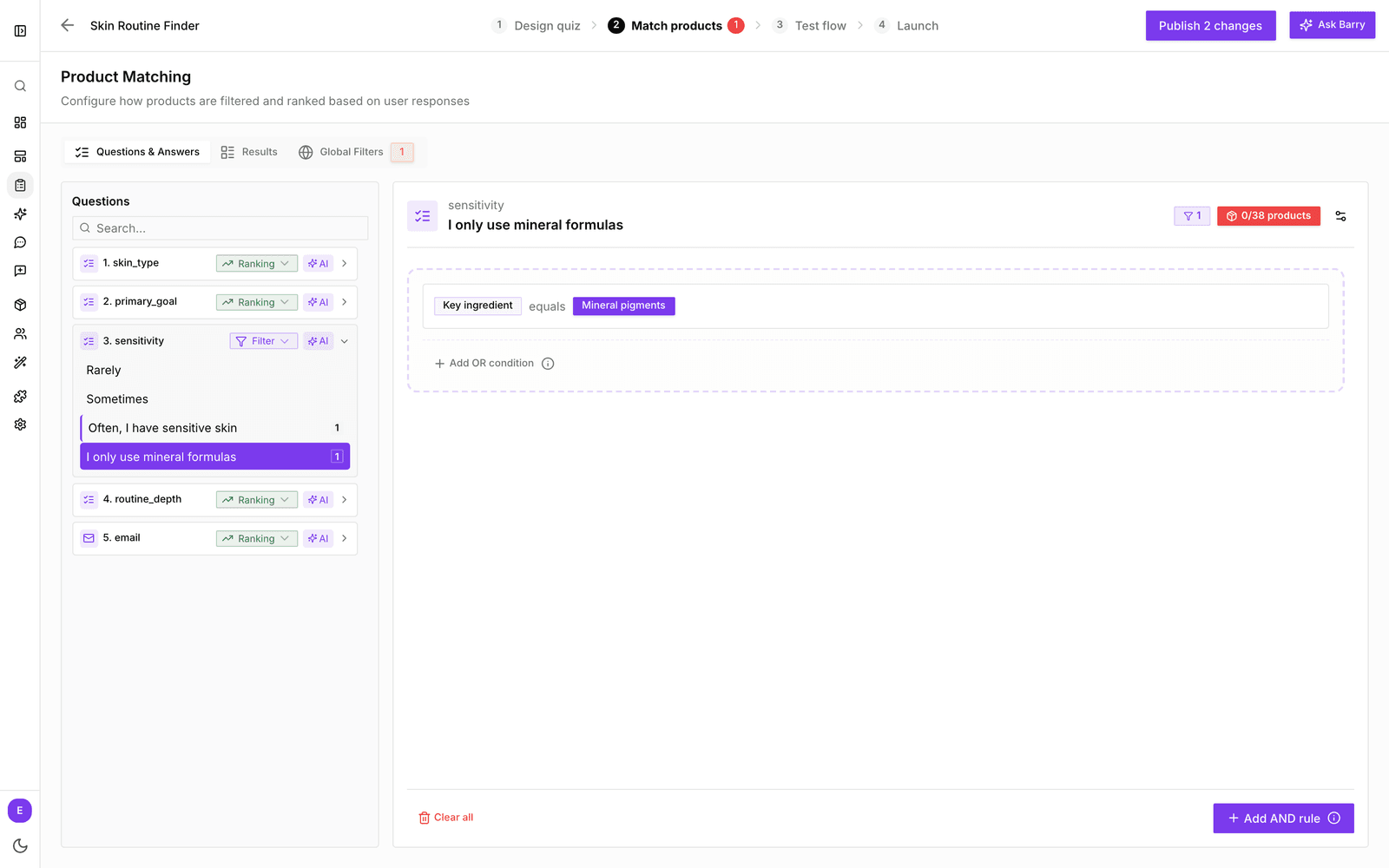
- Click the Match products tab. A warning badge on the tab means at least one answer matches zero products.
- In Questions & Answers, click an answer. The red product count, such as 0/18 products, shows that its rule excludes everything.
- If every answer shows zero, open Global Filters. A rule there applies to the whole quiz.
- Loosen or remove the strictest condition and watch the product count go up.
- Click the Test flow tab and click through the same answers to check the result.
Common causes
| Cause | Fix |
|---|---|
| A global filter matches nothing | Open Global Filters and loosen or remove the rule. |
| One answer's rule is too strict | Select the answer and widen the value, or remove a condition. |
| Two answers together exclude everything | Test the combination in Test flow. Turn one of the questions into a ranking question instead of a filter. |
| Products miss the property the rule checks | Fill in the property on your products, or fix the feed column mapping. |