
Search analytics show what your shoppers look for, what they cannot find, and what search earns. It is also the quickest way to improve search: every search that finds nothing tells you exactly which word to fix.
Open a configuration under Live on your store → Search and click Analyze at the top. The numbers cover that one configuration. The date picker starts at the last 30 days.
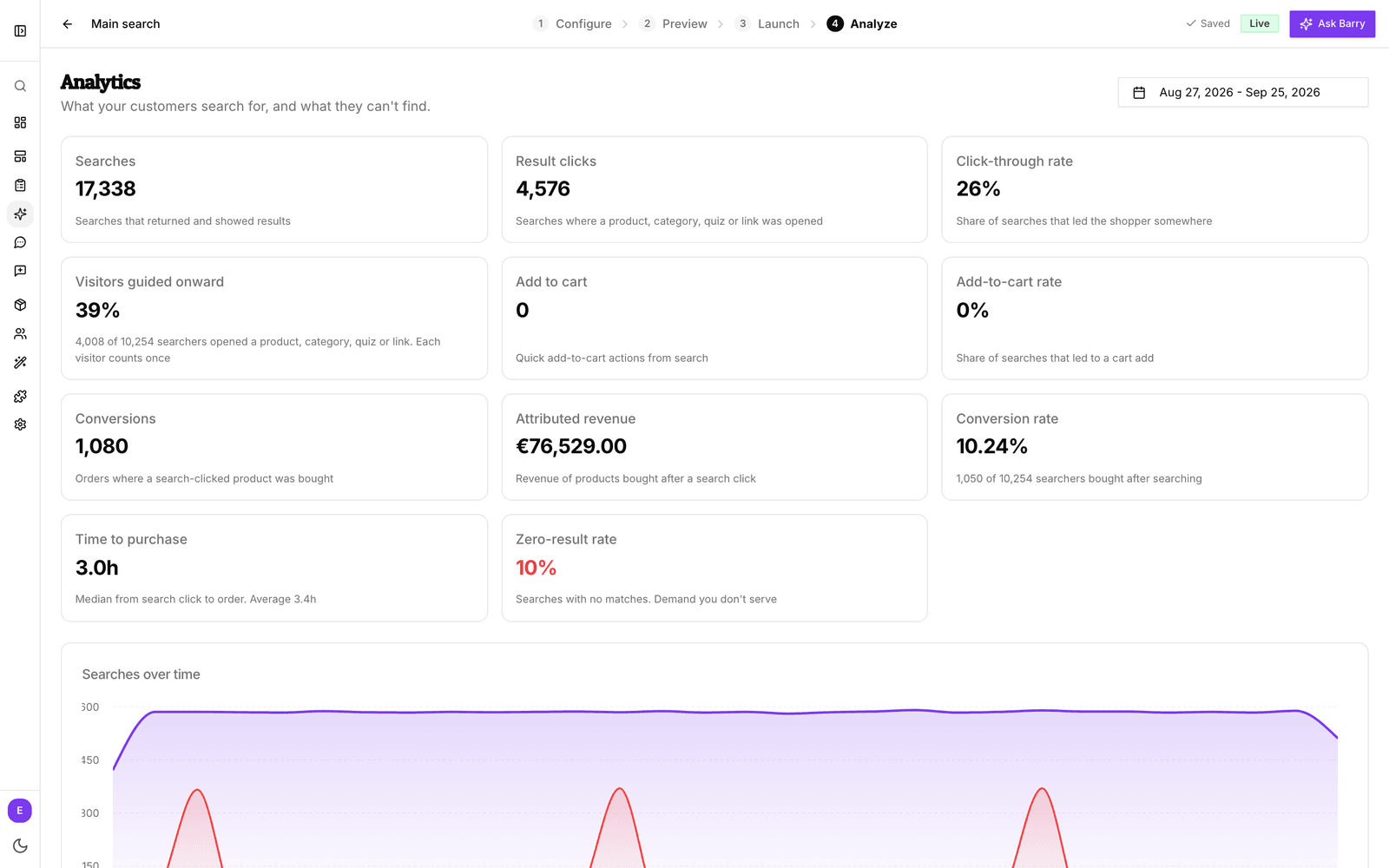
The metrics
| Metric | What it tells you |
|---|---|
| Searches | How many searches shoppers made, including the ones that found nothing. Typing “s”, “sh”, “shoe” counts as one search, not three. |
| Result clicks | Searches where the shopper opened something: a product, a category, a quiz or a link. |
| Click-through rate | The share of searches that led the shopper somewhere. A low rate means results often do not look right. |
| Visitors guided onward | The share of searching visitors who opened something at least once. Each visitor counts once, however often they search. |
| Add to cart | Products added with quick add to cart, straight from search. Shown when quick add is on. |
| Add-to-cart rate | The share of searches that ended in a quick add. Shown when quick add is on. |
| Conversions | Orders that include a product the shopper clicked or added from search in the 7 days before ordering. Any variant of that product counts. |
| Attributed revenue | The value of those products in those orders. Other items in the same order are not counted. |
| Conversion rate | The share of searching visitors who placed an order within 7 days of their first search, whatever they bought. |
| Time to purchase | The typical (median) time between a search click and the order. The card also shows the average. |
| Zero-result rate | The share of searches that found nothing. This is demand you are not serving yet. |
Below the cards, Searches over time and Attributed revenue over time show the trend by day. Conversions and revenue need order tracking on your store. See understand conversion attribution for how orders reach bluebarry.
Zero-result searches
The Zero-result searches list shows what shoppers typed and did not find, with how often. Each row is a shopper who wanted something and got an empty page. Work through the top of the list every week or two.
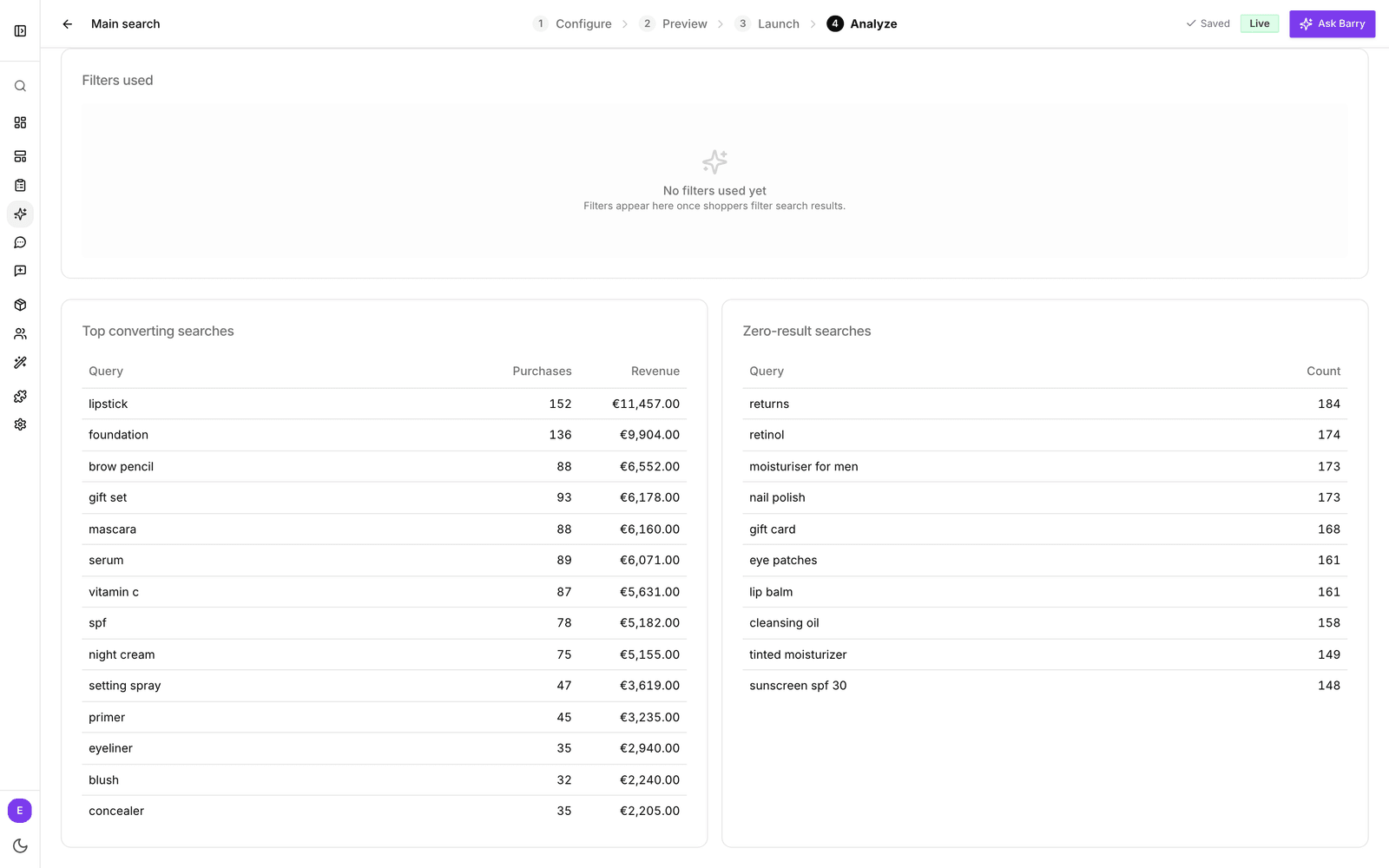
For each search, ask why it found nothing:
- You sell it under another name. Someone searches “moisturiser” and your products say “face cream”. Add a synonym under Configure → Matching. See synonyms.
- They are looking for a page, not a product. “Returns”, “shipping” or “gift card”. Add a redirect that opens the right page. See add redirects, banners and quiz triggers.
- The word is in your catalog, but search does not look there. Make that attribute searchable. See searchable attributes.
- Typos or descriptions. Lower the match sensitivity one step, switch on Match by meaning, or turn on automatic spelling correction.
- You do not sell it. That is useful too. A search that keeps coming back is a product idea, or a reason to show a helpful link or quiz when nothing matches.
Keep an eye on the Zero-result rate card after each round of fixes. It should go down.
Top searches
Top searches lists your most common searches with their searches, click-through rate, conversion rate and revenue. Click a column heading to sort by it. Useful patterns to look for:
- Many searches, low click-through rate. Shoppers get results but not the ones they want. Check the search in Preview, then pin or boost the right products. See personalize search results.
- High conversion rate. These searches sell. Consider a banner or a featured spot for them.
Top converting searches ranks searches by purchases and revenue. Quiz triggers and blogs shows how often each quiz trigger and link was shown and opened. Filters used shows which filter values shoppers pick and whether the filtered results led to a click.
Segment targeting impact
If you gave segments their own search rules, this card shows whether those rules pay off. By default, 10% of shoppers in a targeted segment are held back and see the Everyone rules instead. Comparing the two groups shows what your segment rules add.
- Targeted are shoppers who got the segment rules. Holdout (control) are shoppers in the same segments who did not. Both rows show searches, click-through rate, conversions, conversion rate and attributed revenue.
- Click-through lift and Conversion-rate lift show the difference. While the card says “Too little traffic to trust yet”, wait before drawing conclusions.
- Incremental impact vs the holdout estimates the extra orders and revenue the segment rules brought in.
Performance by segment lists each segment separately. It tells you which segment's shoppers search and buy the most, but it is not a fair test of the rules, because segments differ in who is in them. For that, use the targeted and holdout comparison above. The card only appears once segment rules have served shoppers.
Good to know
- Numbers are per configuration. If you switch your store to a new configuration, its history starts from zero.
- Searches are linked to orders through the bluebarry visitor cookie. Shoppers who block cookies still get search, but their orders cannot be attributed to it.
- Searches you make with the preview link are not counted, so testing does not skew your numbers. Searches you make on your live store are counted like any other.