
Selling in more than one language? How you set that up depends on your platform.
On Shopify with several published languages, keep one quiz and translate it. bluebarry follows your Shopify languages and markets, shows each shopper their own product names, links and prices, and keeps one set of analytics, experiments and segments. Don't duplicate the quiz. See Sell in several languages and markets.
On every other platform, build one quiz per language, as described below. Each quiz holds the questions, answers and result page in that language and recommends the products, names and links that belong to it. You also get separate numbers per market, so you can see how German shoppers answer compared with Dutch ones.
What translates itself
The small texts bluebarry adds to every quiz, such as Next, Skip, email and phone checks and the default discount banner, follow the shopper's browser language. That works for English, Dutch, German, French, Spanish and Italian; other languages get English. Everything you write yourself (questions, answers, the start page, the result page) stays exactly as you wrote it.
One quiz per language
- Build and test the quiz in your main language first.
- In Quizzes, open the menu on the quiz card and click Duplicate.
- Rename the copy, for example “Shoe finder DE”, and translate the questions, answers, start page and result page.
- Keep the internal names of questions the same in every copy. They are the names answers are saved under on shopper profiles, so one segment such as “said trail running” then covers every language. Barry's /normalize command lines them up for you if they have drifted apart.
- Set up the products for each language, as described below, and publish each quiz.
Show the right products for each language
If your product names and links are the same in every language, all quizzes can share one catalog and you are done. If they differ, each quiz should only recommend the products of its own language, so a German shopper never lands on a Dutch product page.
Bring in one feed per language
- Create a feed per language, each with that language's names, descriptions and product links, under Store data → Feeds.
- Give every product a unique identifier per language, for example
CHAIR001_DEandCHAIR001_NL. Two feeds with the same identifier would overwrite each other's products. - Add a column such as
marketwith the valueDEorNL, and map it to a Text property. That gives each quiz something to filter on.
One feed that holds every language works too, as long as it has unique identifiers and the market column. A feed's Import filters leave products out of bluebarry altogether, so keep them for products no quiz should ever show. See import your product feed.
Filter each quiz to its language
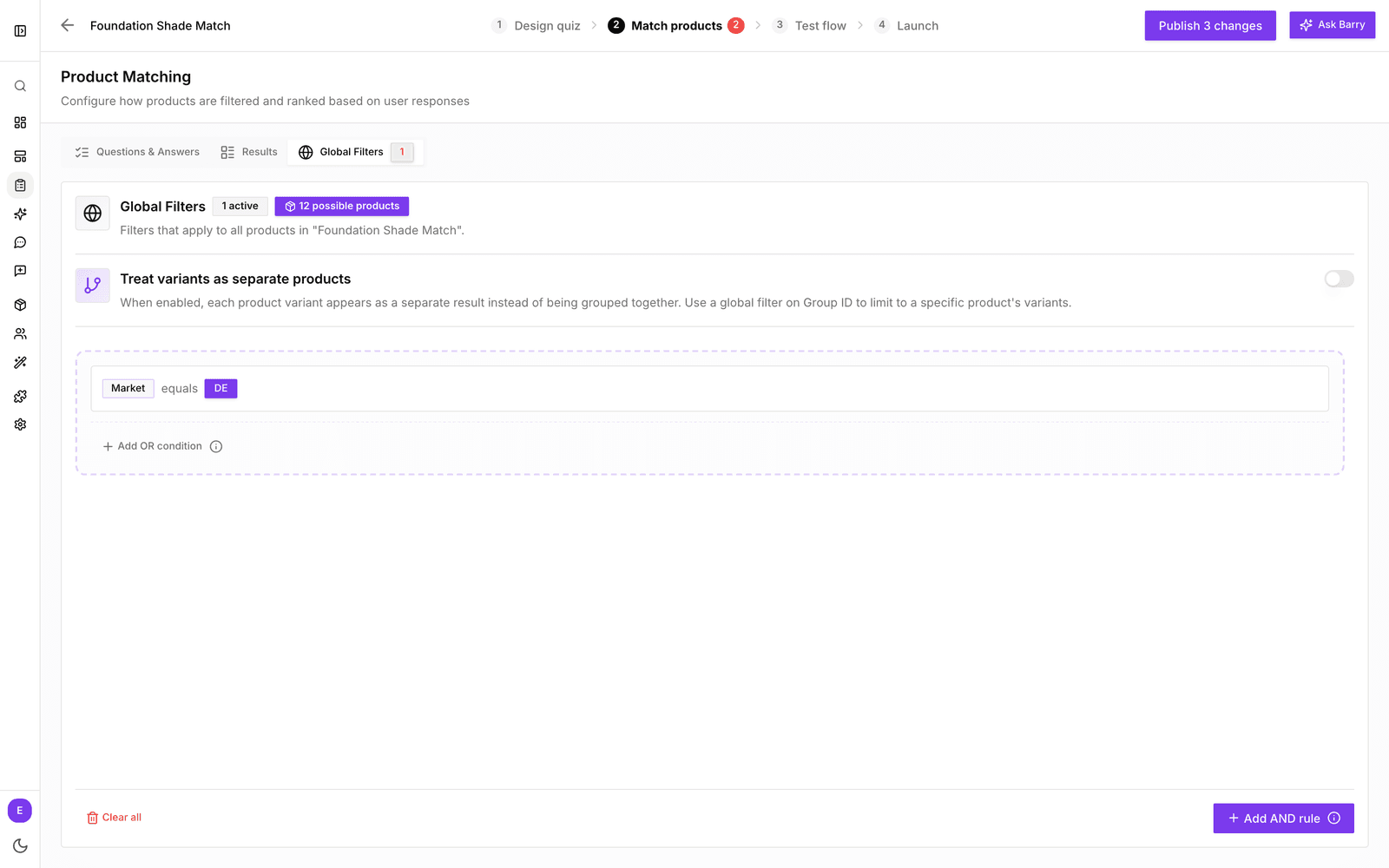
- Open the German quiz and click Match products.
- Click Global Filters.
- Add a rule on your language property, such as market equals DE. If you only used identifiers, a Text property holding the SKU with contains “_DE” works as well.
- Do the same in every other language's quiz, with its own value.
Check on Test flow that only products of that language come back. If the Match products tab shows a red number, your global filter leaves too few products for some answers.
Put each quiz on the right pages
Every quiz has its own link, button and embed code. Place the German quiz on your German pages and the Dutch quiz on your Dutch pages. See add your quiz funnels to your store.
Good to know
- Comparison labels and the discount banner text are set per quiz, so translate them in each copy.
- Quizzes → Results lets you pick one quiz at a time, which makes it easy to compare markets.