
The quiz editor is where a quiz comes together: the questions shoppers see, the rules that turn their answers into product recommendations, a test run, and how the quiz appears on your store. This article is a quick tour so you know where everything lives.
Open the editor
- In the sidebar, go to Quizzes.
- Click Edit on the quiz you want to work on, or click Add quiz funnel to create a new one.
The four steps

The top of the editor shows four steps. You can jump between them at any time.
| Step | What you do there |
|---|---|
| Design quiz | Write the start page, questions, answers and result page, and style the quiz with your brand. |
| Match products | Connect each answer to your product properties, set rules for the result cards, and add global filters for the whole quiz. |
| Test flow | Pick answers like a shopper would and see which products come out, with the reasons why. |
| Launch | Choose how the quiz opens on your store (pop-up, side panel, embedded or full page), when it opens automatically, and the install steps for your platform. |
A red number on Match products is a warning. It counts answers that match no products at all. Hover over it to see which ones. If your global filters leave no products, it says so.
Find your way around Design quiz
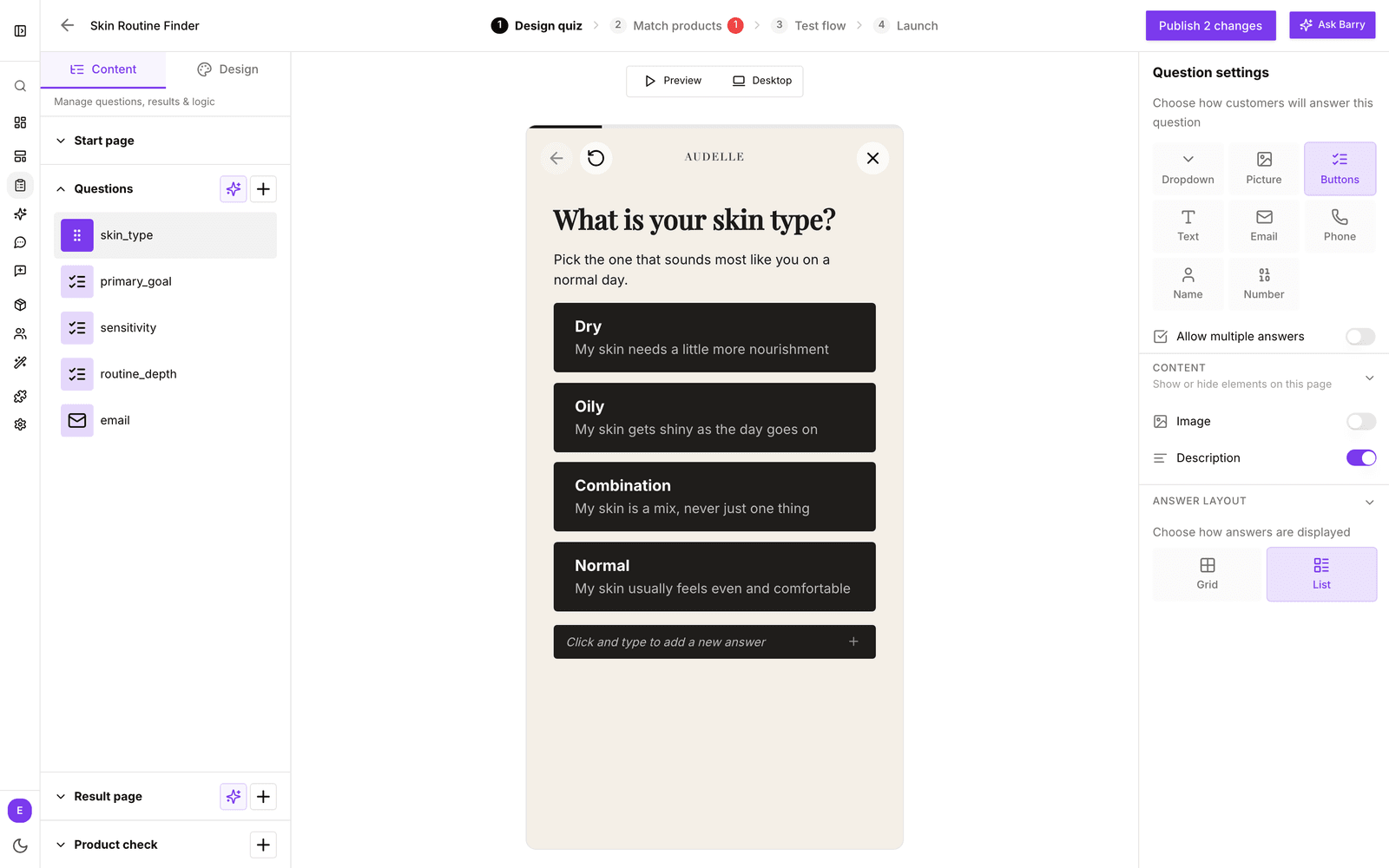
- Left panel, Content tab: the parts of your quiz in order: Start page, Questions, Result page and Product check. Click one to open it.
- Left panel, Design tab: your themes, with logo, fonts, colors, buttons, animations, page styles and custom code.
- Middle: a live preview. Click any text in it to edit it in place. Use Preview to click through the quiz and the Mobile or Desktop button to switch devices. The editor opens in mobile view.
- Right panel: the settings for whatever you selected, such as the question type or the result page layout.
In the header
| Control | What it does |
|---|---|
| Back arrow | Takes you back to All quizzes. |
| Quiz name | Click the pencil next to it to rename the quiz or change its description. Only your team sees these. |
| Publish button | Makes your changes live. It reads Publish quiz the first time, then Publish 1 change or Publish 3 changes when there is something new, and No changes, view implementations when everything is live. |
| Ask Barry | Opens Barry beside your work (⌘J or Ctrl+J). Barry can change questions, copy and the result page for you. |
Saving and publishing
There is no save button. Every change is saved to your draft as you make it. Shoppers keep seeing the published version until you click the publish button in the header, then Publish new version and Publish. See publish a quiz funnel.
Where the answers go
Each answer a shopper gives is saved on their profile, under the question's internal name. From there you can build segments on it, give those segments their own search results, choose who sees a popup, and sync the answers to Klaviyo and other tools. Clear internal names make all of that easier.
Next: create and edit questions.