
Test a quiz before shoppers do. There are two ways: the Preview button shows exactly what shoppers will see, and Test flow shows which products each combination of answers returns, and why. Both work on your draft, so nothing you do here reaches your store.
Click through it like a shopper
- In the sidebar, go to Quizzes and click Edit on your quiz.
- On Design quiz, click Preview above the quiz. The quiz needs at least one question.
- Answer the questions and look at the result page. Use Mobile or Desktop to switch device, Replay to start again and Exit to go back to editing.
See why products are recommended
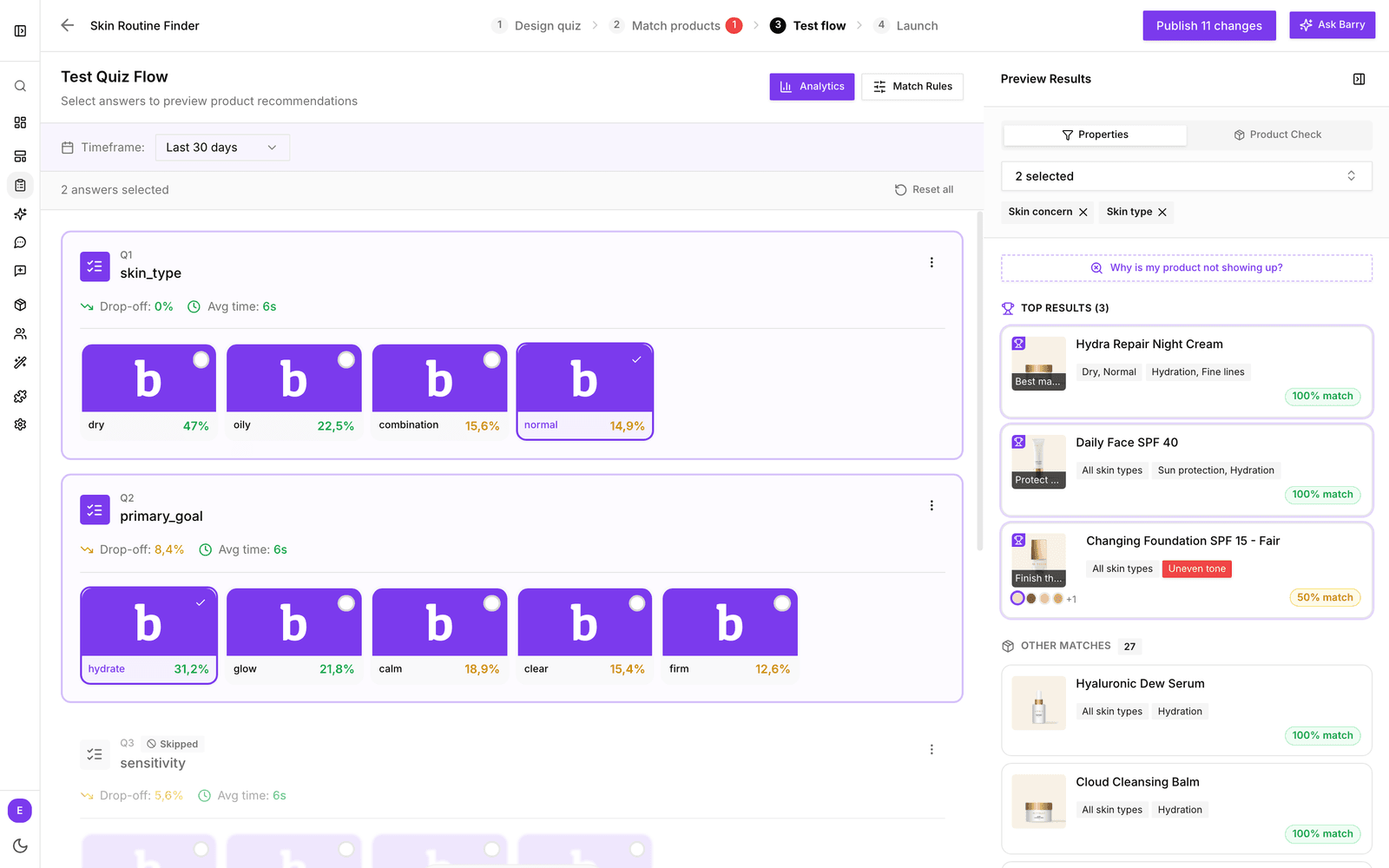
- Click Test flow at the top of the editor.
- Click answers the way a shopper would. Skipped questions are greyed out and marked Skipped.
- On the right, Preview Results updates with every click. Top Results are the products that fill your result cards, with their match score. Other Matches lists the next best products, up to 50.
- Under Properties, pick which product properties to show on each product, so you can see at a glance why it matched.
- Click Reset all to clear your answers and try another path.
When an expected product is missing
Click Why is my product not showing up? above the results. Choose answers and the product you expected, and bluebarry shows which filters it fails. Then click Match Rules to jump to Match products and fix the rule. More in troubleshoot no matching products.
See how real shoppers answer
Once your quiz is live, switch on Analytics (or press M) on Test flow. Each question then shows how shoppers answered, where they drop off and how long they take, for the period you pick under Timeframe.
What to test
| Area | What to check |
|---|---|
| Every path | Each answer leads somewhere sensible, including the skips. |
| Results | The products fit the answers, and no answer combination ends with nothing to show. |
| Required fields | Shoppers cannot continue without the information you need, such as an email address. |
| Both devices | The quiz reads well on a phone and on a desktop. |
| Buttons | Result buttons open the right product page or add to cart as you intended. |
Happy with it? Publish from the button in the top right of the editor. See publish a quiz funnel.