
A discount code is a simple thank-you for shoppers who finish your quiz and leave their email address, and a nudge to buy what you recommended. The code shows on the result page. On Shopify, WooCommerce, CCV Shop and Magento, bluebarry can also put it in the cart for them.
Add the code to your email question
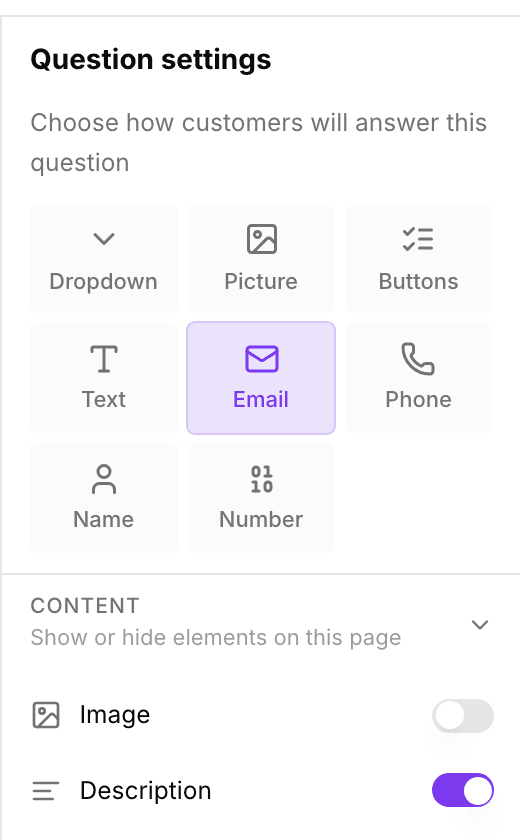
- Create the discount code in your store first, for example
WELCOME10. - In the sidebar, go to Quizzes and click Edit on your quiz.
- On Design quiz, click your Email question in the Questions list. No email question yet? Add one and set its type to Email.
- In Question settings, open Discount code and type the code.
- Switch on Auto-apply if you want the code added to the cart automatically. The switch is named after your store, for example Auto-apply on Shopify, and shows once a Shopify, WooCommerce, CCV Shop or Magento store is connected.
- Optionally fill in Discount amount as a percentage or an amount. It is only used for display; the code in your store decides the actual discount.
- Publish the quiz to make the code live.
A quiz can have one discount code. If you add a code to a second email question, bluebarry warns you and removes the code from the first one when you save.
Give each shopper their own code
Instead of one code for everyone, bluebarry can create a code for each shopper. In the Discount code section of your email question, switch on A unique code per person. You set the discount, and bluebarry creates a code in your store for every shopper who leaves their email. Every code works once.
- Discount: a percentage, a fixed amount or free shipping.
- Valid for (days) and Minimum order: how long the code works and, if you want, the smallest order it counts for.
- Code starts with: the start of every code, for example WELCOME. bluebarry adds eight characters nobody can guess.
- Profile property: the name the code is saved under on the shopper's profile,
discount_codeunless you change it. Its last valid day is saved next to it asdiscount_code_expires. Both are sent to Klaviyo, Omnisend and Spotler, so your welcome email can show the code. - Show the code on screen: switch it off when the code should only arrive by email. The success screen then says the code is on its way to the inbox, so a made-up address gets nothing. You need an email that sends the code, and Studio warns you when no email tool is connected.
The result page shows the code once your store has created it, which takes a moment. With Show the code on screen off, the result page only says the code is on its way to the inbox. A shopper who takes the quiz again gets the code they already have, and a new one once it has expired. In the Studio preview you see an example code. Real codes are only made for shoppers on your published quiz.
This works on Shopify, WooCommerce, CCV Shop and Magento. Studio tells you when your store cannot create codes yet and what to do about it. On Magento a cart takes one discount code: a shopper who entered a code of their own keeps that one and can swap it themselves. A free shipping code works there with shipping methods that follow Magento's own free shipping rules.
What shoppers see
| Your setup | What shoppers see |
|---|---|
| Code filled in, auto-apply off | "Your discount code: WELCOME10" above the recommendations. Clicking the code copies it, ready to paste at checkout. |
| Code filled in, auto-apply on | bluebarry adds the code to the cart as soon as the result page opens, and the banner says "Discount WELCOME10 will be applied at checkout". If that does not work, for example on a page outside your store, shoppers see the copy banner instead. |
| No code | No banner. |
The default banner text appears in the shopper's browser language when it is English, Dutch, German, French, Spanish, Italian, Swedish, Romanian or Polish, and in English otherwise.
Change the banner text
- Click Result page in the left panel.
- Click the text of the discount banner in the preview and type your own, such as “Thanks for taking the quiz. Here is 10% off:”.
- Click outside the text to save it. Clear it to go back to the default.
Your own text is used for every shopper, whatever their language, and can be up to 200 characters. In the copy banner the code still shows next to your text. With auto-apply on, your text replaces the whole message, so include the code in it if you want shoppers to see it.
Settings at a glance
| Setting | Where | What it does |
|---|---|---|
| Discount code | Email question settings | The code shown on the result page after the shopper enters their email. |
| A unique code per person | Email question settings | bluebarry creates a single-use code in your store for each shopper, with the discount you set. |
| Auto-apply | Email question settings, once a code is filled in and a Shopify, WooCommerce, CCV Shop or Magento store is connected | Adds the code to the cart when the result page opens. |
| Discount amount | Email question settings, once a code is filled in | What the code is worth, for display only. |
| Banner text | The discount banner on the result page | Replaces the default text before the code. |
Popups can hand out a code too, the moment someone signs up. See create a popup.