
Keeping your product data in a Google Sheet? Then you can use that sheet as your feed. Publish it as CSV, paste the link in bluebarry, and every change in the sheet reaches your catalog on the next sync.
Publish the sheet as CSV
Sharing a sheet is not enough: bluebarry needs the published CSV version.
- Open your sheet in Google Sheets.
- Go to File → Share → Publish to web.
- Select the tab with your products and choose Comma-separated values (.csv).
- Click Publish and copy the link. It should contain
output=csvor/export?format=csv.
Add the sheet in bluebarry
- In the sidebar, go to Store data → Feeds.
- Click Create Feed.
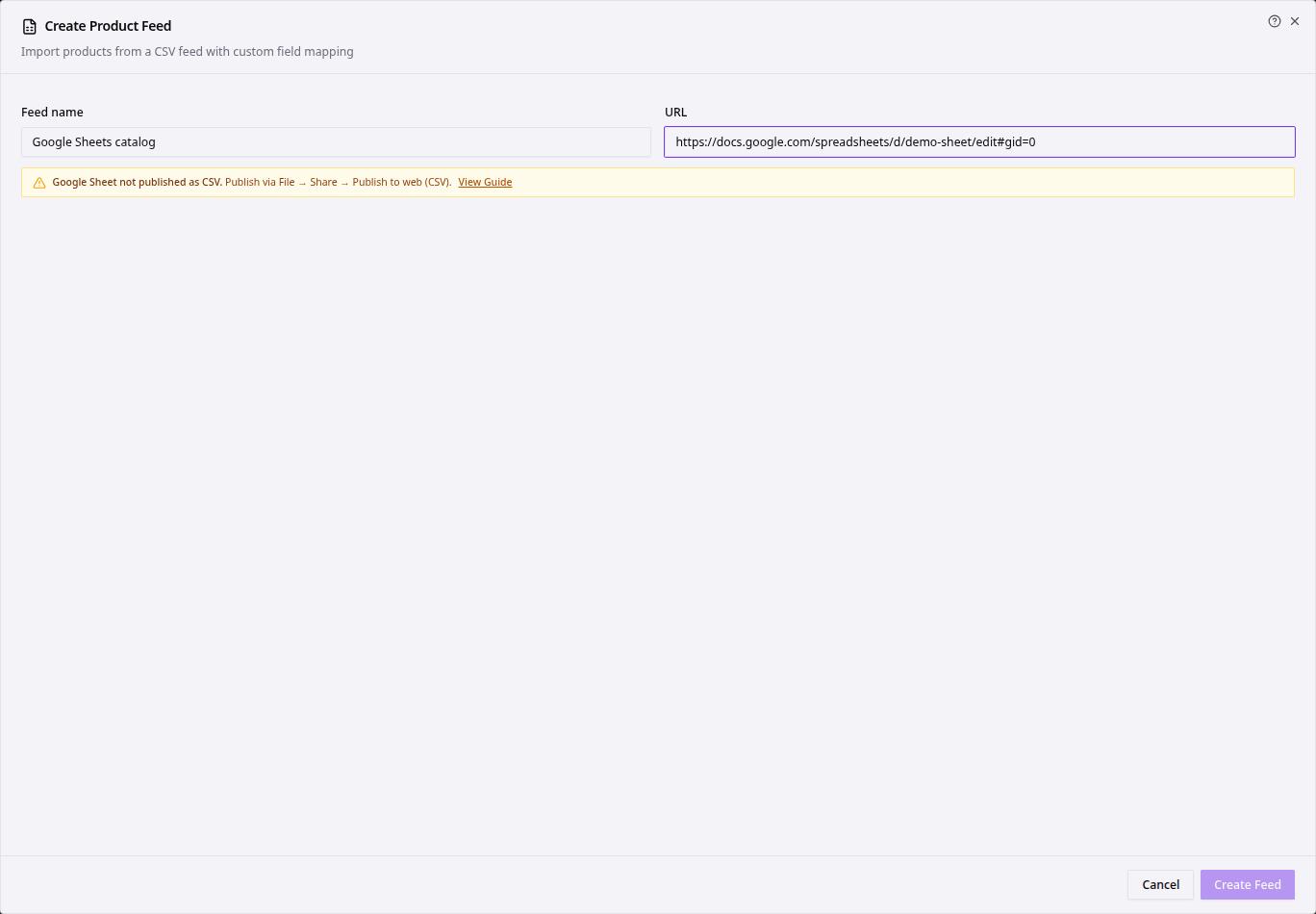
- Enter a Feed name and paste the published link into URL.
- If you see Google Sheet not published as CSV, the link is the normal sheet link. Click View Guide for a walkthrough and publish the sheet as shown above.
- Choose the Product identifier column, click Auto-map columns and check the mapping.
- Click Create Feed, then Sync Now.
When the sync finishes, open Store data → Products to check that your rows are there.
Tips
- Keep the header row as the first row and one product per row below it. Empty rows and merged cells get in the way.
- Google can take a few minutes to update a published sheet. If a change doesn't show after a sync, wait a moment and sync again.
- New to feeds? Start with Preparing your product feed.