
A live feed keeps your bluebarry catalog in step with your product data. bluebarry syncs every feed automatically once a day. This article shows how to check that syncs are working, run one yourself and fix the most common problems.
Check and sync a feed
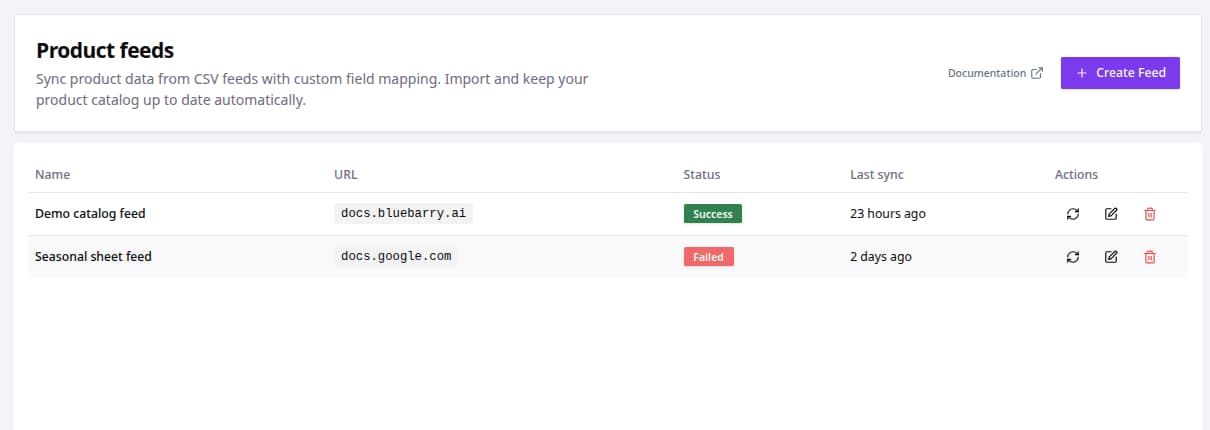
- In the sidebar, go to Store data → Feeds.
- Find your feed in the Product feeds table and look at Status and Last sync.
- To sync right now, click the sync icon under Actions.
- If the status says Failed, hover over it to read what went wrong.
- After a successful sync, check Store data → Products for the changes you expected.
Run a manual sync after you change the feed link or the mapping, so you don't have to wait for the next daily sync.
What the statuses mean
| Status | Meaning |
|---|---|
| Queued | The sync is waiting to start. |
| Syncing | Products are being imported right now. |
| Success | The last sync finished without problems. |
| Failed | The last sync stopped. Hover over the badge for the reason. |
| Never synced | The feed was created but hasn't run yet. |
Common feed issues
| Problem | What to check |
|---|---|
| The feed can't be reached | Open the feed link in a private browser window. If it asks for a login or shows an error, bluebarry can't read it either. |
| A Google Sheet fails | Publish the sheet as CSV. A normal share link doesn't work. |
| Products appear twice | The Product identifier column must be unique and stable. A column that changes between exports creates new products. |
| A new property stays empty | New feed columns need to be mapped. Edit the feed, map the column and sync. |
| Fewer products than expected | Check the feed's import filters and look for rows without a name. |
Still stuck? See Fix feed import errors or go back to Importing your product feed.