
Every column in your feed has to be linked to something in bluebarry: the product name, the image, or a property like color. You don't have to do that by hand. There are two ways to let bluebarry do the mapping for you, and you can always correct it afterwards.
With AI, when you connect your first feed
When you have no feeds yet, Store data → Feeds shows Connect your product feed. Paste your CSV link and click Connect feed. AI looks at the column names and sample values, picks the ID and name columns, creates the properties it needs and starts the import. You don't see a mapping screen at all.
Want to check the result? Open the feed afterwards with the edit icon. You'll see the mapping AI chose and can change it.
With Auto-map columns, in the feed dialog
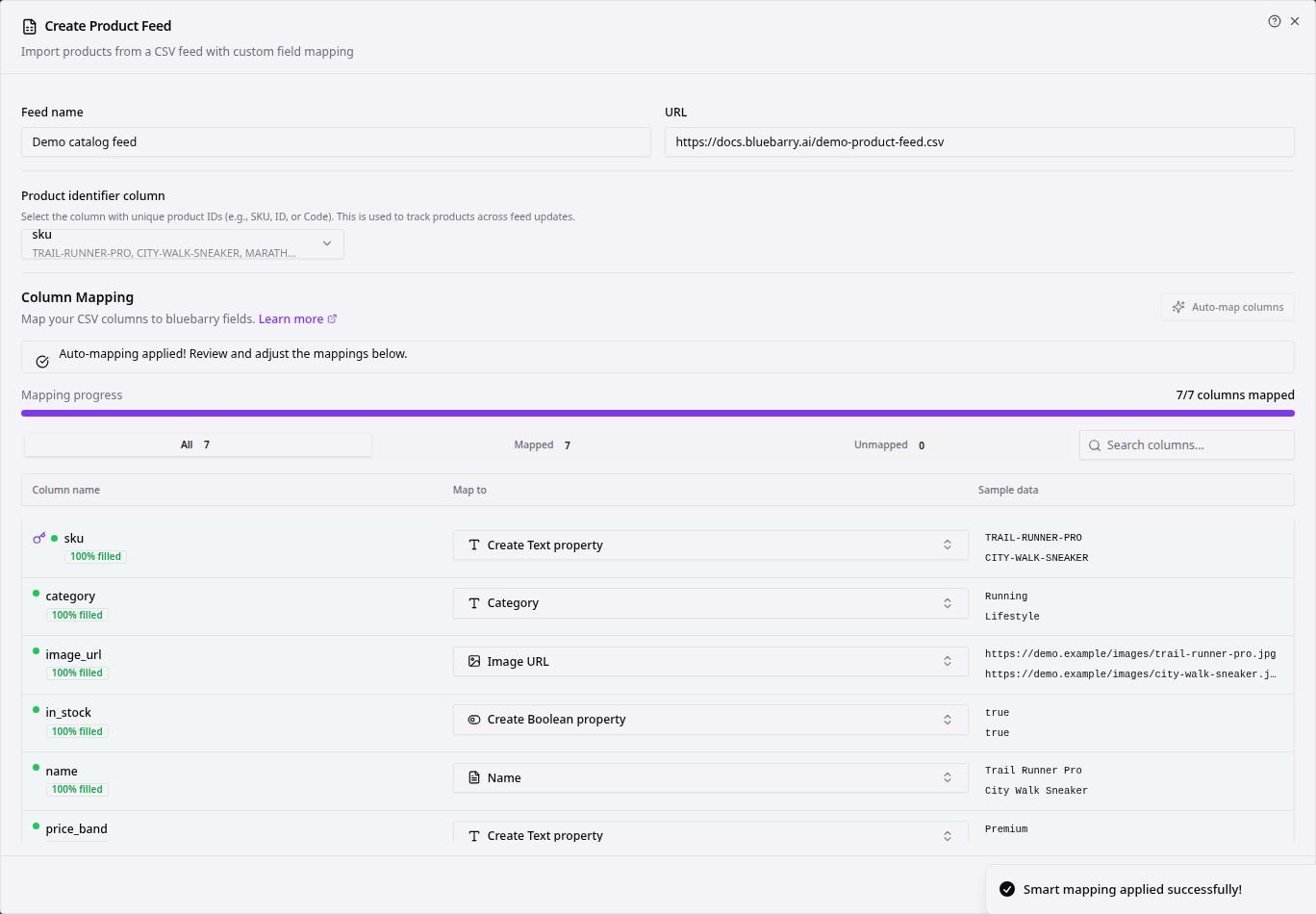
- Go to Store data → Feeds.
- Click Create Feed, or the edit icon next to an existing feed.
- Make sure the URL loads and the Product identifier column is set.
- Under Column Mapping, click Auto-map columns. bluebarry fills in Map to for each Column name based on the header and the sample data.
- Review the suggestions and fix anything that's off. The Unmapped tab shows what still needs a decision.
- Click Create Feed or Update Feed, then Sync Now.
What to check before you sync
| Mapping | What good looks like |
|---|---|
| Product identifier | A column that is unique per row and doesn't change, such as SKU. It's stored as text, even when the values are numbers. |
| Name | The title customers see. This mapping is required. |
| URL | Opens the product page on your store. |
| Image URL | A public link to an image, not a page. |
| Numbers | Prices, ratings and sizes map to Numeric properties, so you can filter and sort on them. |
| Everything else | Useful attributes become properties. Columns you'll never use can be set to Do not import. |
The percentage under each column name shows how many rows have a value. A low number there usually means gaps in your feed, not a mapping problem. For a full walkthrough of the feed dialog, see Importing your product feed.