
Properties are the facts about your products: color, material, skin type, price, in stock or not. They are what quiz answers match on, what search turns into filters and what product chat reads when a shopper asks a question. Clear properties with filled-in values make every feature smarter.
Create or edit a property
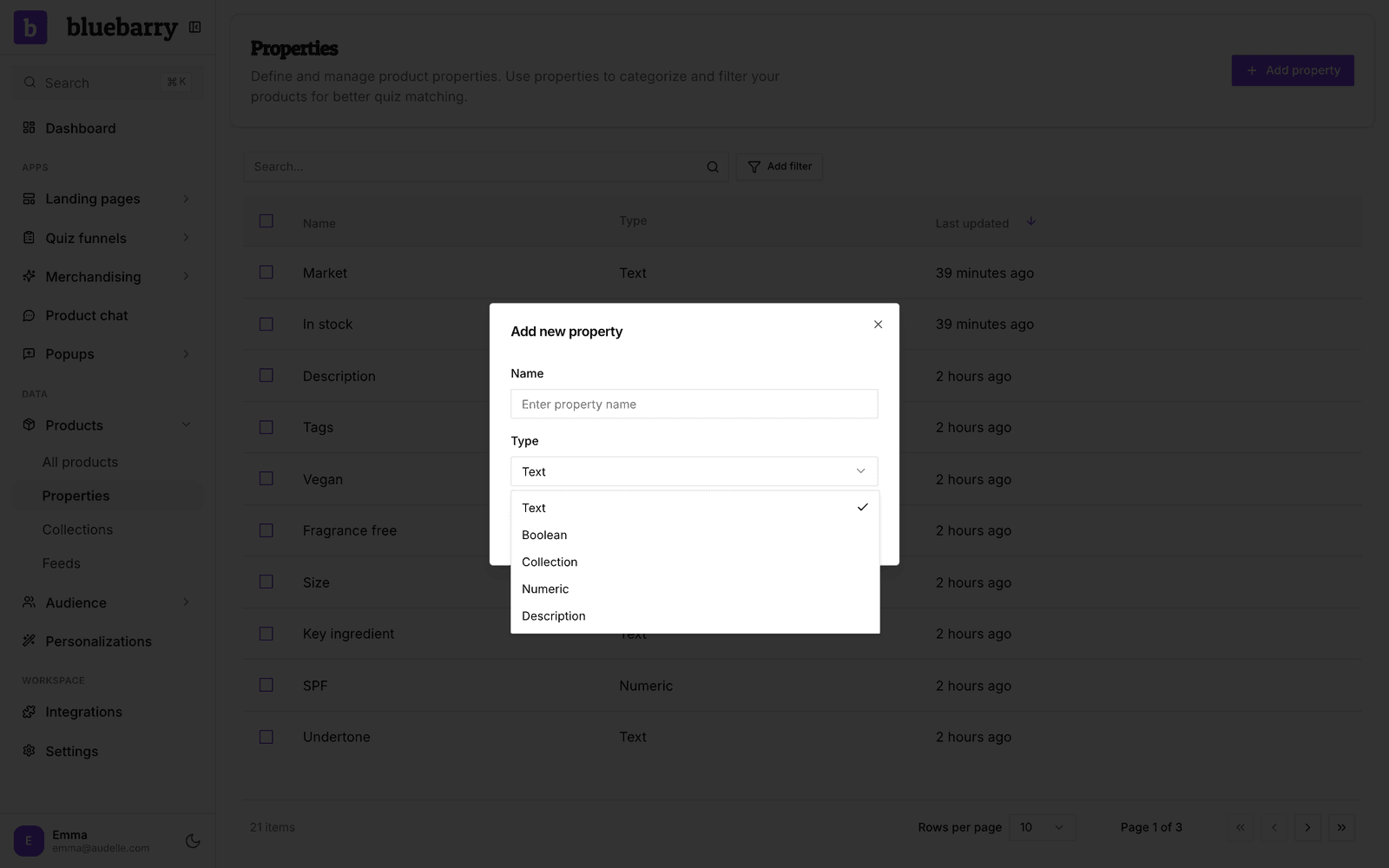
- In the sidebar, go to Store data → Properties.
- Click Add property, or use the edit icon next to an existing property.
- Give it a clear Name, the way you would say it to a customer, such as "Skin type" instead of "attr_03".
- Pick the Type (see below) and click Save.
- Fill the property with values. The easiest way is to map a feed column to it. You can also set values per product on the product page.
Properties from a Shopify, WooCommerce, CCV Shop or Magento sync are created for you. You only add properties by hand for data your store doesn't send, or that comes from a separate feed.
Property types
| Type | Use it for |
|---|---|
| Text | One word or short label per product, such as color, material or category. |
| Numeric | Numbers you want to compare or sort by, such as price, weight or rating. Store them without currency signs or units. |
| Boolean | Yes or no, such as vegan, in stock or waterproof. |
| Collection | Several values for one product, such as a shirt that fits both "casual" and "office". |
| Description | Longer text, such as a product description. You can show it on the result page, but you can't filter on it. |
Change a property's type
When a Text or Collection property holds numbers, such as a weight or an aperture in mm, the properties list shows a hint to change it to Numeric. Click Review to see, per property, how many products keep their value and which values are cleared because they aren't numbers, such as "Not reported". The same check runs when you change the Type in the edit dialog.
Filters on the property in quizzes, search, recommendations, segments, email flows and product chat are updated to match the new type. If a filter has no equivalent, such as "contains Not reported" on a number, the change is blocked until you edit that filter. Your store sync keeps filling the property in its new type.
Tips
- Keep values consistent. "Blue", "blue" and "Navy blue" are three different values to a filter.
- Pick Numeric for prices. The quiz result page asks for a Current price and Compare at price property, and only Numeric properties can fill those.
- Check Store data → Products with the property shown as a column to find products that are still empty.
Next, use your properties in a quiz: Configure answer product filters.