
Good timing is the difference between a popup that helps and one that gets in the way. The Behavior tab decides when your popup opens, on which pages and devices, and how often the same shopper sees it.
When it opens
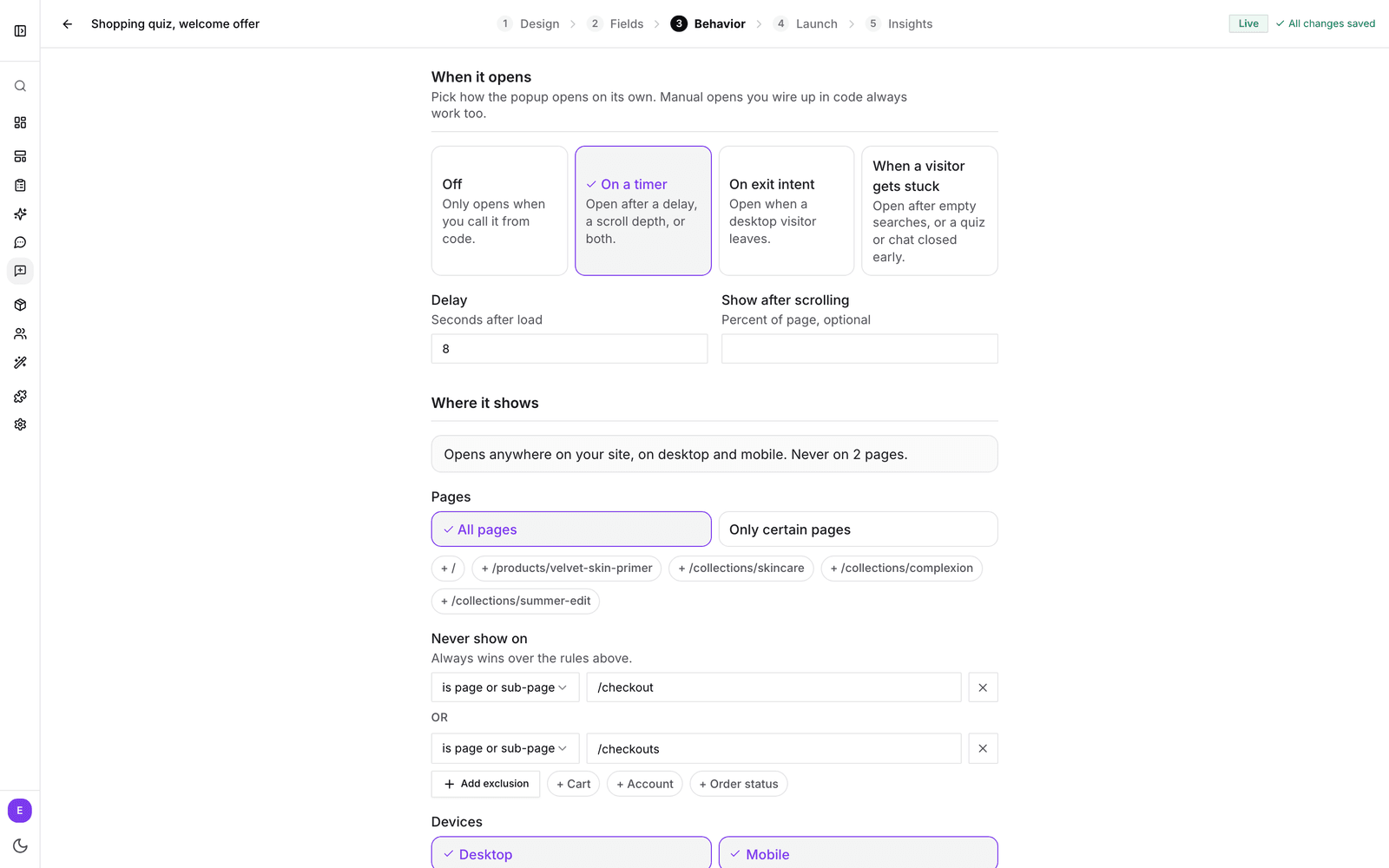
Under When it opens, pick one of four options.
- Off: the popup never opens on its own. It only opens from your own button or link (see open a popup from your own button).
- On a timer: set a Delay in seconds after the page loads, a scroll depth in Show after scrolling (percent of the page), or both. With both, the popup waits until the time has passed and the shopper has scrolled that far. A new popup starts with an 8 second delay.
- On exit intent: opens once when a desktop visitor moves their cursor to leave the page. Phones and tablets have no such gesture, so mobile visitors don't get an automatic open.
- When a visitor gets stuck: opens right when a shopper is struggling, which makes it a good moment to offer help, a quiz or a question about what they are looking for.
When a visitor gets stuck
- Searches find nothing: after a number of searches with no results in one visit. Set the number in Empty searches (2 by default). On your search results page the popup opens right away; in the search box it opens when the shopper closes it.
- Quiz closed early: after a shopper answers a question and closes a quiz before reaching the results.
- Chat closed without a click: after a shopper asks product chat something and closes it without clicking a product.
Where it shows
At the top of Where it shows, one sentence sums up your settings, for example "Opens anywhere on your site, on desktop and mobile." It updates as you go, so you can always check what you just changed.
Pages
Leave All pages selected, or choose Only certain pages and click Add page. Match on the page path (for example /collections/sale) or the full web address, with options such as is page or sub-page, is exactly, contains or matches (with *). Pages where your popups have already been seen appear as one-click suggestions.
Never show on
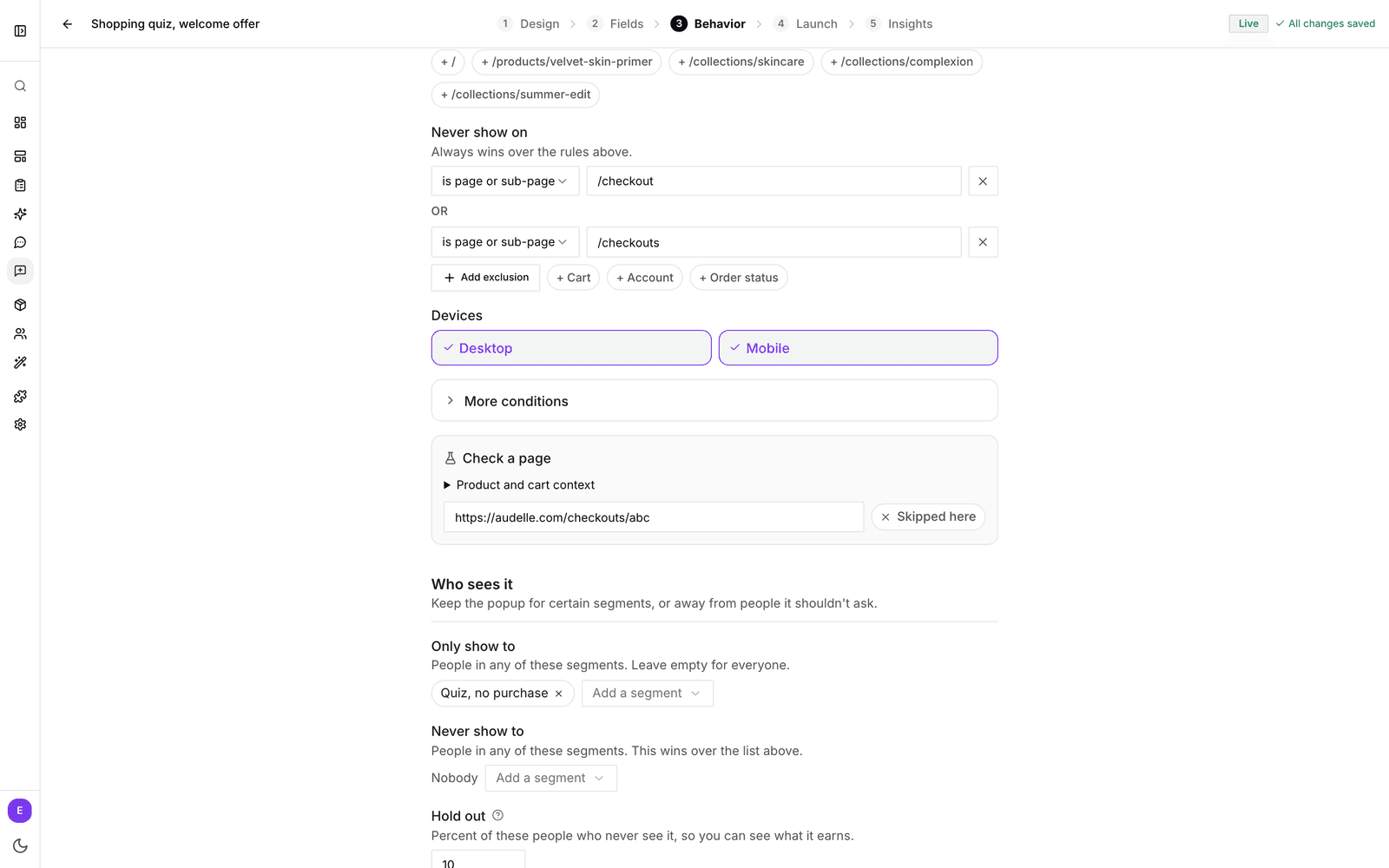
Pages listed under Never show on always win over the rules above. One-click picks cover Cart, Account, Checkout and Order status, the pages where a popup most often interrupts a purchase. You can also exclude by domain, URL parameter, traffic source, product or cart state.
Devices
Choose desktop, mobile or both. At least one stays on. With exit intent, desktop is always on.
More conditions
Open More conditions for finer targeting:
- Domains: if bluebarry runs on more than one of your domains, show the popup on only some of them. Stores with several domains see this choice at the top instead.
- Product: only on specific product pages, by the product ID your store uses.
- Cart state: only when the cart is empty, or only when it contains products.
- URL parameters: only for visitors who arrive with a certain parameter, such as utm_campaign from your newsletter or ads. Use is present to match any value.
- Traffic source: only for visitors who came from a certain site, for example google.com. Visitors moving between pages of your own store count as no source.
How rules combine
Inside one group, any rule may match: two pages mean "this page or that page". Across groups, every group must match: a page rule plus a traffic source rule means "this page, and only for visitors from that source". Never show on beats everything. If you remove a rule by mistake, click Undo.
Check a page
At the bottom of the section, Check a page tells you whether the popup would open on a given page. Paste a web address from your store and you see Opens here or Skipped here. To test product or cart rules, open Product and cart context and fill in a product ID or cart state. The check covers page rules only, not devices.
How often
How often stops the popup from asking the same shopper too soon. These limits apply to automatic opens.
- Per session: how many times it can open on its own in one visit. The default is 1. Set it to 0 to turn automatic opening off.
- Wait after dismiss: hours to wait after a shopper closes the popup. The default is 168 hours, one week.
- Pause after submit: days to hide the popup after a shopper submits it. The default is 365 days.
If your popups show on more than one domain, you also get Count these limits. Choose Across my whole site to treat a shopper as one visitor on all your domains, or Per domain to let the popup show once on each.
Good to know
- Product and cart state rules need your store to tell bluebarry which product is on screen and what is in the cart. The Shopify app does this for you. On other platforms your developer adds it with one line of code.
- A popup never opens on top of another bluebarry popup or an open quiz.
- To show a popup only to certain shoppers, such as first-time visitors or people interested in one category, use segment targeting.