
Every bluebarry app works from the same product catalog. Quizzes match answers to it, search filters and ranks it, product chat answers from it, and popups and segments can target products in it. Ten minutes spent on your catalog before you build pays off in every app at once.
Where your products come from
- Shopify, WooCommerce, CCV Shop and Magento stores sync their products, variants and collections automatically once the store is connected. Magento categories come in as collections from version 2.1.0 of the bluebarry module.
- Any other store connects a product feed: a CSV file at a URL or a Google Sheet. See import your product feed.
- You can also add and edit products by hand.
Check your catalog
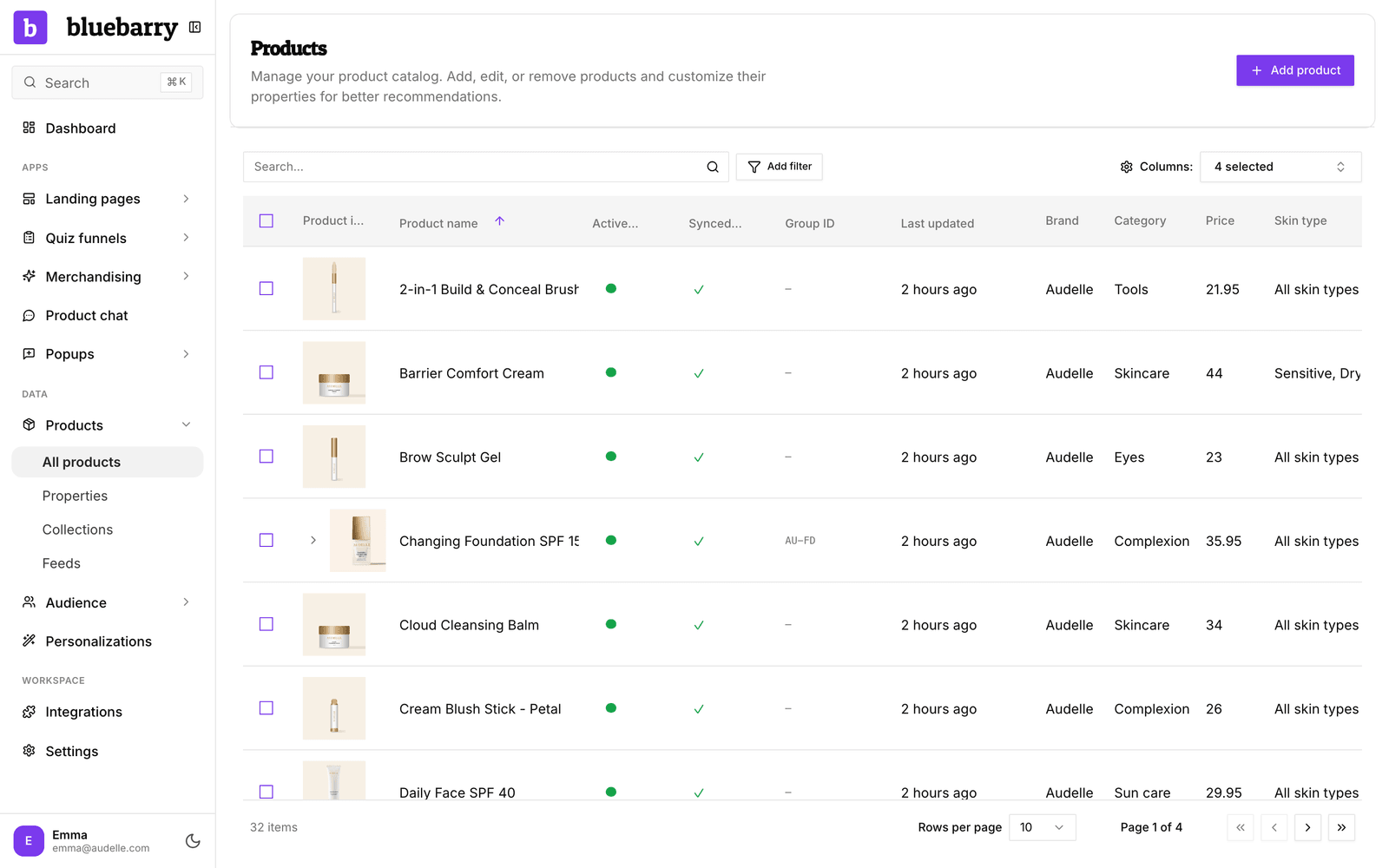
- In the sidebar, go to Store data → Products. Check that the products you want to recommend are there, with a name, image and link. Use Columns to show the properties you care about.
- Go to Store data → Properties. Make sure the details shoppers choose on (brand, size, skin type, material, price) exist as separate properties, not buried in the description.
- Go to Store data → Collections to see the collections or categories synced from your store. You manage them in your store; bluebarry keeps the list up to date.
- If you use a feed, go to Store data → Feeds and check that the last sync succeeded.
What a ready catalog looks like
| Area | What good looks like |
|---|---|
| Products | Every product you want to recommend has a unique identifier, a name, an image and a product page link. A feed only strictly needs the identifier and name, but shoppers need the rest. |
| Properties | Each detail shoppers choose on is its own property, with consistent values: "Sensitive", not a mix of "sensitive", "Sens." and "sensitive skin". |
| Property types | Use Numeric for numbers you compare or sort on, such as price or capacity. Use Text for labels, Boolean for yes or no, and Collection for lists of values. |
| Prices | Price is a Numeric property. Shopify prices are recognized automatically. For a feed, map the price column to a Numeric property. |
| Coverage | Every quiz answer and every search filter value leads to at least a few products, so shoppers never hit an empty page. |
How each app uses your catalog
| App | What it reads |
|---|---|
| Quiz funnels | Properties to filter and rank products per answer, plus name, image, price and link for the result cards. |
| Search | Names, descriptions and the properties you choose as searchable attributes and filters, plus collections for suggestions. |
| Product chat | The product fields you allow it to read. Cost and margin fields are always left out. |
| Popups | Products and cart state, when you show a popup only on certain product pages. |
| Segments | Products, collections and product properties, for rules such as "viewed more than three products from this brand". |
Tips
- Missing properties? Ask Barry on Home to fill them in from your product descriptions, for example “add a skin type property to my skincare products”.
- Change a property once and every app picks it up. You do not have to set it up again per app.
Next: manage product properties or start your first quiz funnel.