
Choose your modules, change your plan, update your payment method and download invoices from one place: the Billing tab in Settings. What you see there depends on how you pay for bluebarry.
Open your billing settings
- In the sidebar, go to Settings.
- The Billing tab opens first. Your plan is at the top and Billing history is below it.
Choose your modules
If you pay by card, you build your plan yourself on the Your plan card. A plan is made of modules, such as quiz funnels, search and popups, and each module is priced by the number of orders your store gets per month.
- Under Orders per month, pick the tier that matches your store: up to 5,000, 5,000 to 10,000 or 10,000 to 25,000 orders a month. Every module on your plan uses the same tier. Above 25,000 orders, click Talk to us and we set up a plan with you.
- Choose Monthly or Yearly. Yearly billing costs less, and the saving shows next to the switch. Your whole plan is billed the same way.
- Click the modules you want. Each card shows its price per month at your tier. Dynamic bundles can only be added next to quiz funnels or recommendations.
- Check the total, excluding VAT, and click Review plan change (Review and start plan without a plan, Keep these modules after the trial during your trial). Stripe, our payment provider, shows what you pay today. The confirm button says what it does, such as Pay €… and update plan, and saves your plan.
Add a module from Home
You can also add a module where you use it: click Add next to it in Your personalization loop on Home, or after + Add a module in the sidebar. If the module is on your plan, Barry starts setting it up straight away. If it is not, Studio first asks you to add it:
- During your free trial: click Enable in the dialog and the module is on right away, free until your trial ends. The dialog shows no price: the Billing tab shows what your plan costs.
- Outside a trial: the dialog shows the price per month. Click Go to billing to confirm the change and the price on the Billing tab.
- On a custom plan: click Talk to us and our team adds the module for you.
Some modules come with another one: landing pages are part of quiz funnels, and post-purchase offers are part of recommendations. The dialog tells you when that is the case.
When a change takes effect
| You | What happens |
|---|---|
| Add a module, move to a higher tier or switch from monthly to yearly | It takes effect right away. You pay for the rest of your current billing period straight away, and are credited for what you no longer use. |
| Remove a module, move to a lower tier or switch from yearly to monthly | It takes effect at the end of your billing period, and you keep everything until then. The Billing tab shows the scheduled change, and Keep my current plan undoes it. |
| Do both at once | The additions take effect right away and the removals at the end of your billing period. A switch from monthly to yearly starts a new yearly period, so then the whole change takes effect right away. |
- On an older plan (Starter, Basic, Pro or Plus)? You can keep it as long as you like. When you save modules, you move to a module plan right away and are credited for the unused time on your old plan. Modules we added to your plan at no cost stay.
- Update payment method, below the plan, opens Stripe to add or replace your card.
- Cancel subscription ends your subscription at the end of the billing period. Until then, Undo cancellation keeps it running. Once it has ended, your store stops showing your modules. Everything you set up is kept and comes back when you choose a plan again.
- Billed through Shopify? The card says your subscription is billed through Shopify. Change or cancel it from the bluebarry app in your Shopify admin.
- On a custom plan? Plans for more than 25,000 orders a month are set up with our team. The Billing tab lists your modules, and Talk to us is the way to change them.
During your free trial
For 14 days, the modules you enable are free. Enable a module with Enable on its page, in the dialog on Home, or with the button Barry shows in the chat when it sets one up for you. While you try modules, Studio shows no prices: the Your plan card on the Billing tab does.
Before the trial ends, add a card with Add payment method on the Billing tab. The modules you enabled then continue as your plan after the trial, and you only pay for those. To change them, your tier or your billing period first, use the Your plan card. Without a card, the trial ends and nothing is charged.
Once the trial has ended without a plan, your store stops showing every module, also the ones you set up during the trial. Everything you set up is kept and comes back as soon as you choose your modules.
A banner shows how many days are left. Its Add payment method button opens the Billing tab, and we email you three days before the trial ends.
Download invoices
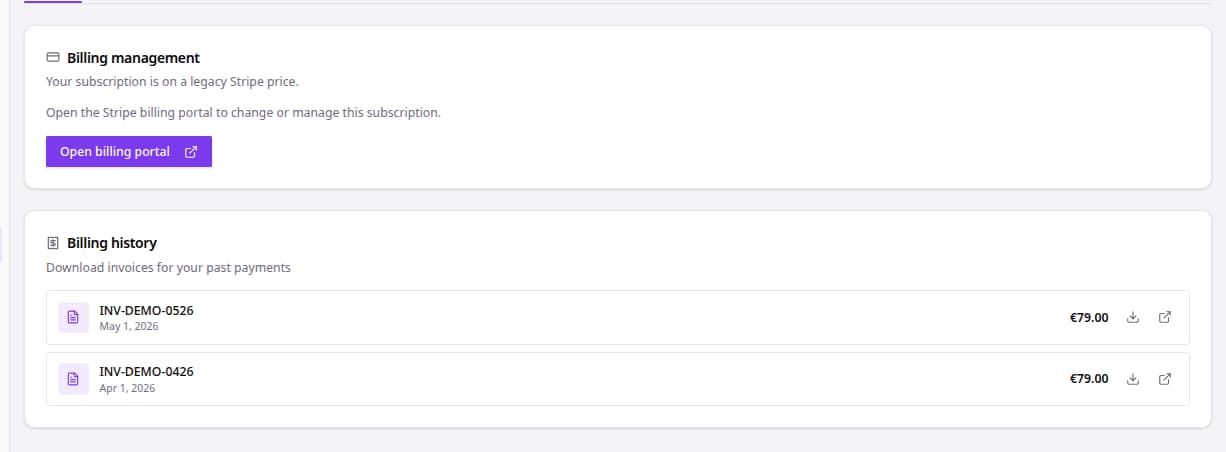
Billing history lists your past invoices with date and amount. Click the download icon to save the PDF, or the arrow icon to open the invoice online. A new account shows “No invoices yet” until the first payment.
Shopify-billed stores find their invoices in Shopify, as part of their Shopify bill.
Related
- Understand quiz and session limits for the limits of the older plans.
- Manage Shopify billing if you pay through Shopify.