
The older plans (Starter, Basic, Pro and Plus) include a number of published quizzes and a number of engaged quiz sessions per billing period. The Usage tab shows where you stand, and lets you decide what happens when you go over.
Plans made of modules have no quiz or session limits and no overage: the order tier you choose is the only size. On those plans the Usage tab only shows your numbers.
Check your usage
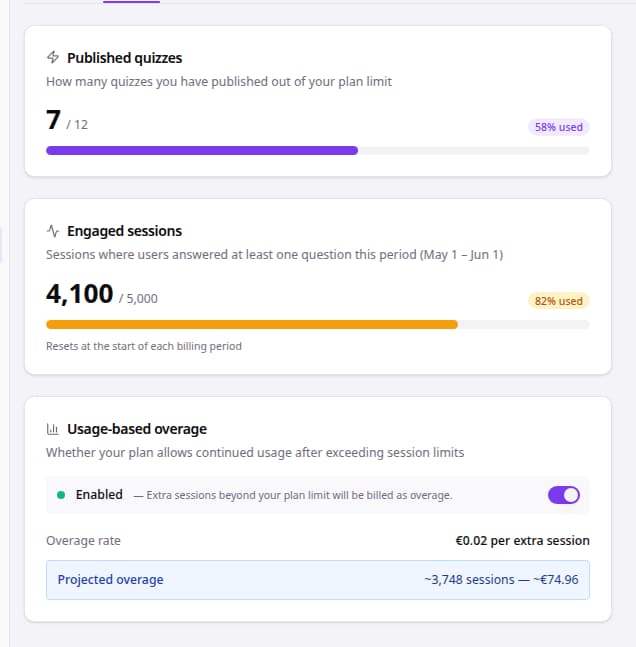
- In the sidebar, go to Settings and open the Usage tab.
- Published quizzes shows how many quizzes you have published out of your plan limit.
- Engaged sessions shows the sessions in the current billing period, with the dates of the period.
- Usage-based overage shows whether sessions above your limit are allowed, and what they cost.
What counts
| Field | What it means |
|---|---|
| Published quizzes | Each quiz that has at least one published version counts once, however often you publish it again. |
| Engaged sessions | A session where the shopper answered at least one question. Opening a quiz and closing it straight away does not count. The count resets at the start of each billing period. |
| Usage-based overage | On: sessions above your limit keep working and are billed at the overage rate. Off: quizzes stop accepting new sessions once the limit is reached, until the next period. |
| Overage rate | The price per extra session. |
| Current overage and projected overage | What you owe for extra sessions so far, and an estimate for the end of the period at your current pace. |
Good to know
- You can switch Usage-based overage on or off yourself. Leave it on during busy seasons so no shopper finds a quiz that will not start.
- If you try to publish a new quiz while you are at your quiz limit, bluebarry offers an upgrade instead. Publishing a new version of a quiz that is already published is always fine.
- The Usage tab only covers quizzes. Search, product chat and popups do not show up in these numbers.
To change your plan, see manage your subscription and invoices.