What is a product recommendation quiz?
A product recommendation quiz is a short set of questions on your store that ends in personal product advice. The shopper answers questions about their situation, needs and preferences. The quiz matches those answers to your catalog and recommends the products that fit. Think of it as your best salesperson, available on every page, at any hour.
You will also see the same mechanism called a product finder, a product selector or a choice guide. Whether those are different things, and which name fits your store, gets its own section below.
Both collect zero-party data: preferences shoppers share on purpose, a term coined by Forrester for data a customer intentionally and proactively shares. That data keeps working after the quiz, in follow-up email flows and on the rest of your site.
Quiz or finder: is there actually a difference?
Mechanically, no. Both ask a few questions, match the answers to your catalog, and end in personal product advice. Every type in this guide runs on that same engine. The real difference is register: what the experience feels like, and what kind of purchase it suits.
| Product quiz | Product finder | |
|---|---|---|
| Feel | Playful, discovery-led | Advisory, guided |
| Suits | Taste-driven choices | Considered, spec-heavy purchases |
| Typical catalogs | Beauty, fragrance, supplements, gifts | E-bikes, power stations, office chairs, tiles |
| Also called | Style quiz, gift finder | Product selector, choice guide, product check |
So pick the word your shopper would use. A skincare brand saying "take our quiz" feels right; an e-bike shop saying the same thing undersells a €2,000 decision, and "find your e-bike" fits. The name changes the tone of your questions and your result page, not the technology underneath. That is why this guide treats quizzes and finders as one family, and from here on "finder" covers both unless the difference matters.
The five types, in short
Different goals ask for different quiz types, on different placements:
- Recommendation quiz. The classic guided Q&A ending in a personal result page.
- PDP mini-quiz. A compact quiz on the product page itself, catching doubt in the moment. Meroda runs these on their beauty product pages, converting 24% of completed sessions.
- Quiz funnel. A dynamic funnel with its own landing page, quiz and result page, built specifically to catch (mostly social) ad traffic and walk it through a high-converting flow instead of dropping it on a cold collection page.
- Lead generation quiz. Optimized for list growth: the result is delivered with an email step, so every signup arrives with preferences attached. Powerstationshop grew their list 200% in three months this way.
- Variant finder. Helps shoppers pick the right variant, size or shade within one product family.
Read the full breakdown: 5 types of product quizzes and finders.
A live product finder example: Decathlon
Decathlon runs 40 product finders on bluebarry, across categories and languages: tents, tennis and padel rackets, footwear, sport shoes and more, converting at 10%. Each category gets its own finder with its own questions, because a tent buyer and a tennis player have completely different doubts.
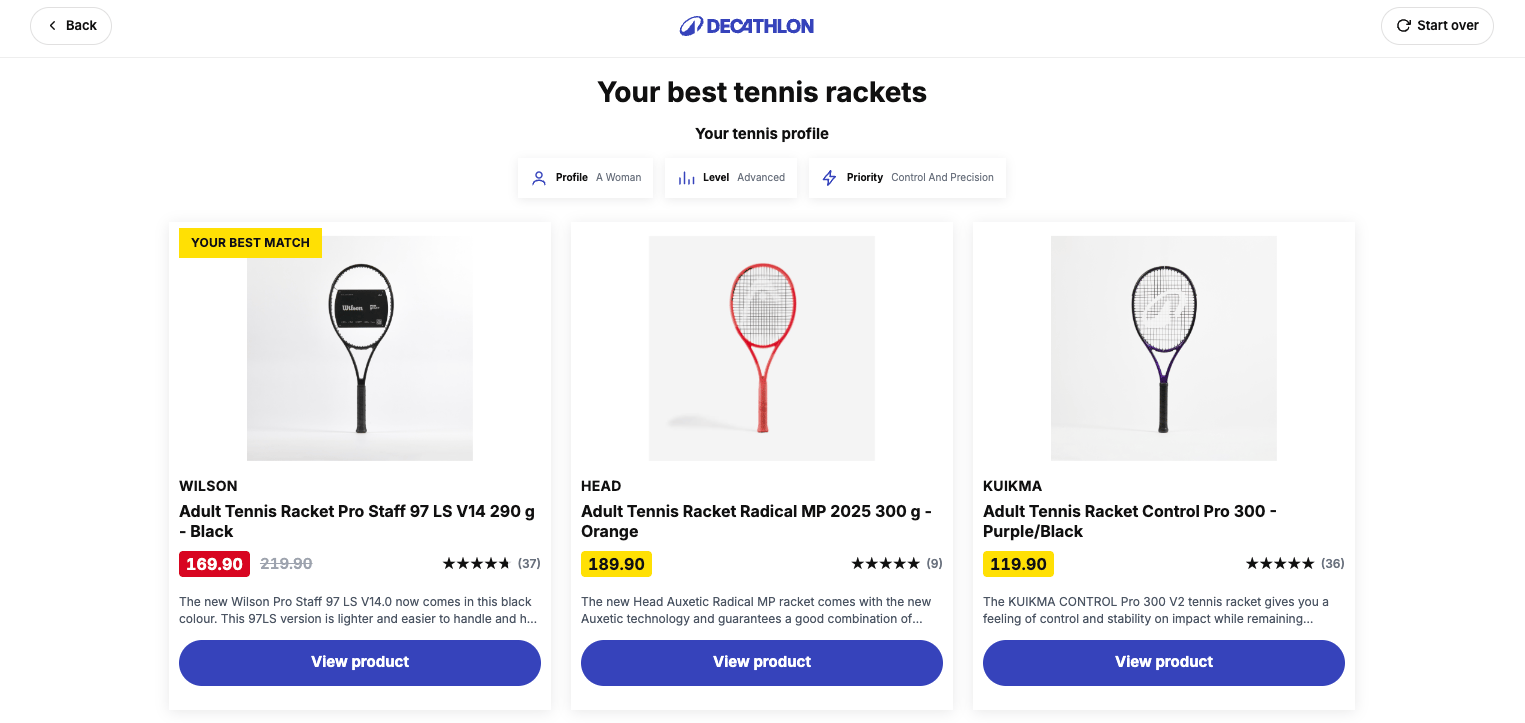
See how they and four other stores set it up: 5 product finder examples from real stores.
How the matching actually works
Every quiz tool connects answers to products in one of two ways, and the choice decides whether your finder has dead ends.
Product-based matching connects an answer to hand-picked individual products: answer "dry skin", get these three creams someone selected by hand. It is simple to reason about and workable for a very small catalog, but it scales badly. Every new product means re-wiring the quiz, and an answer combination nobody foresaw ends in an empty result page.
Attribute-based matching connects answers to product attributes instead: "dry skin" filters on the moisturizing attribute, "under 500W" filters the catalog on wattage. Because every answer narrows the catalog by properties rather than picking from a fixed list, any combination of answers still resolves to fitting products. No dead ends, and new products join the matching automatically the moment they carry the right attributes. This is the approach to insist on for anything beyond a handful of products.
On top of that sits AI matching, which any self-respecting quiz tool has built in by now. AI reads your product data and matches on meaning rather than exact attributes: it understands that "for a small balcony" relates to compact furniture even when no attribute says so. Catalogs change weekly, and AI matching keeps up without a manual tagging project.
The foundation for all of it is your product data. Titles, descriptions, specs and images are what the matching reads, so the better your product data, the better every recommendation. And once that data is in place, AI can generate a quiz for you: describe your store in a prompt on the product finder or product recommendation quiz page and it drafts the questions and the matching from your catalog.
What results look like when it works
Numbers from stores running quizzes and finders on bluebarry:
- Powerstationshop saw a 124% conversion increase and 200% email list growth after replacing filter-based navigation with a finder for high-consideration power stations.
- Meroda's PDP mini-quizzes convert 24% of completed sessions into a purchase.
- Ergo2Work quiz takers convert 126% better than regular visitors.
- Decathlon's 40 finders convert at 10% across categories and languages.
- Across live finders the average completion rate is 89%, and top performers reach a 94% median. Our internal benchmark is 80%: finders that underperform get fixed, not ignored.
These figures, and the full ranges behind them, live in the product quiz benchmark report, built on 130,000+ guided sessions. Use it to judge your own quiz's completion, conversion and revenue per session.
Quiz, finder, search or filters: which does what?
Search works when the shopper can name the product. Filters work when they understand your catalog's attributes, and that is rarer than it looks: Baymard's large-scale research finds that only 16% of major ecommerce sites offer a reasonably good filtering experience. Quizzes and finders work for the shopper who knows their problem but not your products: the "I don't know what I need" majority.
There is solid psychology behind it. The classic Iyengar & Lepper choice research showed that people buy more, and are happier with what they bought, when the set of options in front of them is small. A finder is exactly that: it turns sixty options into three that fit. For search-shaped intent, see ecommerce site search; the strongest stores run both.
Where to run it: platforms and placements
Quizzes and finders run on Shopify, Magento, WooCommerce, CCVShop, Lightspeed and even custom stores through a script embed. They connect to email platforms like Klaviyo, Reloadify and Omnisend, so every answer lands on the shopper's profile for segmentation and flows. See all integrations.
Placement matters as much as platform. The five that work:
- Own page. A destination linked from your menu: best for stores where guidance is a core part of the offer.
- Category level. Inline on the category with the most doubt, narrowing the grid to a shortlist.
- PDP mini-quiz. On the product page, resolving "is this the right one for me?" without sending the shopper away.
- Popup or slide-in. Triggered after time on page or exit intent, meeting the shopper mid-doubt. This is how Powerstationshop runs theirs.
- Ad destination. The quiz as the landing experience for paid traffic, so a click lands in guidance instead of a cold grid. See quiz landing pages.
How to prioritize
Before building anything, decide where a finder earns its keep first and what it should optimize for:
- Start where the traffic is. Take your busiest product category and find the hardest choice in it: the one that generates the most doubt, support questions or returns. That is where a finder earns its keep from day one.
- Pick the type. Variant selectors, PDP mini-quizzes, standalone finders and quiz funnels serve different goals on different placements. Match the type to where the doubt happens, not to what looks nicest.
- Pick the questions. Every question should either narrow the recommendation or be worth knowing for your email segmentation. Cut the rest: the 90%+ completion group asks 5 to 8 questions about the shopper, not the catalog.
- Find the perfect CTA. Decide what the result page is for. Immediate add-to-cart? Leave an email to receive the recommendations? Start a bundle? Pick one primary action and make everything else secondary. The anatomy that converts is in quiz result page design; the step-by-step build lives in how to build a product recommendation quiz.
How to set it up
Once you know where the finder should live, the setup itself takes two steps:
1. Generate a quiz with AI
Describe your store and what the quiz should do. AI reads your product data, drafts the questions and builds the matching, so your first version exists in minutes instead of meetings. Try it right here:
2. Connect your store & catalog
Connect your platform so the finder always recommends from a live catalog, with current stock and prices. Running on Shopify? Install the bluebarry Shopify app. On Magento? Use the Magento 2 module. On WooCommerce? Grab the WordPress plugin. Everything else, from CCVShop and Lightspeed to fully custom stores, runs through a feed and a script embed: see all integrations.
Frequently asked questions
More questions? Product quiz FAQ.
Go deeper
5 types of product quizzes and finders
The full breakdown of every type, with the funnel moment each one owns.
5 product finder examples
Real finders from Decathlon, Powerstationshop and more, with screenshots.
How to build a product recommendation quiz
The step-by-step build: questions, matching, result page and embed.
Quiz result page design
The anatomy of the screen where advice turns into carts.
Lead generation quiz
Grow a list where every signup arrives with preferences attached.
Product quiz benchmarks
Completion, conversion and revenue numbers from 130,000+ live sessions.
Guided selling in ecommerce
The strategy behind finders: shoppers say what they need, the store answers.
Zero-party data
Why the answers shoppers give you beat any tracking pixel.
Quiz funnel software
Turn (mostly social) ad traffic into a landing page, quiz and result funnel.
Ready to build one?
Describe your store, and AI drafts your first finder from your own catalog. Free for 14 days, no credit card needed.