
Connect Omnisend to send shoppers who leave their email or phone number through bluebarry to Omnisend as contacts, with their quiz answers and recommendations. Quiz events let you start automations when someone finishes or abandons a quiz.
Connect Omnisend
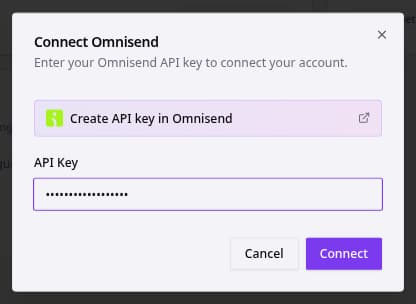
- In Omnisend, create an API key. The link Create API key in Omnisend in the next step takes you there.
- In bluebarry, go to Store data → Integrations and click Connect on the Omnisend card under Marketing & analytics.
- Paste the key into API Key and click Connect.
What bluebarry sends
- Contacts with email and phone number, and first and last name when you ask for them.
- Quiz answers as custom properties, named after each question's internal name.
- Recommendations as custom properties, with the title, URL and image of each recommended product.
- Events: Quiz Completed, Quiz Abandoned (the shopper gave their email and answered questions but didn't reach the results within 30 minutes), and Product Check Matched or Product Check No Match.
Consent and subscription status
Contacts arrive in Omnisend with a subscribed status for email, and for SMS when there's a phone number. When the shopper ticked your consent checkbox, that consent is recorded on the contact as well, with bluebarry as the source.
The settings icon on the Omnisend card opens Omnisend settings with options for when to create contacts. At the moment these options aren't applied to the sync: contacts are sent as described above whatever you choose. If you only want to email people who opted in, filter on consent in Omnisend before you send.
Check that it works
- Take your published quiz with a real email address.
- In bluebarry, go to Audience → Profiles. After about a minute the Synced column shows a green check. Hover over it to see the Omnisend status.
- Open the contact in Omnisend and check the custom properties and events.