
AI can do the busywork of an experiment: draft a new version, pick a sensible goal, even keep testing on its own. You decide how much it may do. And Barry, the assistant in Studio, can explain results and set experiments up with you.
Choose how much AI does
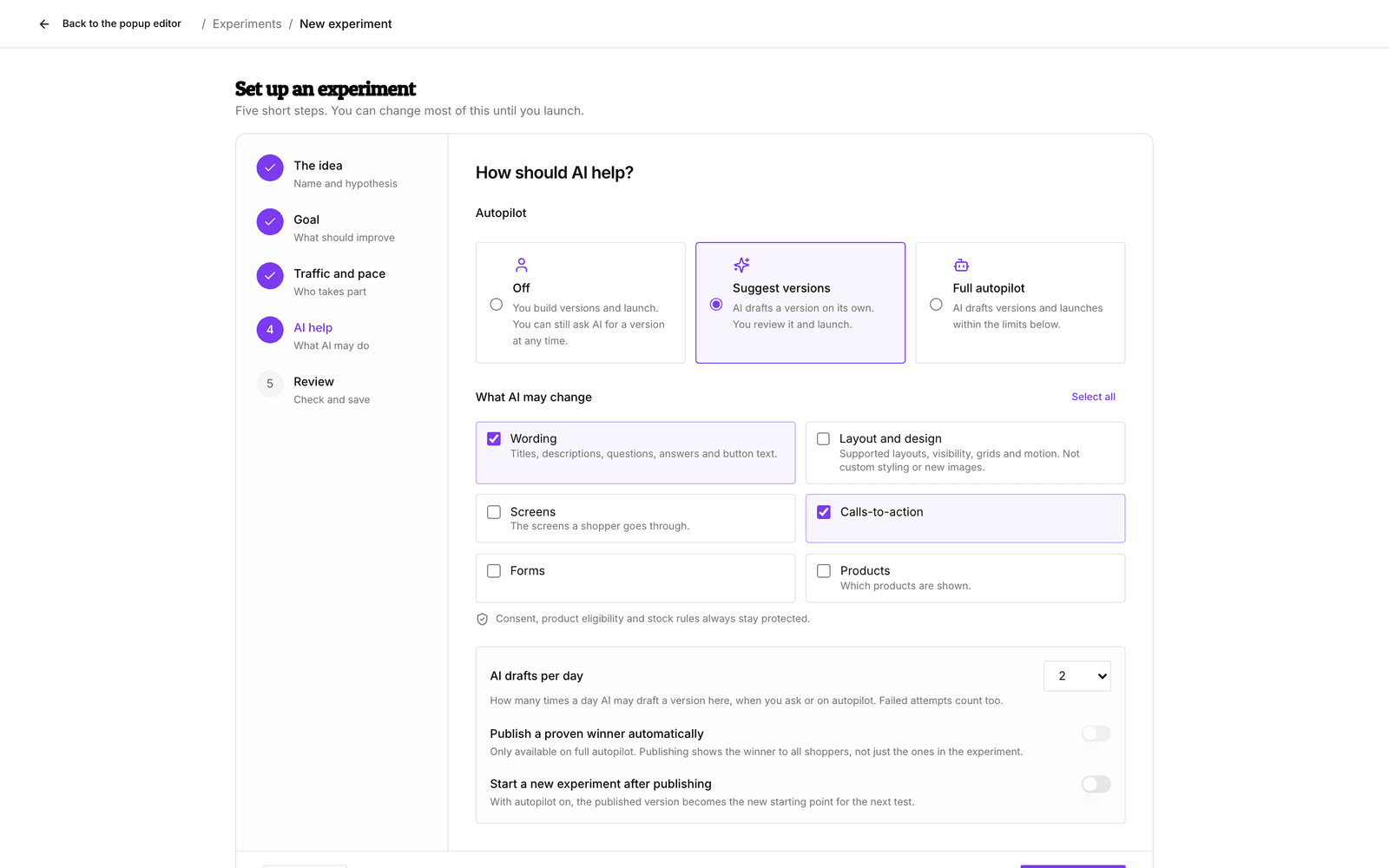
In the setup step AI help (or later under Settings), pick an Autopilot mode:
| Mode | What happens |
|---|---|
| Off | You build versions and launch. You can still ask AI for a version at any time. |
| Suggest versions | AI drafts a version on its own. You review it and launch. |
| Full autopilot | AI drafts versions and launches them within the limits you set. It can also publish a proven winner, if you allow that. |
Decide what AI may change
Under What AI may change, tick the areas AI may touch. One area starts ticked, such as Wording for quizzes. AI cannot draft anything until at least one area is ticked.
| Surface | Areas you can allow |
|---|---|
| Quizzes | Wording, Layout and design, Questions, Question paths, Results page, Product matching |
| Search | Recommendation strategy, Ranking, Rules, Presentation, Quiz suggestions, Banners |
| Popups | Wording, Layout and design, Screens, Calls to action, Forms, Products |
| Recommendations | Recommendation strategy, Ranking, Rules, Wording, Layout and design |
Some things always stay protected, whatever you tick: consent, which products are eligible, stock rules, required quiz questions and form fields. Keep specific items unchanged lets you lock individual questions, sections, audiences or even the whole setup, so AI leaves them and everything inside them alone.
Set the limits
- AI drafts per day: how often AI may draft a version, 1 to 4 times a day, whether you ask or autopilot does. Failed attempts count too.
- Publish a proven winner automatically: only on Full autopilot. When the evidence is clear and the safety checks pass, the winner goes live for all shoppers, not only those in the experiment.
- Start a new experiment after publishing: with autopilot on, the published version becomes the new original and the next round starts from there. Stop optimizing on a finished experiment ends the cycle, and Open the next experiment takes you to the round that followed.
After launch, goals and traffic are locked, but you can still change what AI may do with Settings → Change what AI may do.
Ask Barry
Ask Barry about your experiments in plain language, on Home or in the editor you are working in. For example:
- “How are my experiments doing?”
- “How is the shorter quiz test doing?”
- “Does this popup have enough traffic for a test?”
- “Set up a test for a popup headline that leads with the discount.”
Barry reads the same results you see and explains them without jargon. Asked how your experiments are doing, it goes through every experiment in your store and tells you which need your attention. It tells you honestly when a result is not proven yet.
On an experiment's page, Ask Barry at the top opens Home with the experiment beside the conversation, showing each version's share of shoppers and status. If a conversation on Home brought you to the experiment, it carries on there. Barry can also point you to the experiment's buttons and tabs, such as Launch, Pause, Stop, the verdict or the Results tab, with a Show me button.
Enough traffic for a test?
Before Barry sets up a test on a quiz, search configuration, popup or recommendation block, it looks at the last four weeks: how many shoppers a day would take part and roughly how many days a result needs. When your history cannot measure a goal, Barry says so. Popup clicks, for example, are only recorded during an experiment. When a test could never finish at your traffic, Barry does not set it up and suggests making the change directly instead.
Test a change before everyone sees it
Want to know whether a change to a live quiz, search configuration, popup or recommendation block works? Barry offers to test it on part of your shoppers first. When you only ask for an edit, Barry makes the edit.
- When Barry has AI draft the new version, AI builds the idea you described rather than one of its own.
- To test one change in a quiz, Barry makes it in the quiz draft and saves the draft as the new version. It then checks that the version holds only that change. If the draft holds other unpublished edits, they come along, and Barry names them before you launch.
Approve what Barry proposes
When Barry proposes a change, such as creating an experiment or launching it, nothing happens until you click Apply. The card says what approving does: the goals in order, the share of shoppers, the number of versions, the minimum number of days, the smallest win, the autopilot mode and what AI may change, whether a winner is published automatically and whether a next experiment starts. Settings that let AI or publishing act without asking you, such as Full autopilot, are highlighted.
The only exception to clicking Apply is what you already allowed in the experiment's autopilot settings. Barry never widens those permissions on its own.
Tips
- Start with Suggest versions. You see what AI comes up with before any shopper does.
- Want to test one specific idea of your own? Keep autopilot Off and build that version yourself, or describe it under Ask AI for a version. See Build the versions you want to test.