
Once an experiment runs, its page tells you in one sentence whether there is a winner, before you look at any numbers. This article explains what that sentence means, how to read the numbers behind it, and how to publish the version that won.
The verdict at the top
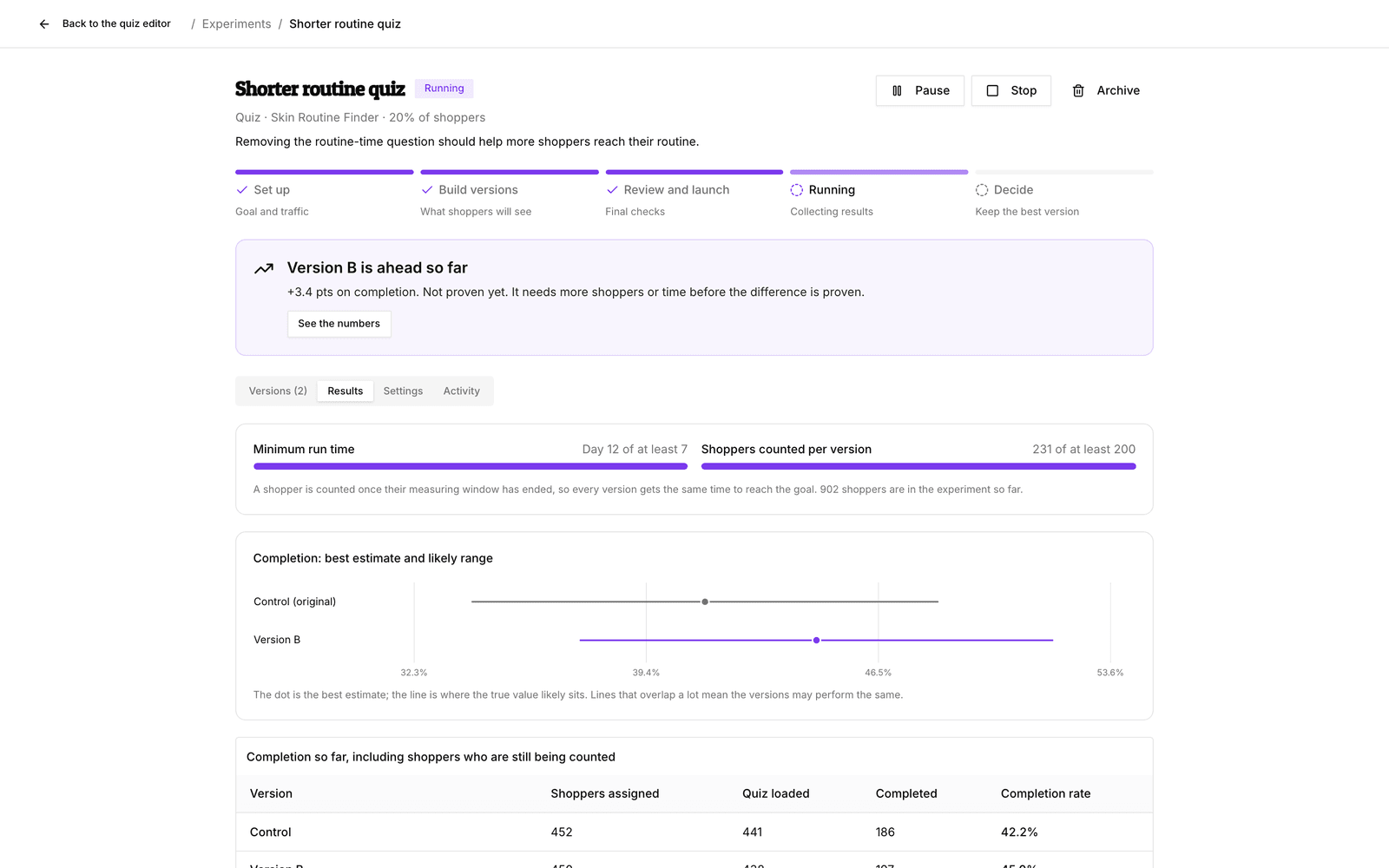
Open the experiment from Experiments. Below the progress bar (Set up, Build versions, Review and launch, Running, Decide) a coloured box sums up where things stand:
| Verdict | What it means |
|---|---|
| Waiting for shoppers | Nobody has seen the experiment yet. Results start once shoppers visit. |
| No clear difference yet | Shoppers are taking part, but the versions perform about the same so far. |
| Version B is ahead so far | One version leads on your main goal, but it is not proven yet. Give it more time. |
| Version B is the winner | The evidence is clear. Review it and publish it to everyone. |
| Paused: needs your attention | A safety check or a change to the original paused it. The message tells you why. |
| Stopped without a winner | The experiment ended. Shoppers see your published version again. |
Read the numbers
Click See the numbers or open the Results tab.
- Minimum run time shows the day count against the minimum you set. No winner is picked before it.
- Shoppers counted per version shows how close the smallest version is to the minimum bluebarry needs, 200 shoppers.
- The chart shows each version's best estimate (the dot) and likely range (the line). Lines that overlap a lot mean the versions may perform the same.
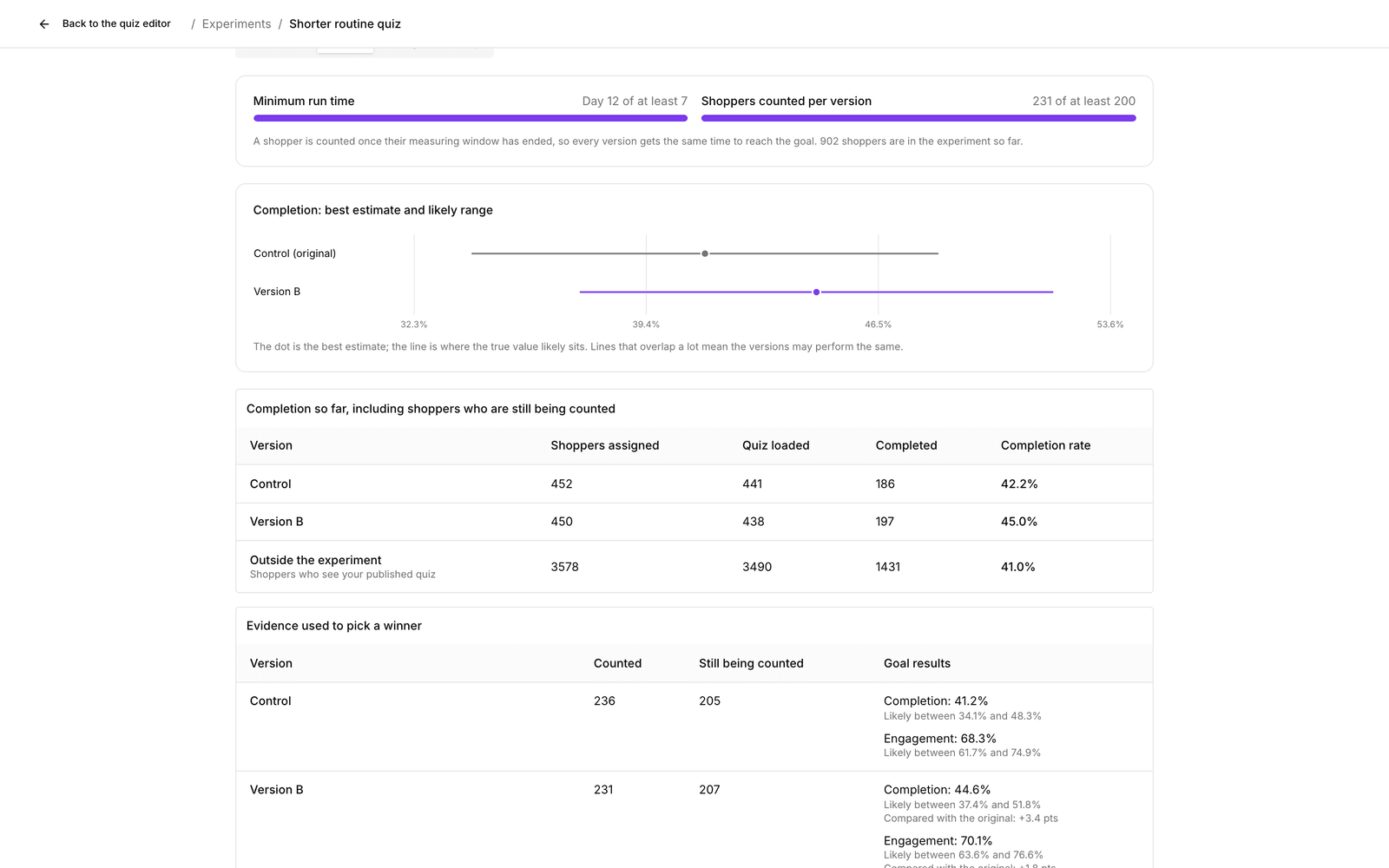
- The table Evidence used to pick a winner lists, per version, how many shoppers are counted, how many are still being counted and the result on each goal, with the difference compared with the original (for example “+2.1 pts”).
Why shoppers are “still being counted”
Every shopper gets the same amount of time to reach the goal. For quick goals like answers, clicks and sign-ups that window is one day. With an order or revenue goal it is the order window you chose, 7 days by default. bluebarry then allows one more day for late tracking. Until that time has passed, a shopper is “still being counted” and does not affect the result. This keeps a version from looking good just because its shoppers had more time.
For quizzes, a separate table shows Completion so far, including shoppers still being counted. It is an early signal, not the evidence used to pick the winner.
The “Outside the experiment” row
Shoppers who are not in the experiment see your published version. Their numbers are shown for monitoring only and never decide the winner. If they differ a lot from the Control group inside the experiment, bluebarry pauses the experiment so you can check the tracking.
When a version wins
bluebarry names a winner only when all of this is true:
- the minimum run time has passed;
- every version has enough counted shoppers;
- the version beats every other version on your main goal by at least the smallest win you set, or ties on the main goal and wins on a tie-breaker;
- its safety checks show no problems.
bluebarry checks the results about once an hour. Refresh results on the Results tab shows the latest numbers. It never lowers the bar.
Publish the winner
- Click Review the winner. The winning card is marked Winner.
- Click Publish Version B to everyone and confirm.
Publishing replaces your quiz, search setup, popup or recommendation block for all shoppers, also those who were outside the experiment, and ends the experiment. It can take a few minutes; keep the page open until it says so. You can publish a version that has not won yet, but the confirmation warns you that it may lower your results.
Pause, stop or drop a version
- Pause: new shoppers see your published version. Shoppers already in the experiment keep theirs. Resume picks up where you left off.
- Stop: everyone sees your published version again. The results so far are kept. A stopped experiment cannot be restarted.
- Stop showing to new shoppers on a version card drops one version without ending the test. Stopping the last new version ends the experiment.
- Make this version live (search, popups and recommendations) puts a stored version back live for all shoppers after the experiment has stopped, finished or paused.
- Archive removes a finished experiment from your list. Its history is kept.
The Activity tab
Activity is the experiment's logbook: when it launched, when AI drafted a version, every time traffic shifted toward the better versions, pauses and why, and when a version was published.
Something paused or stuck? See Fix paused or stuck experiments.