
bluebarry.
ReviewsPricingResources
Sign inBook demoBook a 15 min demo
Help Center/Ecommerce platforms/Connect Lightspeed

Connect Lightspeed

Martijn Douma
Martijn Douma · Co-founder bluebarry
Updated September 25, 2026

bluebarry has an app in the Lightspeed eCom app store. It puts your bluebarry quizzes on your store, tracks which orders came from quiz recommendations and can sync your products. The app has its own settings screens, separate from bluebarry.

Install the app

  1. In bluebarry, go to Integrations. Under Connect your webshop, open View other CMS platforms if needed and click Install on the Lightspeed card. The Lightspeed app store opens.
  2. Install the bluebarry app in Lightspeed. You land on the app's Settings screen.
  3. Paste your Tenant ID. You find it at the top of the Integrations page in bluebarry.
  4. Paste a Bluebarry API key. Create one in bluebarry under Integrations: open the Developer area and click Manage next to API keys.
  5. Click Save.
Settings screen of the bluebarry Lightspeed app with Tenant ID, Bluebarry API key and Start product sync now
The Settings screen in the bluebarry app for Lightspeed.

Sync your products

  1. In the app, open Sync settings.
  2. Tick Sync variants if every variant should arrive in bluebarry as its own product.
  3. Use Configure attributes to push and Configure filters to push to choose which product data bluebarry receives. Leave out what your quizzes don't need.
  4. Click Save. Then, on Settings, tick Start product sync now and save to run a full sync.
  5. Follow it under Open sync progress, then check Products in bluebarry.
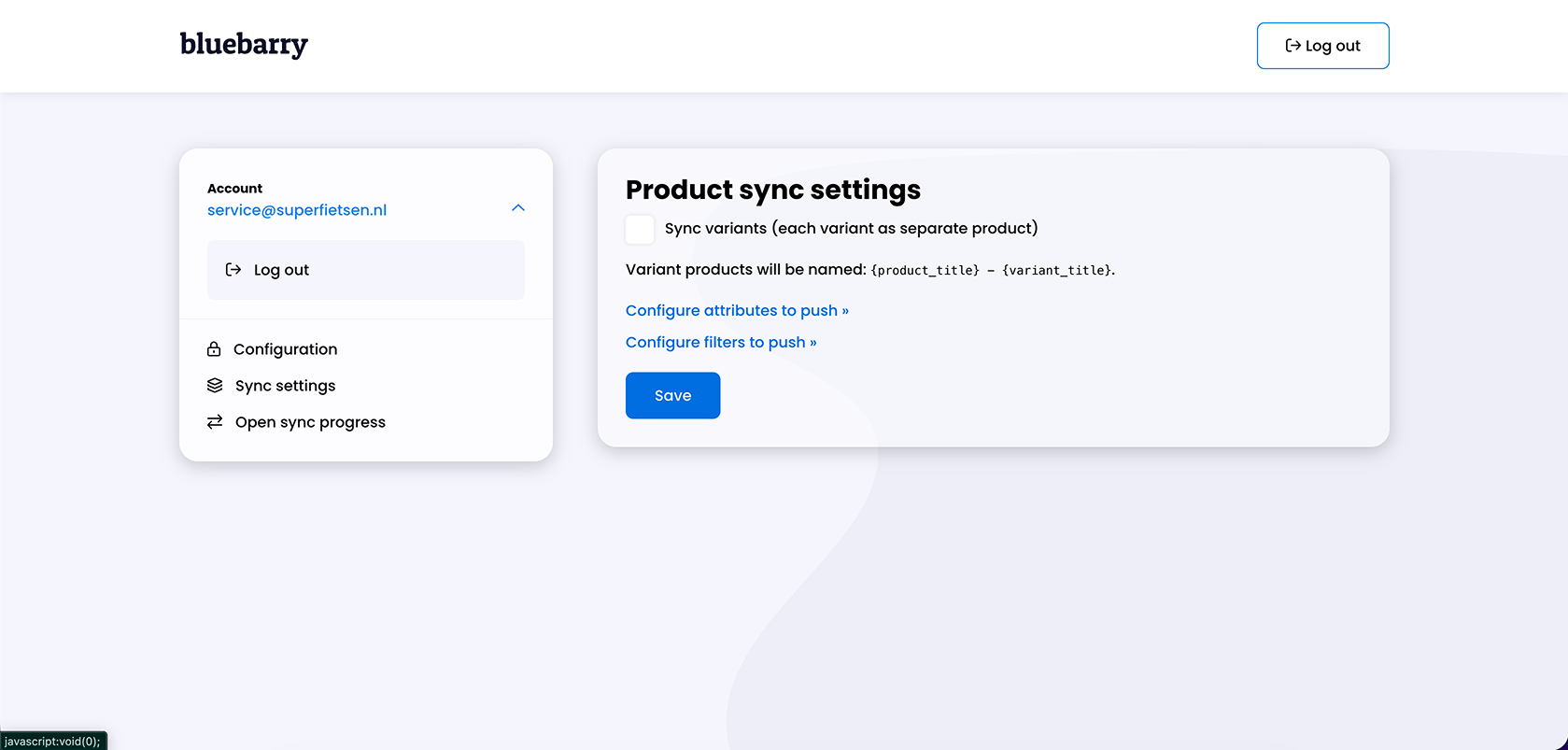
Product sync settings in the bluebarry Lightspeed app with Sync variants and the links to configure attributes and filters
Product sync settings in the Lightspeed app.

Prefer a feed? You can also bring in your Lightspeed catalog through Channable. See Build bluebarry feeds in Channable.

Put a quiz on your store

Open your quiz, click the publish button and go to the Implementation tab. Choose Lightspeed under Showing instructions for, copy the Quiz link and use it as the link on any button or banner in your Lightspeed theme.

Good to know

  • The Lightspeed app focuses on quizzes and conversion tracking. On-site search on Lightspeed needs the bluebarry script on your pages, see Launch search on your store.
  • Planning to use product chat or popups on Lightspeed? Get in touch with us first so we can check your setup.

Related articles

Integrations overview

Tour the Integrations page: webshop apps, Klaviyo, Omnisend, Spotler Activate, BigQuery, Meta, Google Tag Manager, Zapier, Make and the developer area.

Read article →

Building bluebarry feeds in Channable

Use the bluebarry channel in Channable to build a clean product feed, map the required and custom fields, and import the live feed into bluebarry.

Read article →

Launch search on your store

Switch search on for Shopify, CCV Shop, WooCommerce or any other store, add the full results page, and understand what the launch status means.

Read article →

Can’t figure it out? We probably can.

Every article here was written by the people who built the product. If one of them still leaves you stuck, tell us and we’ll fix it.

Contact usJoin Discord, free forever
bluebarry.

Helping beauty, health and outdoor brands reach their dream AOV

[email protected]+31 6 57 16 10 87De Ried 10, 9285KK Buitenpost (The Netherlands)
Martijn DoumaStan van RooyAnco PostmaJelmer Reitsma

The guys that are increasing your AOV.

Platform
Quiz funnelsLanding pagesProduct QuizRecommendationsSearchIntegrationsPricing
Resources
CasesHelp centerFAQCompare
Company
Contact usPartners & affiliateReviewsRequest demo
Book a 15 min demo
© 2026 bluebarry. All rights reserved.
Privacy PolicyCookie PolicyTerms & Conditions
English/Nederlands/Deutsch
bluebarry