
The start page is the welcome screen before the first question. A good one tells shoppers what they get and how long it takes, such as “Three quick questions to find your perfect running shoe”. You can also leave it out and open straight on the first question.
Edit the start page
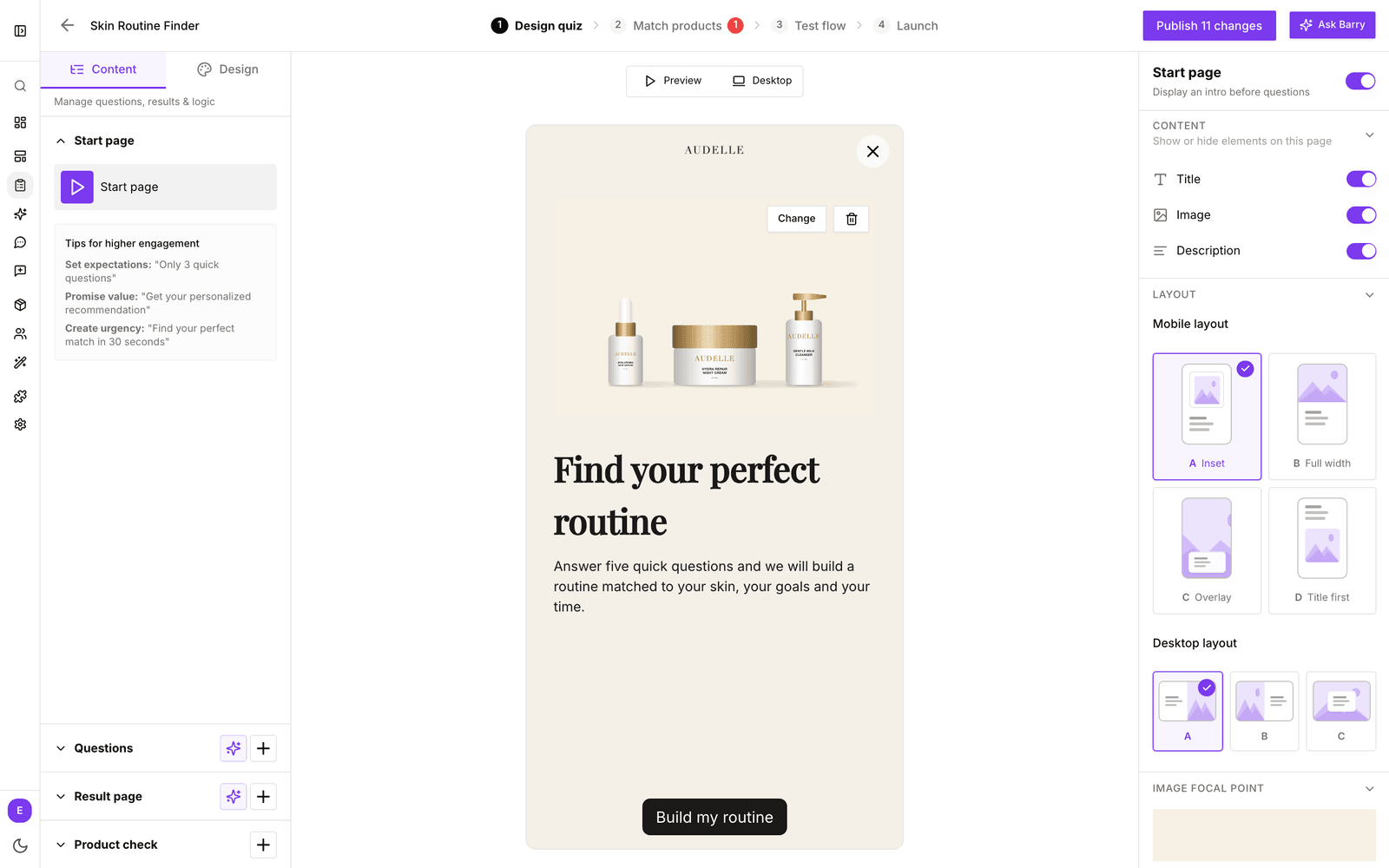
- In the sidebar, go to Quizzes and click Edit on your quiz.
- On Design quiz, click Start page in the Content tab of the left panel.
- In the settings on the right, switch Start page on or off. Its note reads Display an intro before questions.
- Under Content, choose whether to show the Title, Image and Description.
- Click the title, description or start button in the preview to change the text. Use Change on the image to replace it.
- With an image on, pick a Mobile layout and Desktop layout under Layout, and click the part of the image that must stay in view under Image focal point.
Check both devices with the Mobile and Desktop button above the preview, then click Preview to see how the start page leads into the first question.
Tips for a start page that works
- Set expectations: “Only 3 quick questions”.
- Promise value: “Get your personal recommendation”.
- Keep it short: one line of description is plenty. Every extra line is a reason to leave.
- Skip it when the context is clear. An embedded quiz on a page that already explains it can start straight on the first question.
The colors and text sizes of the start page are part of your theme. See customize the quiz theme and layout.