
Webhooks send quiz activity to another system the moment it happens. Someone answers a question or leaves their email, and your CRM, email tool or automation can react right away.
What teams use webhooks for
- Starting post-quiz or abandoned-result email sequences in a tool bluebarry doesn't connect to natively.
- Syncing answers and profile details to a CRM.
- Triggering workflows on one specific answer.
- Storing recommendations in a data warehouse or BI tool.
Webhook topics
You can choose from five topics:
| Topic | Sent when |
|---|---|
| question.answered | Someone answers a question. Scope it to all quizzes, one quiz, one question or even one answer. |
| result.viewed | Someone reaches the results page. All quizzes or one quiz. |
| profile.updated | bluebarry updates a shopper's profile, for example with new answers or consent. All quizzes or one quiz. |
| email.submitted | Someone submits an email address. All quizzes or one quiz. |
| phone.submitted | Someone submits a phone number. All quizzes or one quiz. |
Set up a webhook
- Go to Store data → Integrations, open the Developer area and click Manage next to Webhooks.
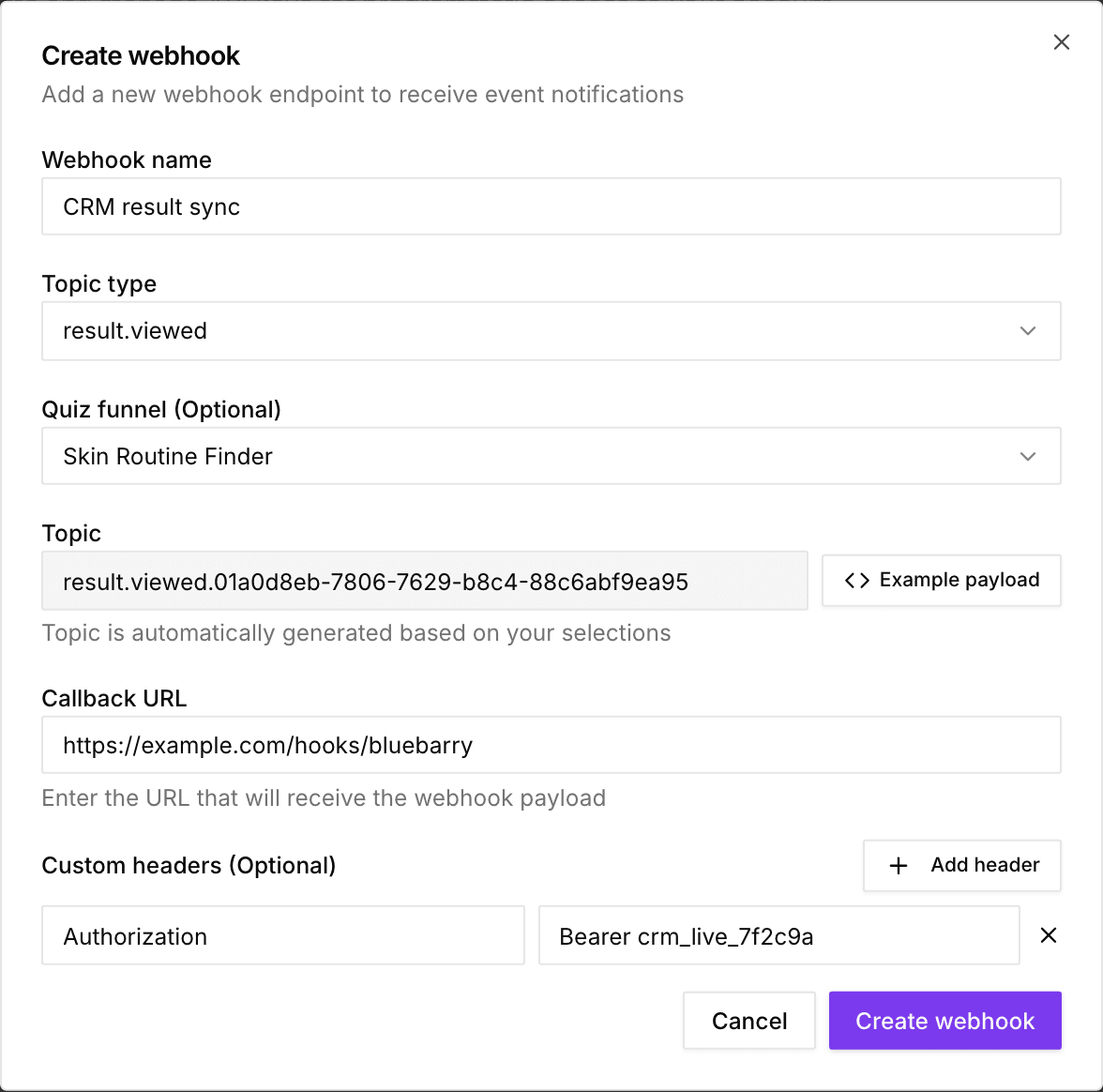
- Click Create webhook.
- Enter a Webhook name and choose a Topic type.
- Optionally narrow it down with Quiz funnel, Question and Answer, depending on the topic.
- Paste the address that should receive the data into Callback URL.
- Optionally click Add header to send custom headers (see below).
- Click Create webhook and copy the signing secret Studio shows. You only see it once.
- Run a test on your live quiz and check that the data arrives.
Name your questions and answers well
Webhooks use the internal names of your questions and answers. You can see and change them on the quiz's Test flow tab. "Q1" and "A1" won't help you much when you build an automation. Descriptive names like "budget" and "under_500" will.
What each webhook contains
- question.answered: visitor and session IDs, the chosen answer and its value, and the consent choice.
- result.viewed: visitor and session IDs, the email when known, the answered questions and the recommended products.
- profile.updated: visitor and session IDs, profile details such as email and properties, consent and recommendations.
- email.submitted and phone.submitted: visitor and session IDs, the email or phone number, the question it came from and the consent choice.
Result and profile webhooks can include product details such as price and category. Click Example payload while creating a webhook or on a saved webhook to see exactly what you'll receive. Field by field details are in the webhook payload reference.
Custom headers
Headers you add are sent with every delivery. Use them to let your endpoint check that a request came from you, for example Authorization: Bearer your-secret-token, or to route requests, for example X-Source: bluebarry. You can change them any time in the webhook's edit dialog. Each delivery also carries an Idempotency-Key header, so your endpoint can skip duplicates.
Signing secret
bluebarry signs every delivery, so your endpoint can check that a request really came from bluebarry. When you create a webhook, Studio shows its signing secret once. Copy it and store it with your endpoint. Each request carries a bluebarry-signature header made with that secret. How to check it is in the webhook payload reference.
Lost the secret, or think it leaked? Open the webhook's edit dialog and click Rotate secret. You get a new secret, and the old one stops working right away.
Delivery and retries
- bluebarry sends the data right after the event. A delivery counts as successful when your endpoint accepts it.
- Every attempt is listed under Delivery Attempts with status and time. You can retry a failed delivery from there.
- After 5 failed deliveries in a row, bluebarry disables the webhook to be safe. Fix the receiving side, then click the Disabled badge to switch it back to Active.
Topic formats for the API
If you create webhooks through the API, use these topic values. Replace the placeholders with real IDs, without the curly braces.
question.answeredquestion.answered.{quizId}question.answered.{quizId}.{questionId}question.answered.{quizId}.{questionId}.{answerId}result.viewedresult.viewed.{quizId}profile.updatedprofile.updated.{quizId}email.submittedemail.submitted.{quizId}phone.submittedphone.submitted.{quizId}
You find a quiz ID in the address bar when the quiz is open: /quiz-funnels/{quizId}/design.
Fetch older results
Webhooks only cover new activity. To load past results, for example when you set up a new CRM, use the Data API endpoint /data/AdvisorResultViewedSyncRecords. It returns one record per result view with visitor IDs, the email when known, the answers and the recommended products. Send your API key as the full Authorization header, set $top (up to 5000) and page with $skip, for example:
GET /data/AdvisorResultViewedSyncRecords?$top=500&$skip=0&$orderby=createdDate asc,id ascAdd $filter=advisorId eq {quizId} for one quiz. Recommendations keep the product name, URL and ID from the time of the result, and are marked productMissing: true if the product no longer exists.
Testing tips
- The quiz editor preview doesn't send webhooks. Test with your published quiz on your store.
- A request inspector such as webhook.site shows incoming data before you connect your real automation.
- Check Delivery Attempts to see whether each send succeeded.