
Webhooks send quiz activity to your own endpoint the moment it happens. This reference lists the topics, the fields in each payload and how delivery works. To create a webhook, go to Integrations → Developer area → Webhooks and see setting up webhooks.
Topics
| Topic | Sent when | Narrow it to |
|---|---|---|
question.answered | A shopper answers a quiz question. One call per selected answer. | A quiz, a question or one answer |
result.viewed | A shopper sees their quiz results. | A quiz |
profile.updated | A profile is created or updated by quiz activity. | A quiz |
email.submitted | A shopper fills in an email question. | A quiz |
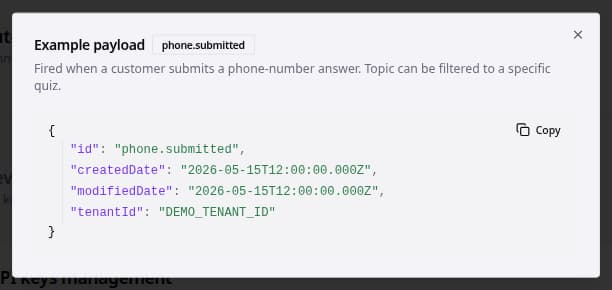
phone.submitted | A shopper fills in a phone number question. | A quiz |
When you pick a quiz, question or answer while creating the webhook, it only fires for that. The topic field in the payload carries the full topic, for example question.answered.<quizId>.<questionId>.<answerId>.
Payload fields
All payloads are JSON with camelCase field names. Every payload has topic, advisorId (the quiz), sessionId and userId (the visitor), except profile.updated, which has profileId instead of advisorId.
| Topic | Other fields |
|---|---|
question.answered | questionId, questionName, selectedAnswerId, selectedAnswerLabel, selectedAnswerValue, selectedAnswerTextValue, selectedAnswerFormattedValue, isEmail, isPhone, consentAccepted |
result.viewed | email and phoneNumber when known; questions[] with each question's answers (the same answer fields as above plus selectedAnswerTopic); results[] with productId, productName, productUrl, productImageUrl and every product property |
profile.updated | email, phoneNumber, firstName, lastName, consentAccepted, consentDate, properties[] (name and value), recommendations[] (position, title, url, imageUrl, quizName and the product's properties), createdDate, updatedDate, triggerEvent |
email.submitted | questionId, questionName, email, selectedAnswerId, selectedAnswerLabel, consentAccepted |
phone.submitted | questionId, questionName, phoneNumber, selectedAnswerId, selectedAnswerLabel, consentAccepted |
Product properties use your property names with a lowercase first letter, such as brand or skinType. Phone numbers are in international format, for example +31612345678.
{
  "topic": "question.answered.3f2c….9a1e….c07b…",
  "advisorId": "3f2c…",
  "sessionId": "d41a…",
  "userId": "7b90…",
  "questionId": "9a1e…",
  "questionName": "skin_type",
  "selectedAnswerId": "c07b…",
  "selectedAnswerLabel": "dry",
  "selectedAnswerValue": null,
  "selectedAnswerTextValue": null,
  "selectedAnswerFormattedValue": "dry",
  "isEmail": false,
  "isPhone": false,
  "consentAccepted": null
}
In Studio, the example payload for each topic is one click away in the Webhooks section.
Delivery
- bluebarry sends a
POSTwithContent-Type: application/jsonand any custom headers you added to the webhook. - Each event has an
Idempotency-Keyheader. A retried delivery reuses the same key, so store it and skip keys you have already processed. - Every request carries a
bluebarry-signatureheader, so you can check that it comes from bluebarry. See Verify signatures below. - Any 2xx response counts as delivered. Each attempt is listed under Delivery Attempts, where you can view the payload and retry it.
- Answer
410 Goneto switch a webhook off. A webhook that keeps failing for more than two days is switched off automatically.
Verify signatures
Every webhook has its own signing secret, starting with whsec_. Studio shows it once, right after you create the webhook. If you lose it, open the webhook's edit dialog and click Rotate secret to get a new one. The old secret stops working right away, so update your endpoint straight after.
The bluebarry-signature header looks like t=1700000000,v1=5257a869…. t is the time of sending in Unix seconds. v1 is an HMAC-SHA256 of the timestamp, a period and the raw request body, keyed with your signing secret and written in lowercase hex. To check a request:
- Read the raw request body before you parse it. Parsing the JSON and writing it out again changes the bytes, and the signature no longer matches.
- Split the header on commas and take the
tandv1values. - Compute HMAC-SHA256 of
{t}.{raw body}, using the full signing secret, includingwhsec_, as the key. - Compare the result with
v1using a constant-time comparison. - Reject the request when
tis more than five minutes away from your server's clock. This stops someone from replaying an old request.
A retried delivery is signed again with a new timestamp, and keeps its Idempotency-Key.
import crypto from "node:crypto";
import express from "express";

const app = express();
const secret = process.env.BLUEBARRY_WEBHOOK_SECRET; // whsec_…

app.post("/webhook", express.raw({ type: "application/json" }), (req, res) => {
  const header = req.get("bluebarry-signature") ?? "";
  const { t, v1 } = Object.fromEntries(header.split(",").map((part) => part.split("=")));
  const expected = crypto
    .createHmac("sha256", secret)
    .update(`${t}.${req.body}`)
    .digest("hex");
  const valid =
    typeof v1 === "string" &&
    v1.length === expected.length &&
    crypto.timingSafeEqual(Buffer.from(v1), Buffer.from(expected));
  const fresh = Math.abs(Date.now() / 1000 - Number(t)) < 300;
  if (!valid || !fresh) return res.sendStatus(401);

  const event = JSON.parse(req.body);
  // Handle the event here.
  res.sendStatus(200);
});