Bluebarry
  • Pricing
  • Reviews
  • Resources
Sign inStart building
Help Center
Developer platform
Manage API Keys

Manage API Keys

MD
Martijn Douma · Co-founder bluebarry
Last updated: May 15, 2026

Create API keys for approved external tools, server-side automations, and integration workflows that need to read bluebarry data.

Create an API Key

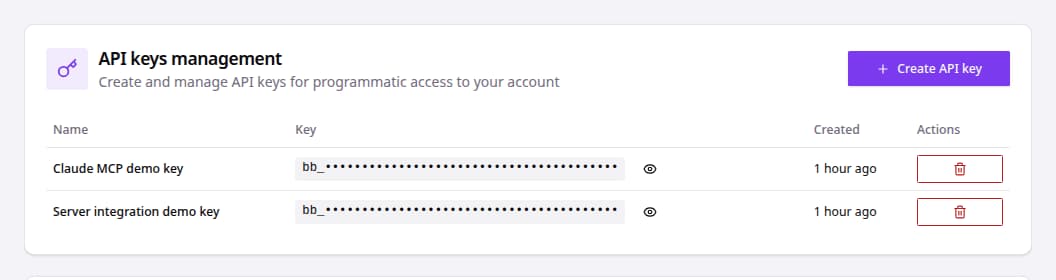
API keys management table with masked keys and create action.
  1. Go to Integrations.
  2. Open Developer area.
  3. Find API keys management.
  4. Click Create API key.
  5. Enter a clear key name.
  6. Click Create key.
  7. Store the generated key securely.
  8. Use the reveal icon only when you need to retrieve the value.
  9. Use the delete icon and confirm Delete API Key to remove keys that are no longer needed.

Related articles

API Authentication Overview

bluebarry supports API authentication for approved integrations through API keys, OAuth, and tenant-aware requests. Use the method that matches your integration type.

Setting Up Webhooks

Configure webhooks to send quiz data to your own systems and third-party tools.

Use MCP Tools

Use MCP tools when approved AI agents need to read bluebarry data for analysis and reporting.

Join the bluebarry community on Discord

Ask questions, share wins, and get support from the team and other e-com brands building with bluebarry.

Join Discord (free forever)

Need help?

If you can't figure it out, we probably can. Just give us a heads up in Discord or email ([email protected]).

Contact us

Platform

  • E-Com Funnels
  • Landing pages
  • Product Quiz
  • Recommendations
  • Integrations
  • Search
  • Pricing
  • Features
  • Reviews

Integrations

  • Shopify
  • Magento
  • WooCommerce
  • Klaviyo

Resources

  • Getting started
  • Resources
  • Help center
  • Shopify Quiz FAQ
  • Klaviyo Quiz FAQ

Contact

  • Partners & affiliate
  • Contact us
  • Request demo

[email protected]

+31 6 57 16 10 87

Hamburgerstraat 10, 9714 JB Groningen (The Netherlands)

LinkedInYouTube
Martijn Douma
Stan van Rooy
Anco Postma
Jelmer Reitsma

© 2026 Bluebarry AI. All rights reserved.

Privacy PolicyCookie PolicyTerms & Conditions