bluebarry.
ReviewsPricingResources
Sign inBook demoBook a 15 min demo
Help Center/Integrations and automation/Adding Product Recommendations to Your Klaviyo Emails

Adding Product Recommendations to Your Klaviyo Emails

Martijn Douma
Martijn Douma · Co-founder bluebarry
Updated April 17, 2026

When bluebarry syncs a completed quiz to Klaviyo, it attaches the exact products it recommended to the Quiz Completed event as an array called event.products. You can render these products in any Klaviyo email using a dynamic table — giving every subscriber a fully personalized recommendation block without any manual curation.

Prerequisites

  • Klaviyo is connected to bluebarry and at least one quiz completion has been synced. See How to Connect Klaviyo to bluebarry if you have not done this yet.
  • You have a Klaviyo flow triggered by the Quiz Completed metric. See Trigger Email Flows Based on Quiz Events.

Add a dynamic product table to your email

The dynamic table block in Klaviyo's drag-and-drop editor iterates over any array in the event payload and renders one row per item — perfect for product recommendations.

  1. Open the email template you want to use inside your Quiz Completed flow
  2. Drag a Dynamic Table block into the email layout
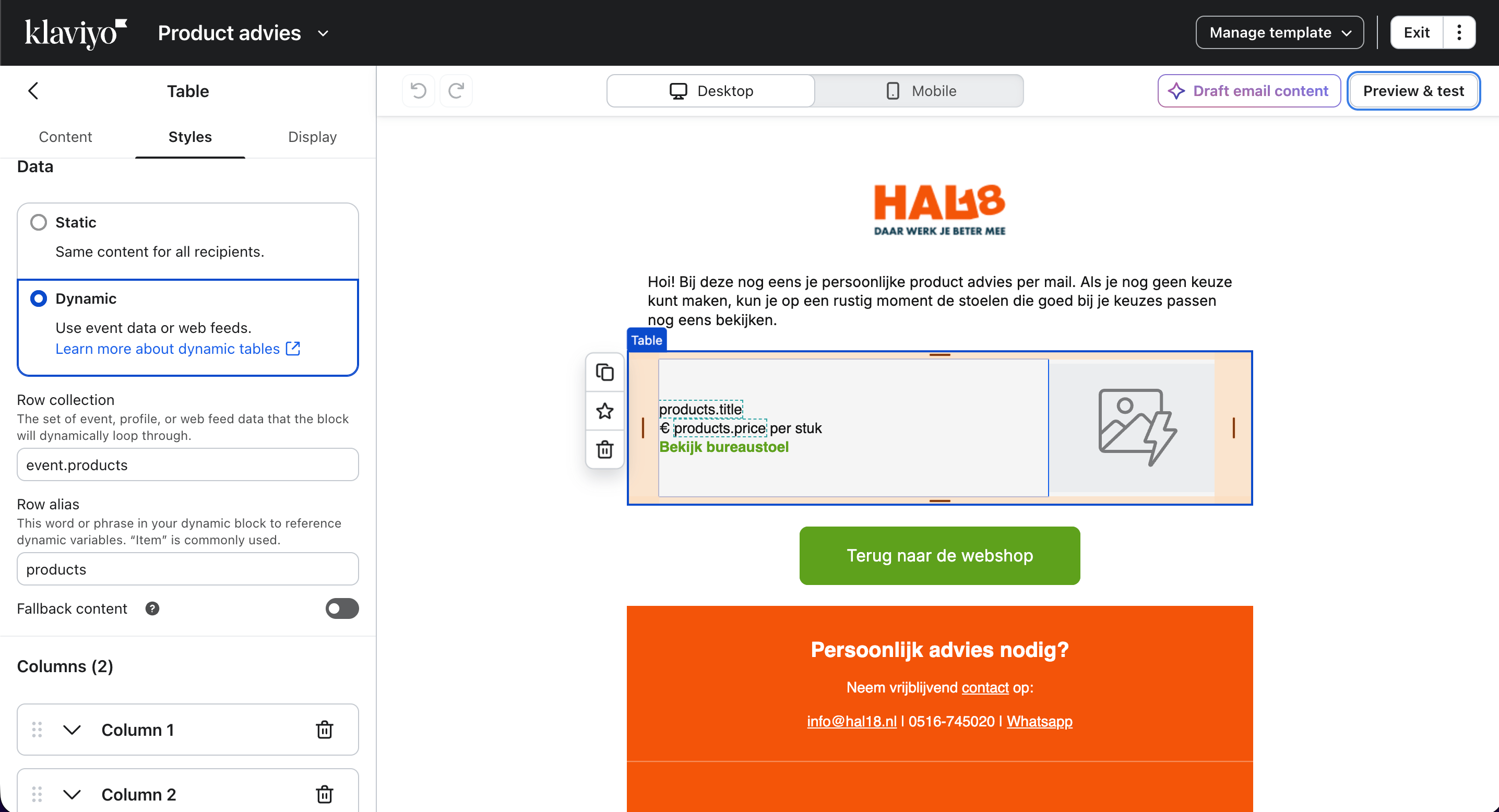
  3. In the Row Collection field, enter: event.products
  4. In the Row Alias field, enter: products
  5. Inside the table row, use the variables below to display each product's data
Klaviyo dynamic table configured with event.products as the row collection

Available product variables

VariableOutput
{{ products.title }}Product name
{{ products.imageUrl }}Product image URL
{{ products.url }}Product page link
{{ products.price }}Product price
{{ products.position }}Rank in the recommendation list (1 = best match)

Testing your email template

  1. Complete your quiz as a test user using a real email address
  2. Wait for the profile to sync in bluebarry (about 10 seconds)
  3. In Klaviyo, use the Preview feature and select the test profile — the dynamic table should populate with the actual products bluebarry recommended
  4. Send a test email to yourself to verify the layout renders correctly in your email client

Next steps

  • Segmenting Your Audience Based on Quiz Results — target campaign sends based on quiz answers and product preferences
  • Trigger Email Flows Based on Quiz Events — add trigger filters to personalize flows further

Related articles

Klaviyo Quiz Integration for e-Commerce

Step-by-step guide to connecting bluebarry with Klaviyo for email marketing automation.

Read article →

Trigger Email Flows Based on Quiz Events

Set up automated Klaviyo flows that fire when a visitor completes your bluebarry quiz. Use trigger filters for highly targeted email sequences based on quiz answers.

Read article →

Segmenting Your Audience Based on Quiz Results

Create powerful Klaviyo segments based on quiz answers, product recommendations, and profile properties synced by bluebarry to send the right message to the right person.

Read article →

Can’t figure it out? We probably can.

Every article here was written by the people who built the product. If one of them still leaves you stuck, tell us and we’ll fix it.

Contact usJoin Discord, free forever
bluebarry.

Helping beauty, health and outdoor brands reach their dream AOV

[email protected]+31 6 57 16 10 87De Ried 10, 9285KK Buitenpost (The Netherlands)
Martijn DoumaStan van RooyAnco PostmaJelmer Reitsma

The guys that are increasing your AOV.

Platform
Quiz funnelsLanding pagesProduct QuizRecommendationsSearchIntegrationsPricing
Resources
CasesHelp centerFAQCompare
Company
Contact usPartners & affiliateReviewsRequest demo
Book a 15 min demo
© 2026 bluebarry. All rights reserved.
Privacy PolicyCookie PolicyTerms & Conditions
English/Deutsch
bluebarry