Bluebarry
  • Pricing
  • Reviews
  • Resources
Sign inStart building
Help Center
Landing pages
Customize Landing Page Theme

Customize Landing Page Theme

MD
Martijn Douma · Co-founder bluebarry
Last updated: May 15, 2026

Landing pages inherit their base theme from the selected quiz, then let you fine-tune fonts, button styling, and device previews for the campaign page.

Review Inherited Theme Settings

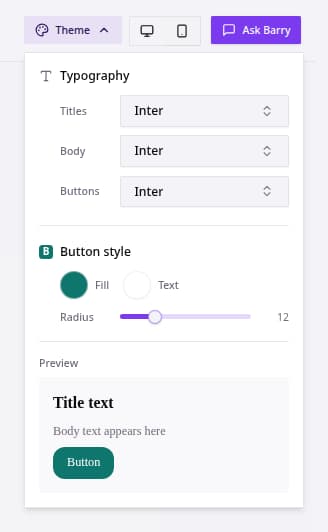
Landing page theme panel with typography and button style controls.
  1. Open a landing page.
  2. Click Theme.
  3. Review Typography for Titles, Body, and Buttons. These values start from the selected quiz theme.
  4. Adjust page-specific fonts or Button style only when the landing page needs a different treatment.
  5. Switch between desktop and mobile preview.
  6. Save and preview the page.

Theme changes update page sections that still use the inherited theme values. Section-level overrides remain separate so custom sections keep their own styling.

Related articles

Configure Landing Page SEO Settings

Configure landing page SEO settings so published pages have useful titles, descriptions, preview images, and paths.

Join the bluebarry community on Discord

Ask questions, share wins, and get support from the team and other e-com brands building with bluebarry.

Join Discord (free forever)

Need help?

If you can't figure it out, we probably can. Just give us a heads up in Discord or email ([email protected]).

Contact us

Platform

  • E-Com Funnels
  • Landing pages
  • Product Quiz
  • Recommendations
  • Integrations
  • Pricing
  • Features
  • Reviews

Integrations

  • Shopify
  • Magento
  • WooCommerce
  • Klaviyo

Resources

  • Getting started
  • Resources
  • Help center
  • Shopify Quiz FAQ
  • Klaviyo Quiz FAQ

Contact

  • Partners & affiliate
  • Contact us
  • Request demo

[email protected]

+31 6 57 16 10 87

Hamburgerstraat 10, 9714 JB Groningen (The Netherlands)

LinkedInYouTube
Martijn Douma
Stan van Rooy
Anco Postma
Jelmer Reitsma

© 2026 Bluebarry AI. All rights reserved.

Privacy PolicyCookie PolicyTerms & Conditions