bluebarry.
ReviewsPricingResources
Sign inBook a 15 min demo
Help Center/Account and billing/Manage Team Members

Manage Team Members

Martijn Douma
Martijn Douma · Co-founder bluebarry
Updated May 15, 2026

Use Team members settings to invite teammates and review who belongs to the bluebarry organization.

Review Team Members

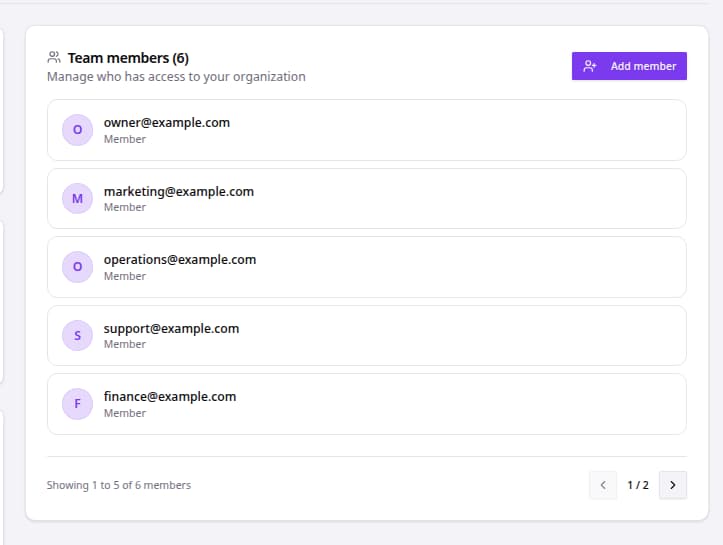
Organization settings showing team members and the Add member button.
  1. Go to Settings.
  2. Click Organization.
  3. Find Team members.
  4. Review the visible member list.
  5. Click Add member to invite another teammate.
  6. Enter the teammate email in Email Address.
  7. Click Send Invite.
  8. Use the member list to remove a teammate when needed.

Team Member Checklist

AreaWhat to review
EmailInvite the teammate's correct work email address.
Membership needConfirm the teammate still belongs in the organization.
Member listReview pagination if the organization has more members than the first page shows.
Removed usersConfirm removed users no longer appear after refreshing Settings.

Related articles

Create and Sign In to Your Account

Create a bluebarry account or sign in to an existing workspace so you can build quiz funnels, connect product data, and manage your organization.

Read article →

Fix Authentication and Billing Issues

Use this article when a user can sign in but billing, invoices, team settings, or paid features do not appear as expected.

Read article →

Can't figure it out? We probably can.

Every article here was written by the people who built the product. If one of them still leaves you stuck, tell us and we'll fix it.

Contact usJoin Discord, free forever
bluebarry.

Helping beauty, health and outdoor brands reach their dream AOV

[email protected]+31 6 57 16 10 87De Ried 10, 9285KK Buitenpost (The Netherlands)
Martijn DoumaStan van RooyAnco PostmaJelmer Reitsma

The guys that are increasing your AOV.

Platform
Quiz funnelsLanding pagesProduct QuizRecommendationsSearchIntegrationsPricing
Resources
CasesHelp centerFAQCompare
Company
Contact usPartners & affiliateReviewsRequest demo
Book a 15 min demo
© 2026 bluebarry. All rights reserved.
Privacy PolicyCookie PolicyTerms & Conditions
bluebarry