
When bluebarry syncs a completed quiz to Klaviyo, it attaches the exact products it recommended to the Quiz Completed event as an array called event.products. You can render these products in any Klaviyo email using a dynamic table — giving every subscriber a fully personalized recommendation block without any manual curation.
Prerequisites
- Klaviyo is connected to bluebarry and at least one quiz completion has been synced. See How to Connect Klaviyo to bluebarry if you have not done this yet.
- You have a Klaviyo flow triggered by the Quiz Completed metric. See Trigger Email Flows Based on Quiz Events.
Add a dynamic product table to your email
The dynamic table block in Klaviyo's drag-and-drop editor iterates over any array in the event payload and renders one row per item — perfect for product recommendations.
- Open the email template you want to use inside your Quiz Completed flow
- Drag a Dynamic Table block into the email layout
- In the Row Collection field, enter:
event.products - In the Row Alias field, enter:
products - Inside the table row, use the variables below to display each product's data
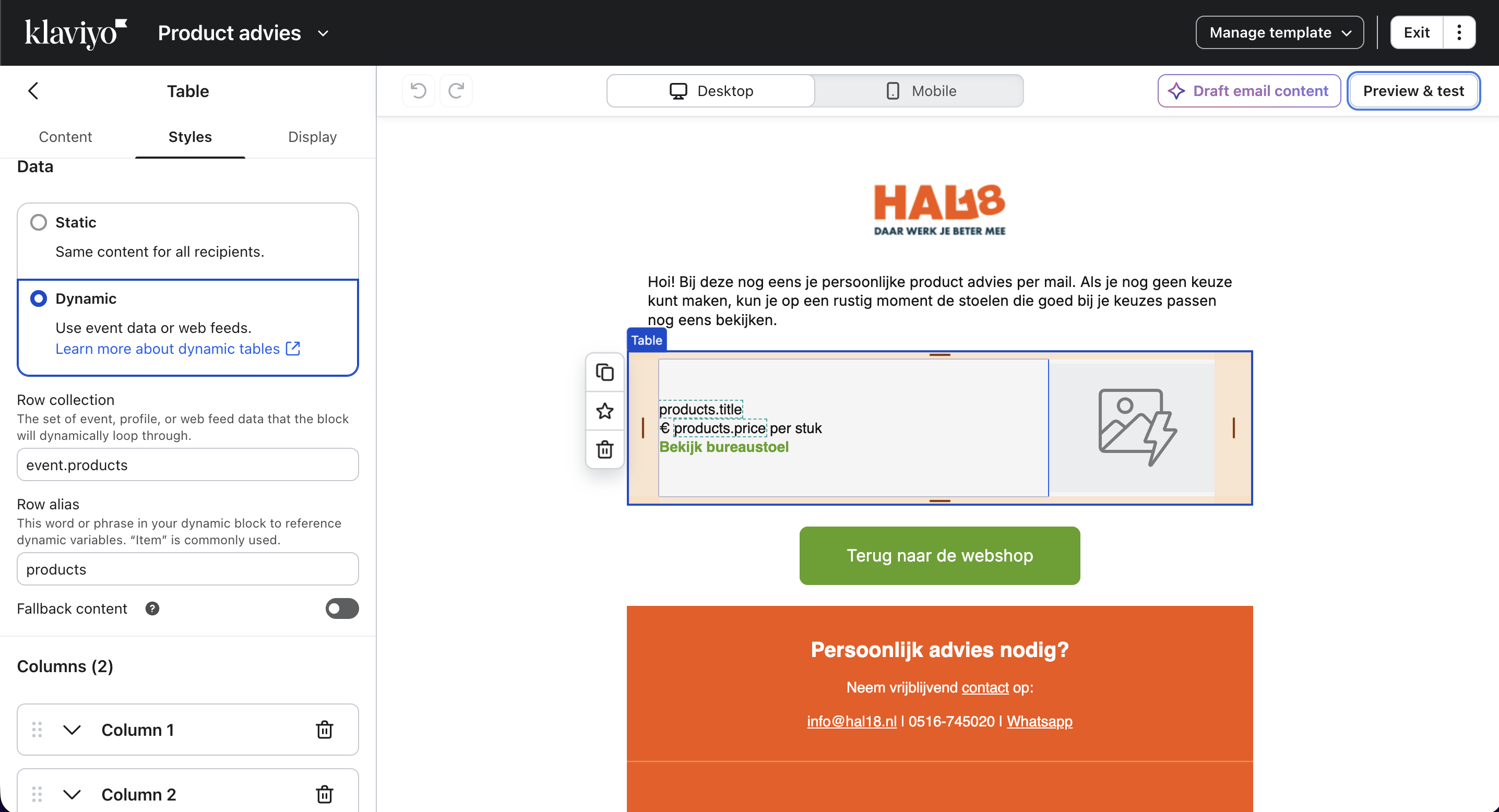
Available product variables
| Variable | Output |
|---|---|
| {{ products.title }} | Product name |
| {{ products.imageUrl }} | Product image URL |
| {{ products.url }} | Product page link |
| {{ products.price }} | Product price |
| {{ products.position }} | Rank in the recommendation list (1 = best match) |
Testing your email template
- Complete your quiz as a test user using a real email address
- Wait for the profile to sync in bluebarry (about 10 seconds)
- In Klaviyo, use the Preview feature and select the test profile — the dynamic table should populate with the actual products bluebarry recommended
- Send a test email to yourself to verify the layout renders correctly in your email client
Next steps
- Segmenting Your Audience Based on Quiz Results — target campaign sends based on quiz answers and product preferences
- Trigger Email Flows Based on Quiz Events — add trigger filters to personalize flows further