
Every quiz completion enriches the Klaviyo profile with structured data: answers, recommended products, topic scores, and more. You can use any of these properties to build precise audience segments — making your campaigns dramatically more relevant than traditional tag-based approaches.
What quiz data is available in Klaviyo
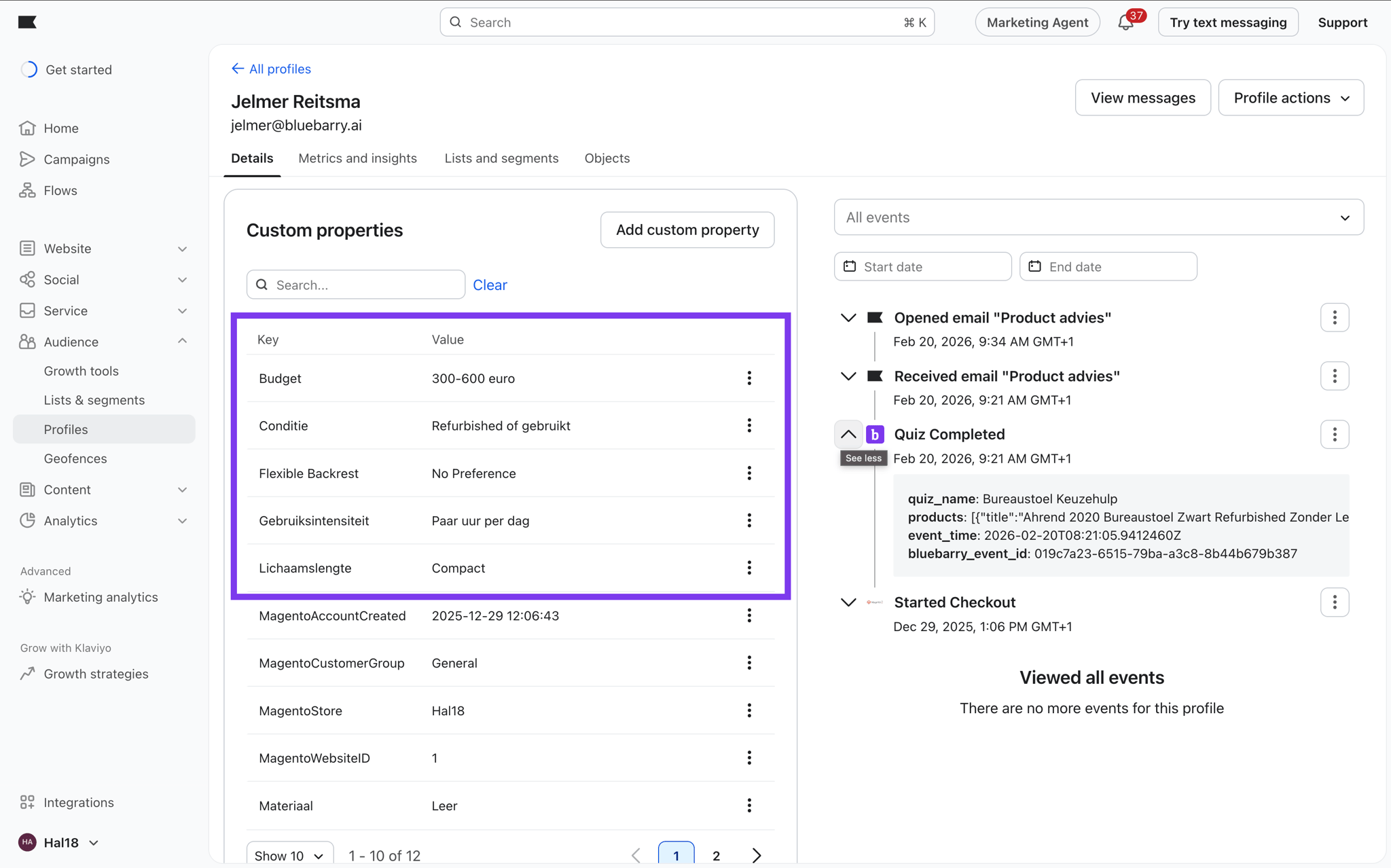
When bluebarry syncs a quiz completion, it writes the following data to the Klaviyo profile and to the Quiz Completed event:
- Profile properties — quiz answers stored directly on the profile (e.g.,
skin_type: oily,hair_concern: frizz) - Event properties — the full Quiz Completed event payload including recommended products, result name, and quiz name
- Topic scores — numeric affinity scores per topic/attribute, useful for range-based segments (e.g., customers with a score above 70 for "sustainability")
To inspect exactly what is being sent, open a synced profile in Klaviyo, scroll to Custom Properties, and look for all properties prefixed with your quiz answers.
Creating a segment based on quiz answers
- In Klaviyo, navigate to Audience → Segments → Create Segment
- Give your segment a descriptive name, for example "Quiz — Sensitive Skin"
- Click Add a condition and choose Properties about someone
- In the property dropdown, type the property name bluebarry synced — for example
skin_type - Set the operator to equals and the value to
sensitive - Click Create Segment — Klaviyo will immediately start populating it
Segmenting by Quiz Completed event
Profile properties are written once per quiz session. If someone completes the quiz multiple times, the properties are overwritten. For historical accuracy — or when you want to segment based on data that only lives in the event (like recommended product titles) — use event-based conditions instead:
- Add a condition and choose What someone has done (or not done)
- Select the Quiz Completed metric
- Click Add a filter and select a property from the event payload, for example
result_nameequalsDry Skin Routine - Optionally add a time window — for example "in the last 30 days" — to keep the segment fresh
Segment ideas to get you started
- High-intent quiz completers — profiles who completed the quiz and received at least one product recommendation (event property
productsis not empty) - Answer-based segments — one segment per key quiz answer, for example all customers who said they prefer vegan ingredients
- Result page segments — separate segments per result page, allowing you to send targeted campaigns per outcome
- Re-engagement targets — profiles who completed the quiz more than 60 days ago and have not placed an order since
- Topic affinity segments — profiles with a topic score above a threshold, ideal for high-relevance campaign sends
Using segments in campaigns
Once your segments are live, you can use them anywhere in Klaviyo: as the recipient list for a campaign, as an audience filter in a flow, or to suppress certain groups from receiving irrelevant content. Combine quiz-based segments with purchase history and email engagement data for the most targeted possible sends.
Next steps
- Trigger Email Flows Based on Quiz Events — combine flows with trigger filters for fully automated personalization
- Consent Settings & Profile Sync — make sure only opted-in profiles enter your segments