
Answer product filters connect shopper choices to product properties. Use them when selecting an answer should narrow or shape the recommendations shown at the end of the quiz.
Add a Filter to an Answer
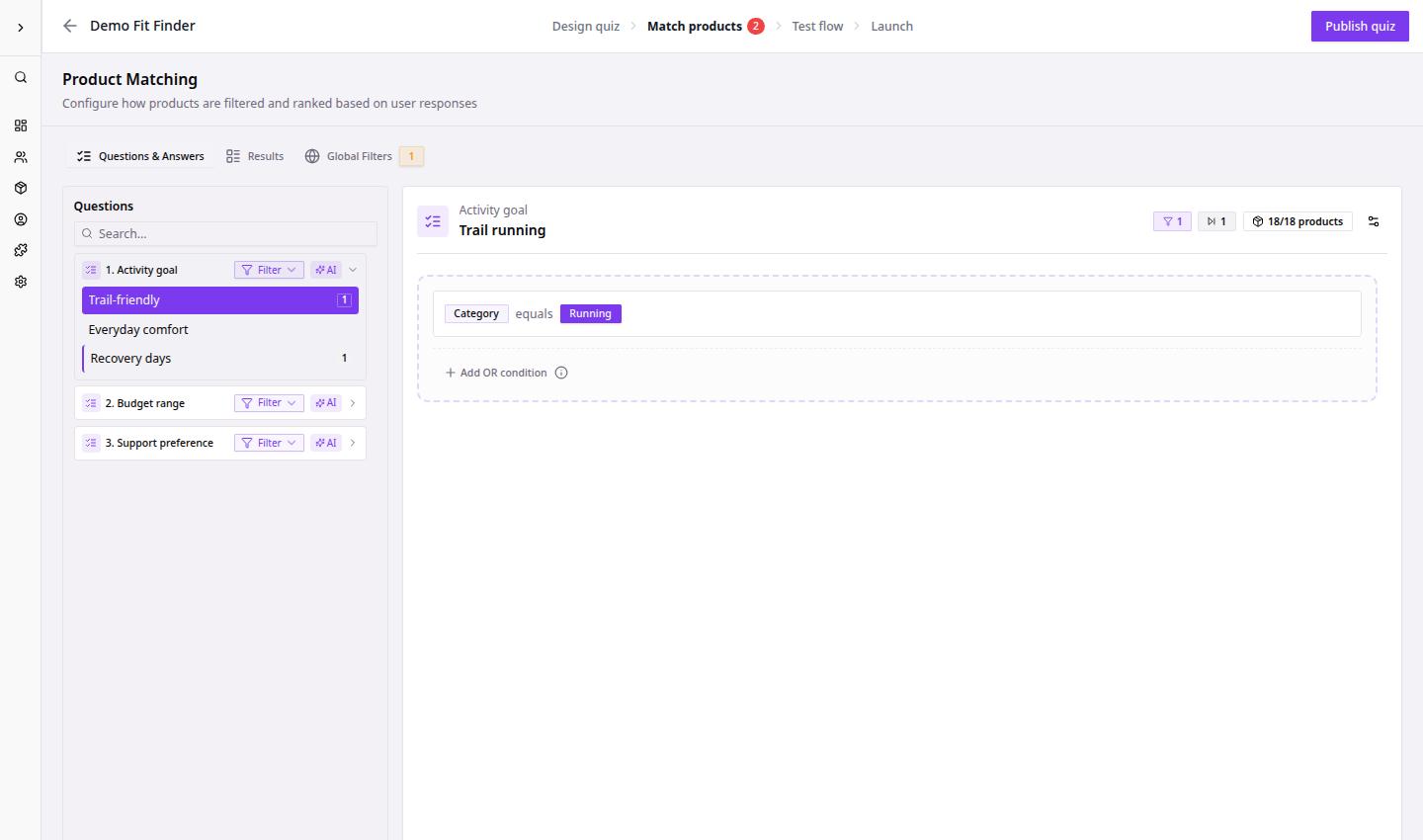
- Go to Dashboard.
- Open the quiz funnel.
- Click Match products.
- Select the question you want to configure.
- Select the answer that should affect products.
- Add a filter rule using a product property.
- Choose the matching value or condition.
- Review the product count.
- Repeat for the remaining answers.
After filters are saved, bluebarry uses the selected answer values when calculating recommendations.
Filter Checklist
| Check | Why it matters |
|---|---|
| Product property exists | Filters cannot work without structured product data. |
| Values are populated | Empty values can remove products unexpectedly. |
| Product count is not zero | Zero-product answers usually lead to poor results. |
| Filters match shopper intent | Hard requirements should be stricter than soft preferences. |