
Connect a Meta Pixel so you can measure visitor behavior and improve ad performance. The pixel is set once for your workspace and applies to every landing page you publish.
Connect Meta Pixel
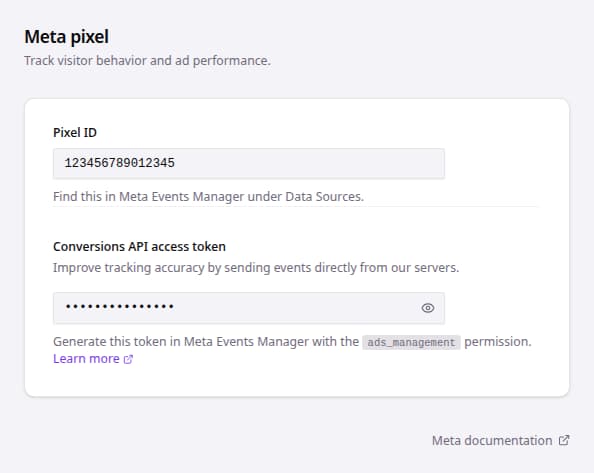
- Go to Landing Pages.
- Open Settings.
- Find the Meta pixel card.
- Enter the Meta Pixel ID in Pixel ID.
- Leave the field so bluebarry saves the value.
- Enter Conversions API access token if you want to send events directly from bluebarry servers.
- Turn on Lead event if your quiz asks for an email address or phone number and you want to measure those leads.
After the Pixel ID is saved, your landing pages are ready to use Meta Pixel tracking. Adding the Conversions API access token improves tracking accuracy by sending events server-side as well.
Events Sent to Meta
Once Meta Pixel is connected, bluebarry sends the following events:
| Event | Trigger | Notes |
|---|---|---|
| PageView | Landing page page view | Standard Meta event, fired when a visitor opens the landing page. |
| Lead | Quiz with contact details is completed | Optional. Turn on Lead event in the Meta pixel settings. Fires once per quiz session, when the visitor shared an email, phone number, or name in the quiz and reached the results. |
About the Lead event
Lead is a standard Meta event, so it shows up in your reporting and can be used for optimization as soon as it starts arriving. It fires once per quiz session, at the moment the visitor reaches the results.
The email address and phone number entered in the quiz are hashed in the visitor's browser and sent along with the event, so Meta can match the lead to a person. bluebarry never sends the raw values, and the hash cannot be turned back into an email address or phone number.
Settings Reference
| Setting | Use it for | Notes |
|---|---|---|
| Pixel ID | Connects the landing page to Meta Pixel. | Find it in Meta Events Manager under Data Sources. |
| Conversions API access token | Adds server-side event sending for stronger attribution. | In Meta, go to Events Manager → select the Meta Pixel → Settings → Generate access token. |
| Lead event | Measures quiz completions that captured contact details. | Off by default. Lead is a standard Meta event, so it is available for reporting and optimization right away. |
Test Your Setup
To verify events are being sent correctly, use Meta's built-in test tool:
- Go to Events Manager in your ad account.
- Select the pixel.
- Open Test events.
- Select Website.
- Enter your BlueBarry landing page URL.
Alternatively, use the Meta Pixel Helper browser extension:
- Install the Meta Pixel Helper Chrome extension.
- Open your BlueBarry landing page.
- Click the extension icon to check if events are being sent correctly.