
Die bluebarry-App für CCV Shop verbindet deinen Shop in einem Schritt. Sie bringt bluebarry in deine Storefront, damit Quizze, Suche, Produkt-Chat und Popups erscheinen können, erfasst Conversions im Checkout und hält deine Produkte synchron.
App installieren
- Installier in deinem CCV-Shop-Admin die bluebarry-App. Du kommst auch aus bluebarry dorthin: Geh zu Store data → Integrations und klick bei der Karte CCV Shop auf Install.
- CCV Shop leitet dich zu bluebarry weiter. Melde dich an, falls nötig. Die Seite Connect CCV Shop zeigt deine Tenant ID und was die Installation macht: bluebarry in deinen Shop einbinden, Conversion-Tracking im Checkout einschalten und die Produktsynchronisierung einrichten.
- Klick auf Complete Installation. Siehst du Installation Complete!, ist dein Shop verbunden.
Verbindung prüfen
- Geh in bluebarry zu Store data → Integrations.
- Klick unter Connect your webshop bei CCV Shop auf Manage.
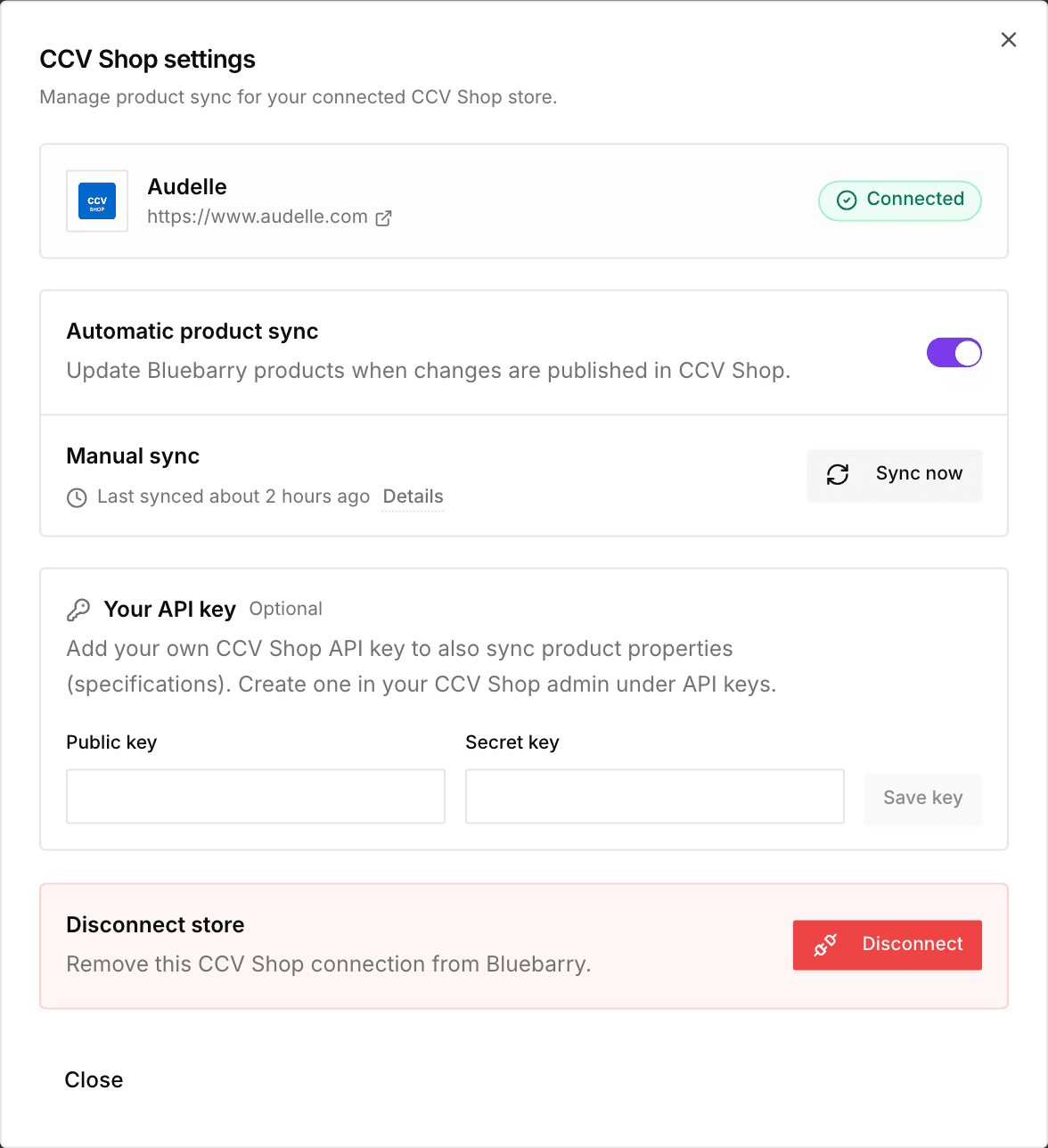
- In CCV Shop settings steht dein Shop als Connected, darunter der Status der Produktsynchronisierung.
bluebarry in deinem Shop live schalten
- Quizze öffnen sich über jeden Link oder Button mit deinem Quiz-Link. Kopier ihn im Veröffentlichen-Dialog des Quiz unter Implementation und füg ihn im Editor von CCV Shop als Link ein.
- Popups, die du in der Popups-App veröffentlichst, erscheinen ohne zusätzlichen Code.
- Die Suche kann das Suchfeld und die Ergebnisseite deines Shops übernehmen. Siehe Suche in deinem Shop starten.
Im Tab Launch eines Quiz hat die Karte CCV Shop zwei Buttons: Manage sync öffnet die Einstellungen oben, View app öffnet die App in CCV Shop. Wo das Quiz erscheint, bestimmen deine Links und Buttons.
bluebarry auf Produkt- und Warenkorbseiten zeigen
In CCV Shop settings platziert die Karte On your store bluebarry für dich im Shop. Du musst nichts in deinem Theme anpassen. Schalte ein, was du möchtest:
- Product check button: ein Button „Passt das zu mir?“ bei Produkten mit einem Product-Check-Quiz. Diese Produkte wählst du im Tab Launch des Quiz. Den Text änderst du unter Button text.
- Product chat: Kunden stellen Fragen zum Produkt, das sie sich ansehen, unter dem Preis.
Empfehlungsblöcke für Produktseiten und den Warenkorb schaltest du unter Recommendations → Placements ein. Siehe Empfehlungen gestalten und in den Shop einbauen.
Klick auf Save. Dein Shop wird sofort aktualisiert. Landet ein Element in deinem Theme an der falschen Stelle? Trag unter Place somewhere else (optional) einen CSS-Selektor ein, zum Beispiel .product-info.
Bestellungen, Kundenaktivität und Rabatte
- Conversions. Deine Bestellbestätigungsseite meldet jede Bestellung eines Kunden, der bluebarry genutzt hat: ein Quiz, die Suche, Empfehlungen, Product chat oder ein Popup. bluebarry liest Summen und Artikel selbst aus CCV Shop und verknüpft die E-Mail-Adresse der Bestellung mit dem Profil des Kunden.
- Bestellungen. Jede Bestellung kommt bei bluebarry an, sobald sie aufgegeben wird, und spätere Änderungen folgen. Bestellungen sind die Grundlage für Bestseller, Kaufhistorie und kaufbasierte Segmente. Für ältere Bestellungen siehe Bestellungen importieren.
- Was Kunden sich ansehen. Seitenaufrufe, Produktansichten, Produkte im Warenkorb und der Start des Checkouts. Sie sind die Grundlage für zuletzt angesehene Produkte, Verhaltenssegmente, Popup-Regeln nach Produkt oder Warenkorb und einen Product chat, der die Seite kennt.
- In den Warenkorb. Quizergebnisse, das Such-Widget und Empfehlungsblöcke legen Produkte direkt in den Warenkorb von CCV Shop.
- Rabatte. Ein Rabatt, den du auf der Ergebnisseite eines Quiz oder in einem Empfehlungsblock anbietest, wird zu einem einmaligen Rabattcode in CCV Shop. bluebarry erstellt ihn und fügt ihn dem Warenkorb hinzu, sobald der Kunde ein Produkt hinzufügt, für das er gilt. Er gilt nur für diese Produkte und bleibt 30 Tage gültig.
Nutzt dein Shop die Cookie-Leiste von CCV Shop? Dann erfasst bluebarry erst, was ein Kunde sich ansieht, wenn er Statistik-Cookies akzeptiert. Ohne Cookie-Leiste wird nichts zurückgehalten.
Bestellungen im Moment der Bestellung und Rabattcodes nutzen Berechtigungen, die die App erst später bekommen hat. Hast du deinen Shop davor verbunden? Installier die bluebarry-App in CCV Shop erneut, um sie zu erteilen. Bis dahin kommen neue Bestellungen alle paar Stunden an und Kunden sehen keine Rabatte.
Verbindung trennen
Klick in CCV Shop settings unter Disconnect store auf Disconnect. Für eine vollständige Deinstallation entfernst du die bluebarry-App auch in deinem CCV-Shop-Admin. Das Entfernen der App kündigt dein bluebarry-Abo nicht. Läuft es noch, bekommst du eine E-Mail mit einem Link zu Settings → Billing, wo du entscheidest, ob du kündigst.